EasyManua.ls Logo

Aiwa NSX-430 - RECORDING FROM TAPE TO TAPE MANUALLY

Aiwa NSX-430
84 pages
Print Icon
To Next Page IconTo Next Page
To Previous Page IconTo Previous Page
Loading...
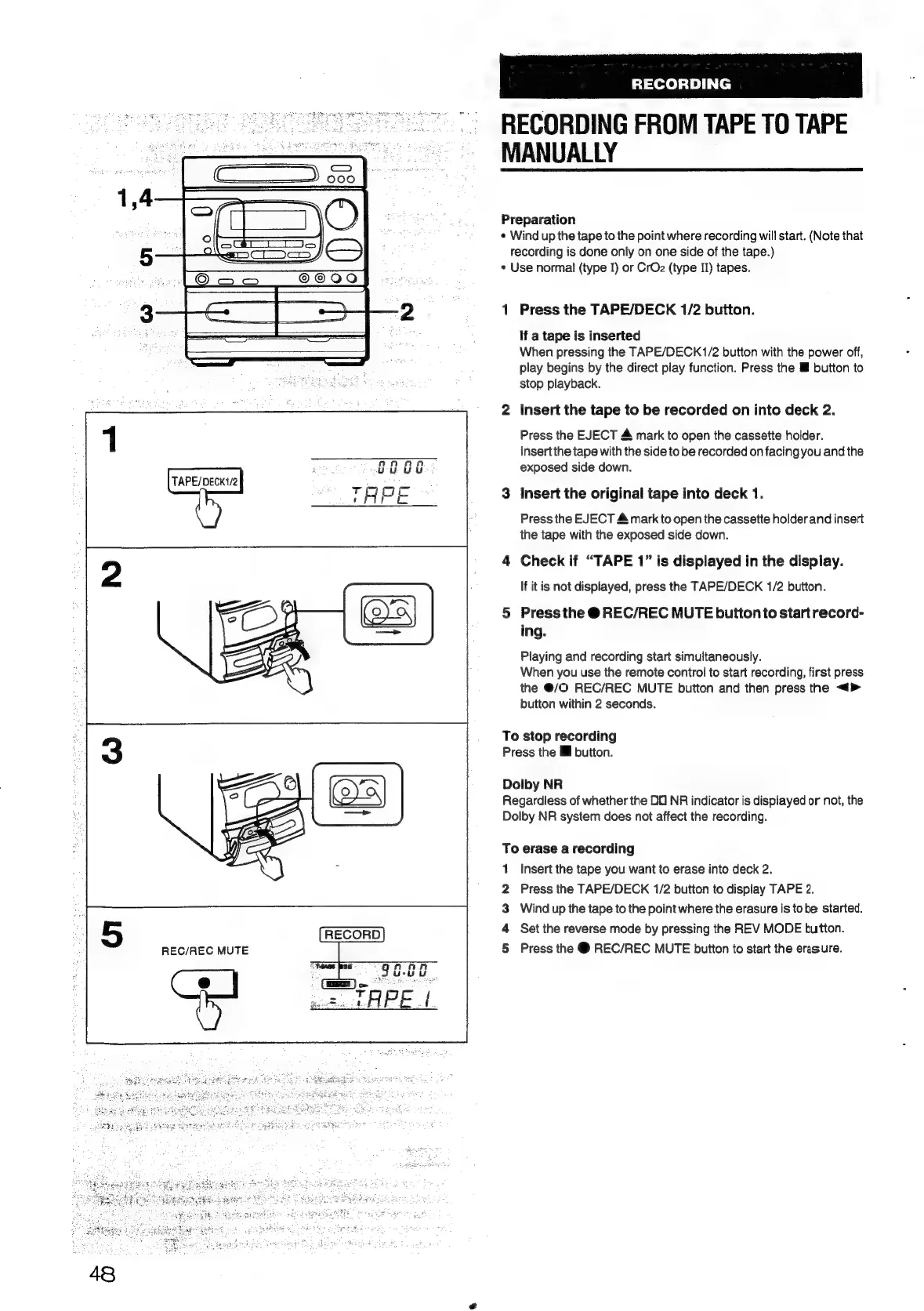
TAPE/DECK1/2
REC/REC
MUTE
RECORDING
RECORDING
FROM
TAPE
TO
TAPE
MANUALLY
Preparation
¢
Wind
up
the
tape
to
the
point
where
recording
will
start.
(Note
that
recording
is
done
only
on
one
side
of
the
tape.)
e
Use
normal
(type
I)
or
CrO2
(type
II)
tapes.
1
Press
the
TAPE/DECK
1/2
button.
If
a
tape
is
inserted
When
pressing
the
TAPE/DECK1/2
button
with
the
power
off,
play
begins
by
the
direct
play
function.
Press
the
ll
button
to
stop
playback.
2
Insert
the
tape
to
be
recorded
on
into
deck
2.
Press
the
EJECT
&
mark
to
open
the
cassette
holder.
Insert
the
tape
with
the
side
to
be
recorded
on
facing
you
and
the
exposed
side
down.
3
Insert
the
original
tape
into
deck
1.
Press
the
EJECT
&
mark
to
open
the
cassette
holder
and
insert
the
tape
with
the
exposed
side
down.
4
Check
if
“TAPE
1”
is
displayed
in
the
display.
If
it
is
not
displayed,
press
the
TAPE/DECK
1/2
button.
5
Press
the
@
REC/REC
MUTE
button
to
start
record-
ing.
Playing
and
recording
start
simultaneously.
When
you
use
the
remote
control
to
start
recording,
first
press
the
@/O
REC/REC
MUTE
button
and
then
press
the
<>
button
within
2
seconds.
To
stop
recording
Press
the
Ml
button.
Dolby
NR
Regardless
of
whether
the
00
NR
indicator
is
displayed
or
not,
the
Dolby
NR
system
does
not
affect
the
recording.
To
erase
a
recording
1
Insert
the
tape
you
want
to
erase
into
deck
2.
Press
the
TAPE/DECK
1/2
button
to
display
TAPE
2.
Wind
up
the
tape
to
the
point
where
the
erasure
is
tobe
started.
Set
the
reverse
mode
by
pressing
the
REV
MODE
button.
Press
the
@
REC/REC
MUTE
button
to
start
the
erasure.
a
&
©
N

Table of Contents

Related product manuals