EasyManua.ls Logo

Aiwa NSX-430 - TAPE PLAYBACK; BASIC OPERATIONS

Aiwa NSX-430
84 pages
Print Icon
To Next Page IconTo Next Page
To Previous Page IconTo Previous Page
Loading...
32
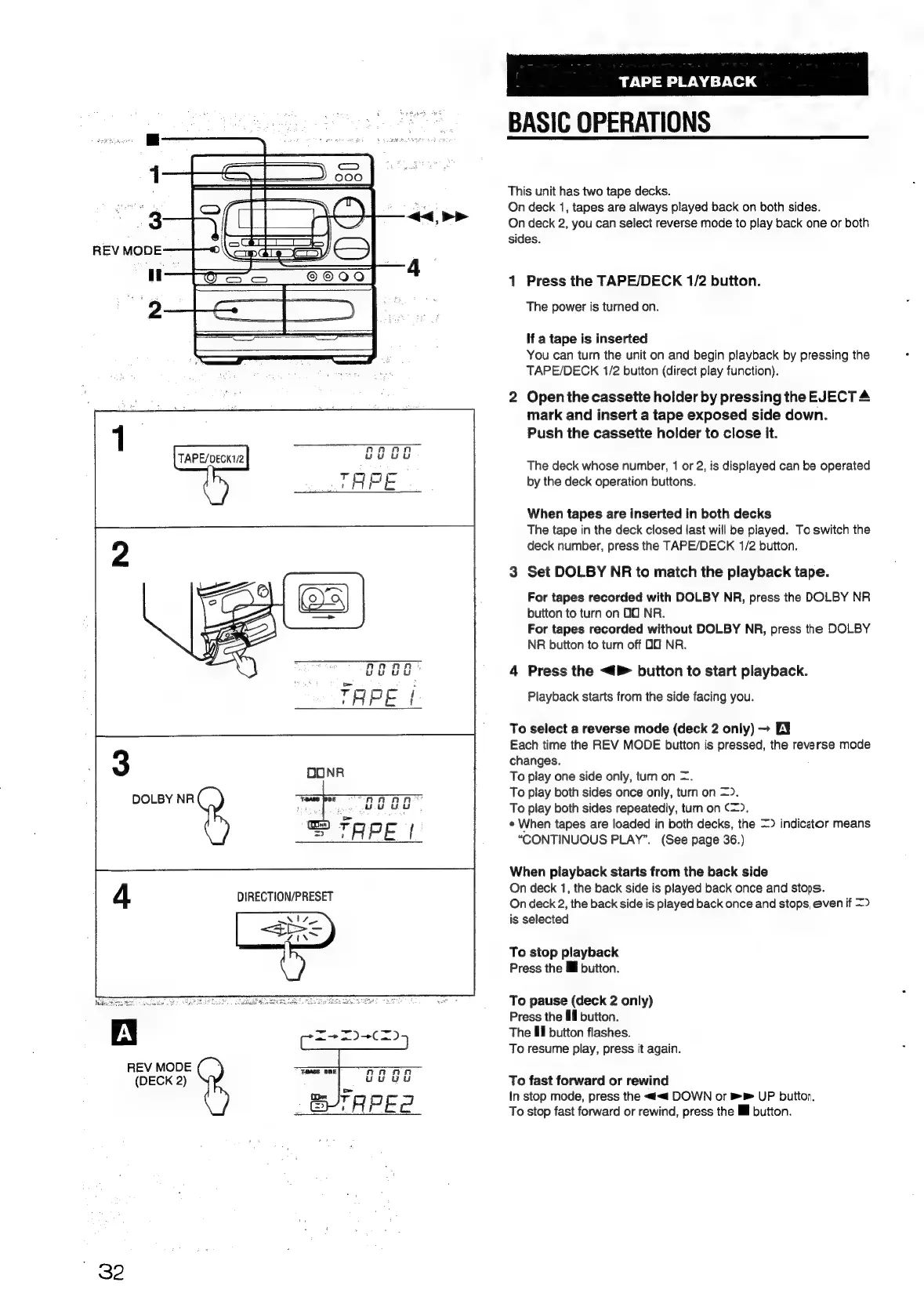
DOLBY
NR
REV
MODE
(DECK
2)
TAPE
PLAYBACK
BASIC
OPERATIONS
This
unit
has
two
tape
decks.
On
deck
1,
tapes
are
always
played
back
on
both
sides.
On
deck
2,
you
can
select
reverse
mode
to
play
back
one
or
both
sides.
ad
Press
the
TAPE/DECK
1/2
button.
The
power
is
turned
on.
If
a
tape
is
inserted
You
can
turn
the
unit
on
and
begin
playback
by
pressing
the
TAPE/DECK
1/2
button
(direct
play
function).
2
Open
the
cassette
holder
by
pressing
the
EJECT
4
mark
and
insert
a
tape
exposed
side
down.
Push
the
cassette
holder
to
close
it.
The
deck
whose
number,
1
or
2,
is
displayed
can
be
operated
by
the
deck
operation
buttons.
When
tapes
are
inserted
in
both
decks
The
tape
in
the
deck
closed
last
will
be
played.
To
switch
the
deck
number,
press
the
TAPE/DECK
1/2
button.
3
Set
DOLBY
NR
to
match
the
playback
tape.
For
tapes
recorded
with
DOLBY
NR,
press
the
DOLBY
NR
button
to
turn
on
OO
NR.
For
tapes
recorded
without
DOLBY
NR,
press
the
DOLBY
NR
button
to
turn
off
OO
NR.
4
Press
the
<4
button
to
start
playback.
Playback
starts
from
the
side
facing
you.
To
select
a
reverse
mode
(deck
2
only)
EY
Each
time
the
REV
MODE
button
is
pressed,
the
reverse
mode
changes.
To
play
one
side
only,
turn
on
=.
To
play
both
sides
once
only,
turn
on
=>.
To
play
both
sides
repeatedly,
turn
on
(=).
¢
When
tapes
are
loaded
in
both
decks,
the
=>
indicator
means
“CONTINUOUS
PLAY”.
(See
page
36.)
When
playback
starts
from
the
back
side
On
deck
1,
the
back
side
is
played
back
once
and
stops.
On
deck
2,
the
back
side
is
played
back
once
and
stops,
even
if
=>
is
selected
To
stop
playback
Press
the
lil
button.
To
pause
(deck
2
only)
Press
the
Ill
button.
The
Hl
button
flashes.
To
resume
play,
press
it
again.
To
fast
forward
or
rewind
In
stop
mode,
press
the
<#<
DOWN
or
UP
button.
To
stop
fast
forward
or
rewind,
press
the
Il
button.

Table of Contents

Related product manuals