EasyManua.ls Logo

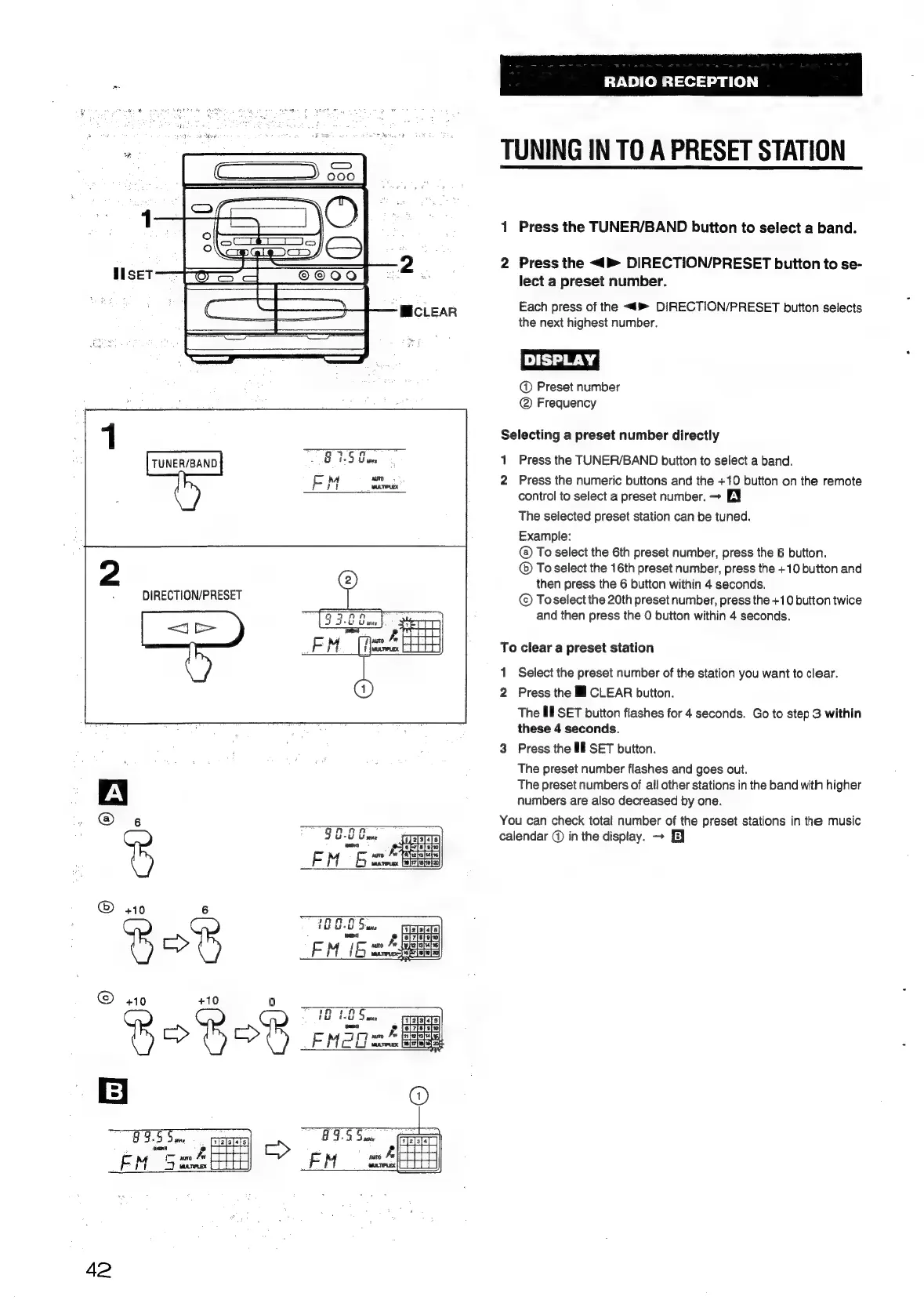
Aiwa NSX-430 - TUNING IN TO A PRESET STATION

Aiwa NSX-430
84 pages
Print Icon
To Next Page IconTo Next Page
To Previous Page IconTo Previous Page
Loading...
TUNER/BAND
:
DIRECTION/PRESET
ee
a
6
AA
-
Tt.
toes
=
Aapeietsiel
-
M
aura
Pwr
{BN2
[rs
ieis5|
ancrecex
[36]17/t8/10]20}
®
+10
6
1O
G8
Su
are
2
[ei
7[8i9}0}
1
ES
EM
16
Aes
Piet
mucTipess)
6
F219
[20]
©
+10
+10
0
*
!
if}
1.85
mua
e
tataets
c>
iy
MoO
nF
eeee
42
MICLEAR
RADIO
RECEPTION
TUNING
IN
TO
A
PRESET
STATION
1
Press
the
TUNER/BAND
button
to
select
a
band.
2
Press
the
<
DIRECTION/PRESET
button
to
se-
lect
a
preset
number.
Each
press
of
the
<4
DIRECTION/PRESET
button
selects
the
next
highest
number.
DISPLAY!
@
Preset
number
@
Frequency
Selecting
a
preset
number
directly
1
Press
the
TUNER/BAND
button
to
select
a
band.
2
Press
the
numeric
buttons
and
the
+10
button
on
the
remote
control
to
select
a
preset
number.
>
EY
The
selected
preset
station
can
be
tuned.
Example:
@
To
select
the
6th
preset
number,
press
the
6
button.
To
select
the
16th
preset
number,
press
the
+10
button
and
then
press
the
6
button
within
4
seconds.
©
To
select
the
20th
preset
number,
press
the
+10
button
twice
and
then
press
the
0
button
within
4
seconds.
To
clear
a
preset
station
1
Select
the
preset
number
of
the
station
you
want
to
clear.
2
Press
the
Ml
CLEAR
button.
The
Ml
SET
button
flashes
for
4
seconds.
Go
to
step
3
within
these
4
seconds.
Press
the
If
SET
button.
The
preset
number
flashes
and
goes
out.
The
preset
numbers
of
all
other
stations
in
the
band
with
higher
numbers
are
also
decreased
by
one.
wo
You
can
check
total
number
of
the
preset
stations
in
the
music
calendar
@
in
the
display.
+
EJ

Table of Contents

Related product manuals