EasyManua.ls Logo

Aiwa NSX-430 - AI EDIT RECORDING

Aiwa NSX-430
84 pages
Print Icon
To Next Page IconTo Next Page
To Previous Page IconTo Previous Page
Loading...
4
H44DOWN
UP
PPI
5
54
REC/REC
MUTE
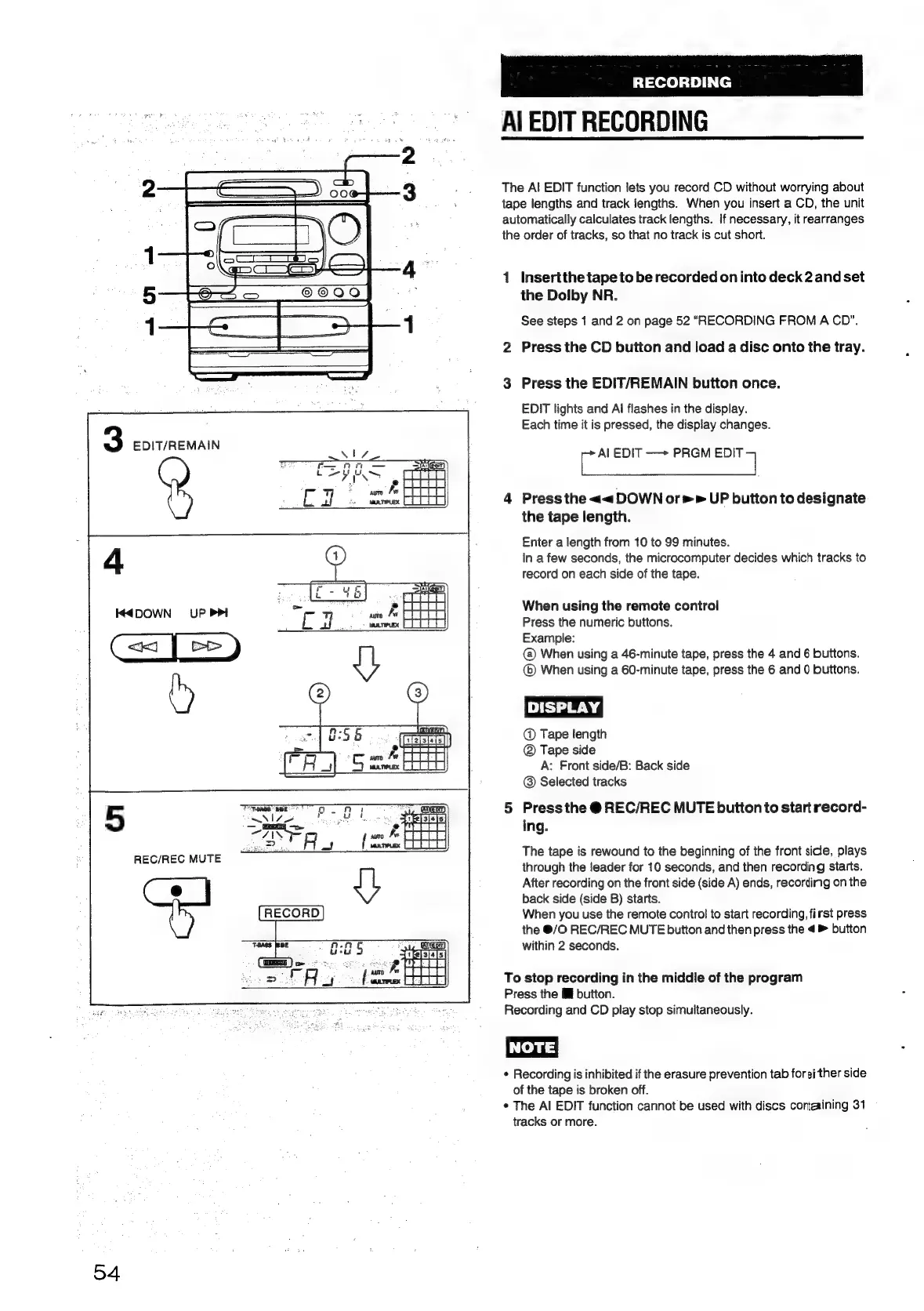
RECORDING
Al
EDIT
RECORDING
The
Al
EDIT
function
lets
you
record
CD
without
worrying
about
tape
lengths
and
track
lengths.
When
you
insert
a
CD,
the
unit
automatically
calculates
track
lengths.
If
necessary,
it
rearranges
the
order
of
tracks,
so
that
no
track
is
cut
short.
Insert
the
tape
to
be
recorded
on
into
deck
2
and
set
the
Dolby
NR.
See
steps
1
and
2
on
page
52
“RECORDING
FROM
A
CD”.
nN
Press
the
CD
button
and
load
a
disc
onto
the
tray.
wo
Press
the
EDIT/REMAIN
button
once.
EDIT
lights
and
Al
flashes
in
the
display.
Each
time
it
is
pressed,
the
display
changes.
ae
EDIT
—~+
PRGM
sae
4
Press
the
<<
DOWN
or»
UP
button
to
designate
the
tape
length.
Enter
a
length
from
10
to
99
minutes.
In
a
few
seconds,
the
microcomputer
decides
which
tracks
to
record
on
each
side
of
the
tape.
When
using
the
remote
control
Press
the
numeric
buttons.
Example:
When
using
a
46-minute
tape,
press
the
4
and
6
buttons.
(@)
When
using
a
60-minute
tape,
press
the
6
and
0
buttons.
@
Tape
length
@
Tape
side
A:
Front
side/B:
Back
side
@
Selected
tracks
5
Press
the
@
REC/REC
MUTE
button
to
start
record-
ing.
The
tape
is
rewound
to
the
beginning
of
the
front
side,
plays
through
the
leader
for
10
seconds,
and
then
recording
starts.
After
recording
on
the
front
side
(side
A)
ends,
recording
on
the
back
side
(side
B)
starts.
When
you
use
the
remote
control
to
start
recording,
first
press
the
@/O
REC/REC
MUTE
button
and
then
press
the
4
>
button
within
2
seconds.
To
stop
recording
in
the
middle
of
the
program
Press
the
I
button.
Recording
and
CD
piay
stop
simultaneously.
Recording
is
inhibited
if
the
erasure
prevention
tab
foreither
side
of
the
tape
is
broken
off.
¢
The
Al
EDIT
function
cannot
be
used
with
discs
cortaining
31
tracks
or
more.

Table of Contents

Related product manuals