EasyManua.ls Logo

Aiwa NSX-430 - KARAOKE; MICROPHONE MIXING; USEFUL FUNCTIONS FOR KARAOKE

Aiwa NSX-430
84 pages
Print Icon
To Next Page IconTo Next Page
To Previous Page IconTo Previous Page
Loading...
KARAOKE
>
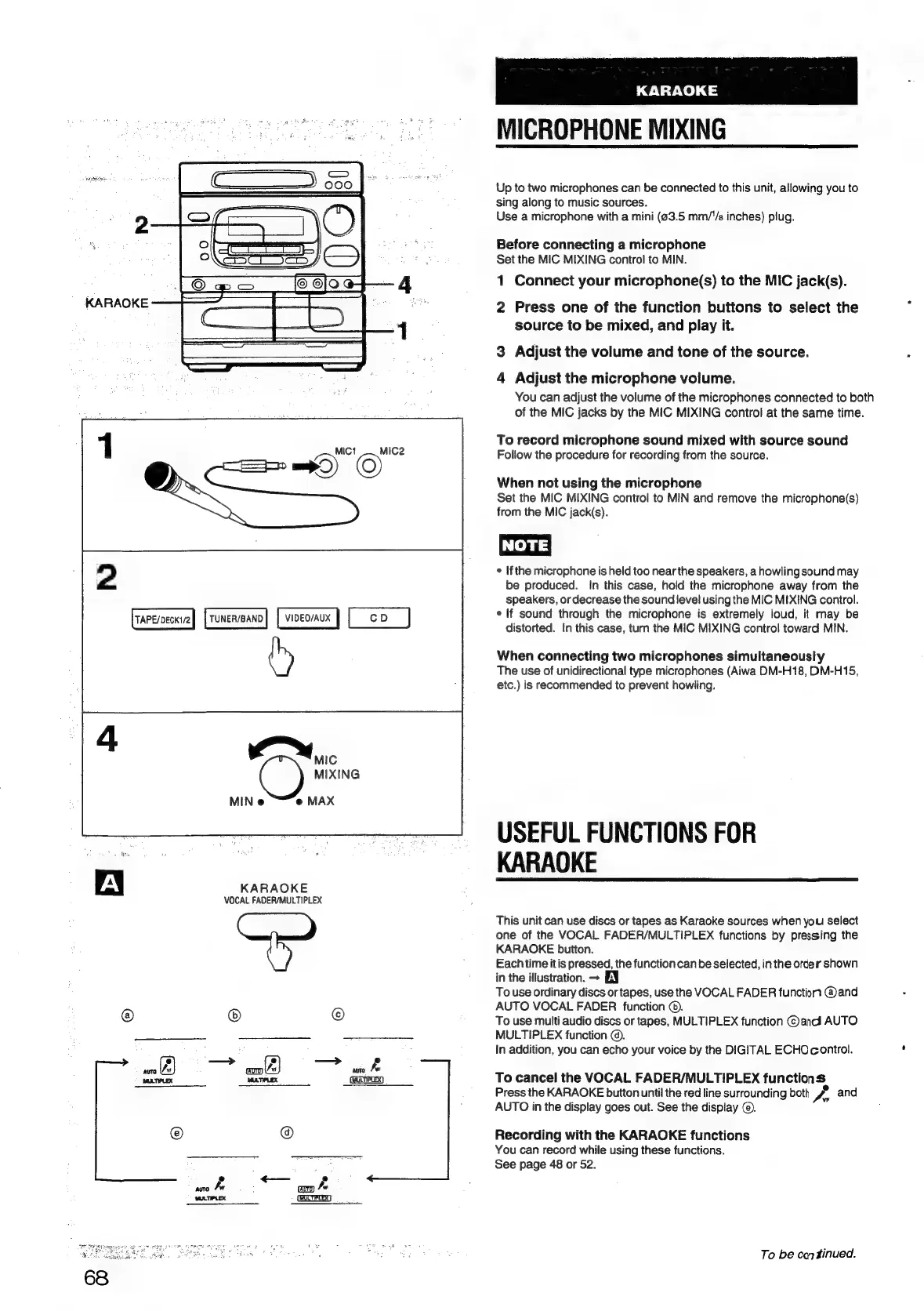
MICROPHONE
MIXING
Up
to
two
microphones
can
be
connected
to
this
unit,
allowing
you
to
sing
along
to
music
sources.
Use
a
microphone
with
a
mini
(63.5
mm/"/s
inches)
plug.
Before
connecting
a
microphone
Set
the
MIC
MIXING
control
to
MIN.
1
Connect
your
microphone(s)
to
the
MIC
jack(s).
KARAOKE
2
Press
one
of
the
function
buttons
to
select
the
source
to
be
mixed,
and
play
it.
3
Adjust
the
volume
and
tone
of
the
source.
4
Adjust
the
microphone
volume.
You
can
adjust
the
volume
of
the
microphones
connected
to
both
of
the
MIC
jacks
by
the
MIC
MIXING
control
at
the
same
time.
To
record
microphone
sound
mixed
with
source
sound
MICt
/—
MIC2
Follow
the
procedure
for
recording
from
the
source.
=)
©
When
not
using
the
microphone
Set
the
MIC
MIXING
control
to
MIN
and
remove
the
microphone(s)
from
the
MIC
jack(s).
NOTE)
2
*
Ifthe
microphone
is
held
too
near
the
speakers,
a
howling
sound
may
be
produced.
In
this
case,
hold
the
microphone
away
from
the
speakers,
or
decrease
the
sound
level
using
the
MIC
MIXING
control.
TUNER/BAND)
|
VIDEO/AUX
CD
¢
lf
sound
through
the
microphone
is
extremely
loud,
it
may
be
uci
eil
distorted.
In
this
case,
turn
the
MIC
MIXING
control
toward
MIN.
(hy
When
connecting
two
microphones
simultaneously
The
use
of
unidirectional
type
microphones
(Aiwa
DM-H18,
DM-H15,
etc.)
is
recommended
to
prevent
howling.
C)
MIXING
MIN
e
MAX
USEFUL
FUNCTIONS
FOR
KARAOKE
A
KARAOKE
VOCAL
FADER/MULTIPLEX
This
unit
can
use
discs
or
tapes
as
Karaoke
sources
when
you
select
one
of
the
VOCAL
FADER/MULTIPLEX
functions
by
pressing
the
KARAOKE
button.
Each
time
itis
pressed,
the
function
can
be
selected,
inthe
order
shown
in
the
illustration.
+
EY
To
use
ordinary
discs
or
tapes,
use
the
VOCAL
FADER
functiort
@and
AUTO
VOCAL
FADER
function
©).
@
®
©
To
use
multi
audio
discs
or
tapes,
MULTIPLEX
function
©
andl
AUTO
MULTIPLEX
function
©.
In
addition,
you
can
echo
your
voice
by
the
DIGITAL
ECHO
control.
es
—*
ck
antvnt
Seer
[cmauisto]
To
cancel
the
VOCAL
FADER/MULTIPLEX
functions
Press
the
KARAOKE
button
until
the red
line
surrounding
both
Z.
and
AUTO
in
the
display
goes
out.
See
the
display
©).
@
Recording
with
the
KARAOKE
functions
You
can
record
while
using
these
functions.
ae
See
page
48
or
52.
Eom
pee
h
‘WATIPLEX
(HUCTIFLEX}
To
be
continued.

Table of Contents

Related product manuals