EasyManua.ls Logo

Aiwa NSX-430 - PREPARATIONS; BEFORE OPERATION; CASSETTE TAPES

Aiwa NSX-430
84 pages
Print Icon
To Next Page IconTo Next Page
To Previous Page IconTo Previous Page
Loading...
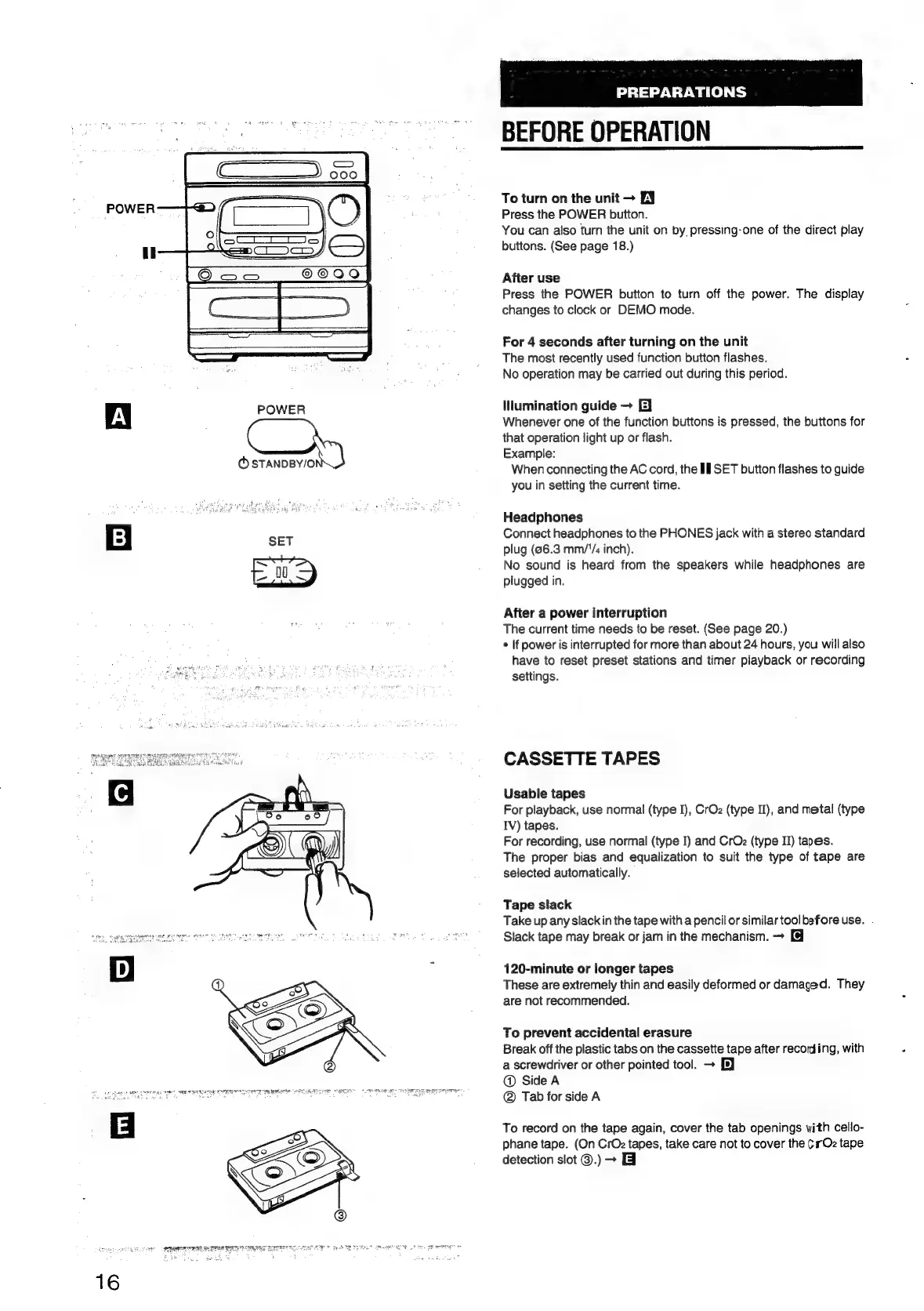
POWER
Al
POWER
—y
SET
16
PREPARATIONS
BEFORE
OPERATION
To
turn
on
the
unit
EY
Press
the
POWER
button.
You
can
also
turn
the
unit
on
by,
pressing-one
of
the
direct
play
buttons.
(See
page
18.)
After
use
Press
the
POWER
button
to
turn
off
the
power.
The
display
changes
to
clock
or
DEMO
mode.
For
4
seconds
after
turning
on
the
unit
The
most
recently
used
function
button
flashes.
No
operation
may
be
carried
out
during
this
period.
Illumination
guide
E]
Whenever
one
of
the
function
buttons
is
pressed,
the
buttons
for
that
operation
light
up
or
flash.
Example:
When
connecting
the
AC
cord,
the
If
SET
button
flashes
to
guide
you
in
setting
the
current
time.
Headphones
Connect
headphones
to
the
PHONES
jack
with
a
stereo
standard
plug
(96.3
mm/"/
inch).
No
sound
is
heard
from
the
speakers
while
headphones
are
plugged
in.
After
a
power
interruption
The
current
time
needs
to
be
reset.
(See
page
20.)
*
If
power
is
interrupted
for
more
than
about
24
hours,
you
will
also
have
to
reset
preset
stations
and
timer
playback
or
recording
settings.
CASSETTE
TAPES
Usable
tapes
For
playback,
use
normal
(type
I),
CrOz
(type
II),
and
metal
(type
IV)
tapes.
For
recording,
use
normal
(type
I)
and
CrOz
(type
II)
tapes.
The
proper
bias
and
equalization
to
suit
the
type
of
tape
are
selected
automatically.
Tape
slack
Take
up
any
slack
in
the
tape
with
a
pencil
or
similar
tool
before
use.
Slack
tape
may
break
or
jam
in
the
mechanism.
120-minute
or
longer
tapes
These
are
extremely
thin
and
easily
deformed
or
damaged.
They
are
not
recommended.
To
prevent
accidental
erasure
Break
off
the
plastic
tabs
on
the
cassette
tape
after
recording,
with
a
screwdriver
or
other
pointed
tool.
-
@
Side
A
@
Tab
for
side
A
To
record
on
the
tape
again,
cover
the
tab
openings
with
cello-
phane
tape.
(On
CrOz
tapes,
take
care
not
to
cover
the
¢rOz
tape
detection
slot
@.)
-
&

Table of Contents

Related product manuals