EasyManua.ls Logo

Aiwa NSX-430 - TROUBLESHOOTING GUIDE; General; Tuner section; Cassette deck section

Aiwa NSX-430
84 pages
Print Icon
To Next Page IconTo Next Page
To Previous Page IconTo Previous Page
Loading...
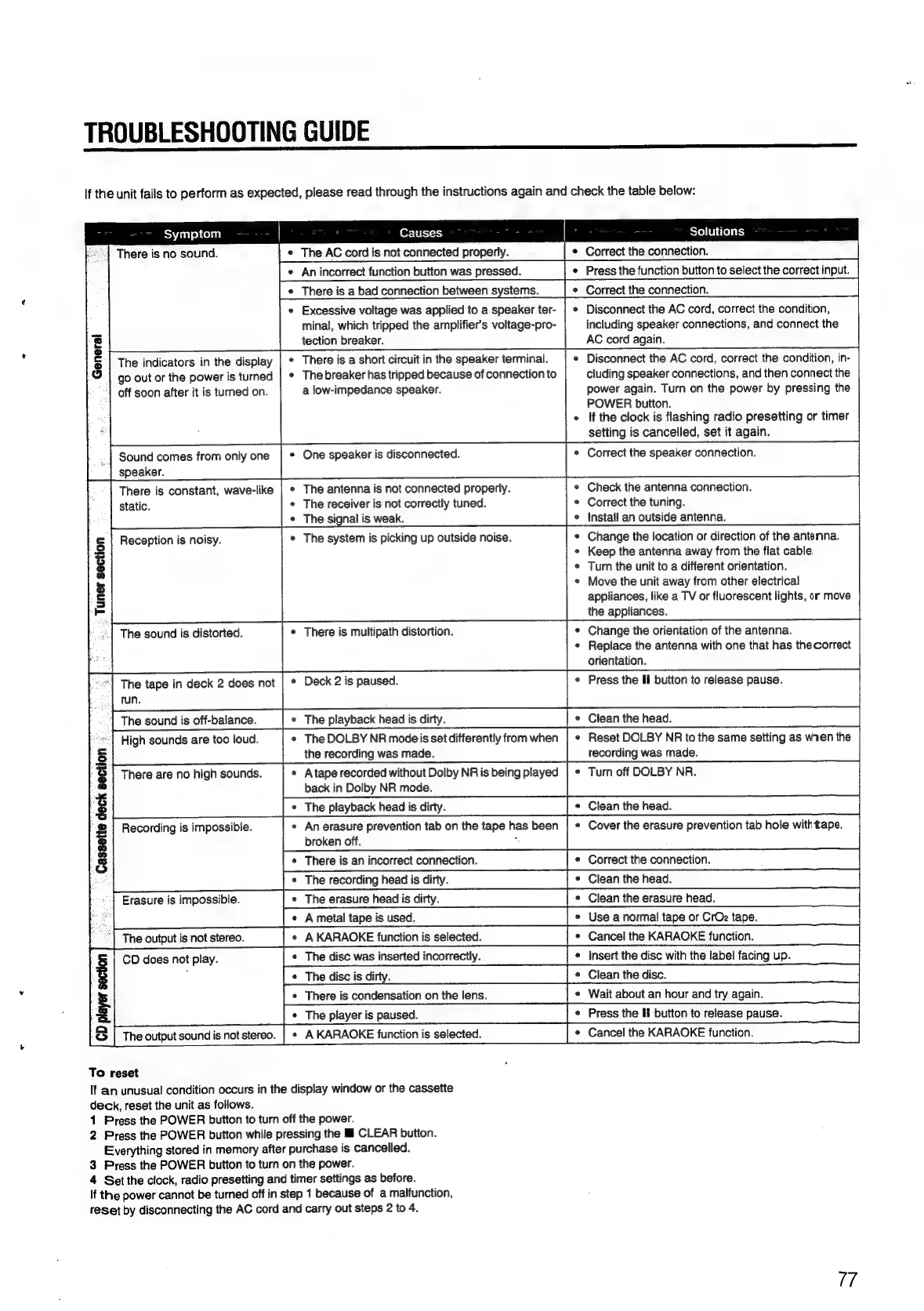
TROUBLESHOOTING
GUIDE
re
TSU
If
the
unit
fails
to
perform
as
expected,
please
read
through
the
instructions
again
and
check
the
table
below:
Solutions
*
The
AC
cord
is
not
connected
properly.
¢
Correct
the
connection.
¢
An
incorrect
function
button
was
pressed.
¢
Press
the
function
button
to
select
the
correct
input.
¢
There
is
a
bad
connection
between
systems.
¢
Correct
the
connection.
¢
Excessive
voltage
was
applied
to
a
speaker
ter-
minal,
which
tripped
the
amplifier’s
voltage-pro-
tection
breaker.
¢
There
is
a
short
circuit
in
the
speaker
terminal.
*
The
breaker
has
tripped
because
of
connection
to
a
low-impedance
speaker.
Symptom
Causes
24
There
is
no
sound.
*
Disconnect
the
AC
cord,
correct
the
condition,
including
speaker
connections,
and
connect
the
AC
cord
again.
¢
Disconnect
the
AC
cord,
correct
the
condition,
in-
cluding
speaker
connections,
and
then
connect
the
power
again.
Turn
on
the
power
by
pressing
the
POWER
button.
If
the
clock
is
flashing
radio
presetting
or
timer
setting
is
cancelled,
set
it
again.
|
Sound
comes
from
only
one
|
*
One
speaker
is
disconnected.
*
Correct
the
speaker
connection.
speaker.
There
is
constant,
wave-like
|
¢
The
antenna
is
not
connected
properly.
¢
Check
the
antenna
connection.
static.
¢
The
receiver
is
not
correctly
tuned.
¢
Correct
the
tuning.
¢
The
signal
is
weak.
e
{nstall
an
outside
antenna.
*
The
system
is
picking
up
outside
noise.
¢
Change
the
location
or
direction
of
the
antenna.
¢
Keep
the
antenna
away
from
the
flat
cable.
¢
Turn
the
unit
to
a
different
orientation.
¢
Move
the
unit
away
from
other
electrical
appliances,
like
a
TV
or
fluorescent
lights,
or
move
the
appliances.
¢
Change
the
orientation
of
the
antenna.
¢
Replace
the
antenna
with
one
that
has
thecorrect
orientation.
“=]
The
tape
in
deck
2
does
not
|
*
Deck
2
is
paused.
¢
Press
the
Il
button
to
release
pause.
|
run.
~]
The
sound
is
off-balance.
¢
The
playback
head
is
dirty.
¢
Clean
the
head.
|
High
sounds
are
too
loud.
¢
The
DOLBY
NR
modeis
set
differently
from
when
|
Reset
DOLBY
NR
to
the
same
setting
as
mnen
the
the
recording
was
made.
recording
was
made.
¢
Atape
recorded
without
Dolby
NR
is
being
played
|
¢
Turn
off
DOLBY
NR.
back
in
Dolby
NR
mode.
¢
The
playback
head
is
dirty.
*
Clean
the
head.
¢
An
erasure
prevention
tab
on
the
tape
has
been
|
«
Cover
the
erasure
prevention
tab
hole
withtape.
broken
off.
;
*
Correct
the
connection.
~
Clean
the
head.
¢
Clean
the
erasure
head.
ae
*
Use
a
normal
tape
or
CrOz
tape.
CD
does
not
play.
*
Insert
the
disc
with
the
label
facing
up.
+
Clean
the
disc.
¢
Wait
about
an
hour
and
try
again.
¢
Press
the
If
button
to
release
pause.
8
17
The
indicators
in
the
display
go
out
or
the
power
is
turned
off
soon
after
it
is
turned
on.
Reception
is
noisy.
-
Tuner
section
«|
The
sound
is
distorted.
©
There
is
multipath
distortion.
There
are
no
high
sounds.
Recording
is
impossible.
Cassette
deck
section
-
Erasure
is
impossible.
player
section
To
reset
If
an
unusual
condition
occurs
in
the
display
window
or
the
cassette
deck,
reset
the
unit
as
follows.
1
Press
the
POWER
button
to
turn
off
the
power.
2
Press
the
POWER
button
while
pressing
the
ll
CLEAR
button.
Everything
stored
in
memory
after
purchase
is
cancelled.
3
Press
the
POWER
button
to
turn
on
the
power.
4
Set
the
clock,
radio
presetting
and
timer
settings
as
before.
If
the
power
cannot
be
turned
off
in
step
1
because
of
a
malfunction,
reset
by
disconnecting
the
AC
cord
and
carry
out
steps
2
to
4.

Table of Contents

Related product manuals