EasyManua.ls Logo

Aiwa NSX-430 - DSP (Digital Signal Processor); SOUND ADJUSTMENT DURING RECORDING

Aiwa NSX-430
84 pages
Print Icon
To Next Page IconTo Next Page
To Previous Page IconTo Previous Page
Loading...
DSP
24
ADJUSTING
THE
SOUND
DSP
(DIGITAL
SIGNAL
PROCESSOR)
~
&
The
sound
of
a
concert
hall
is
produced
by
sounds
reflected
from
the
walls
and
ceiling,
reinforcing
the
sounds
coming
directly
from
the
orchestra.
You
can
use
this
unit’s
DSP
circuits
to
recreate
reflected
sounds
digitally,
to
obtain
the
sound
presence
of
a
disco,
live
music
performance
or
concert
hall.
In
addition,
the
supplied
speaker
system
has
a
surround
speaker
which
faces
upwards
and
outsides,
for
a
surround
sound
effect.
By
selecting
a
DSP
mode,
you
can
obtain
more
effective
surround
sound,
Sound
characteristics
of
DSP
modes
There
are
three
DSP
modes.
Equalization
curves
are
selected
automatically
to
match
the
DSP
sound.
Sound
characteristics
DISCO
|-A
powerful
sound
like
that
of
a
disco.
Surround|
The
graphic
equalizer
is
automatically
set
to
ROCK.
LIVE
|
A
vibrant
sound
like
that
of
a
live
music
performance.
Surround|
The
graphic
equalizer
is
automatically
set
to
POP.
HALL
|A
sound
presence
like
that
of
a
concert
hall.
Surround|
Suitable
for
playback
of
orchestral
music.
The
graphic
equalizer
is
automatically
set
to
CLASSIC.
¢
The
graphic
equalization
curve
can
also
be
selected
orturned
off,
as
you
prefer.
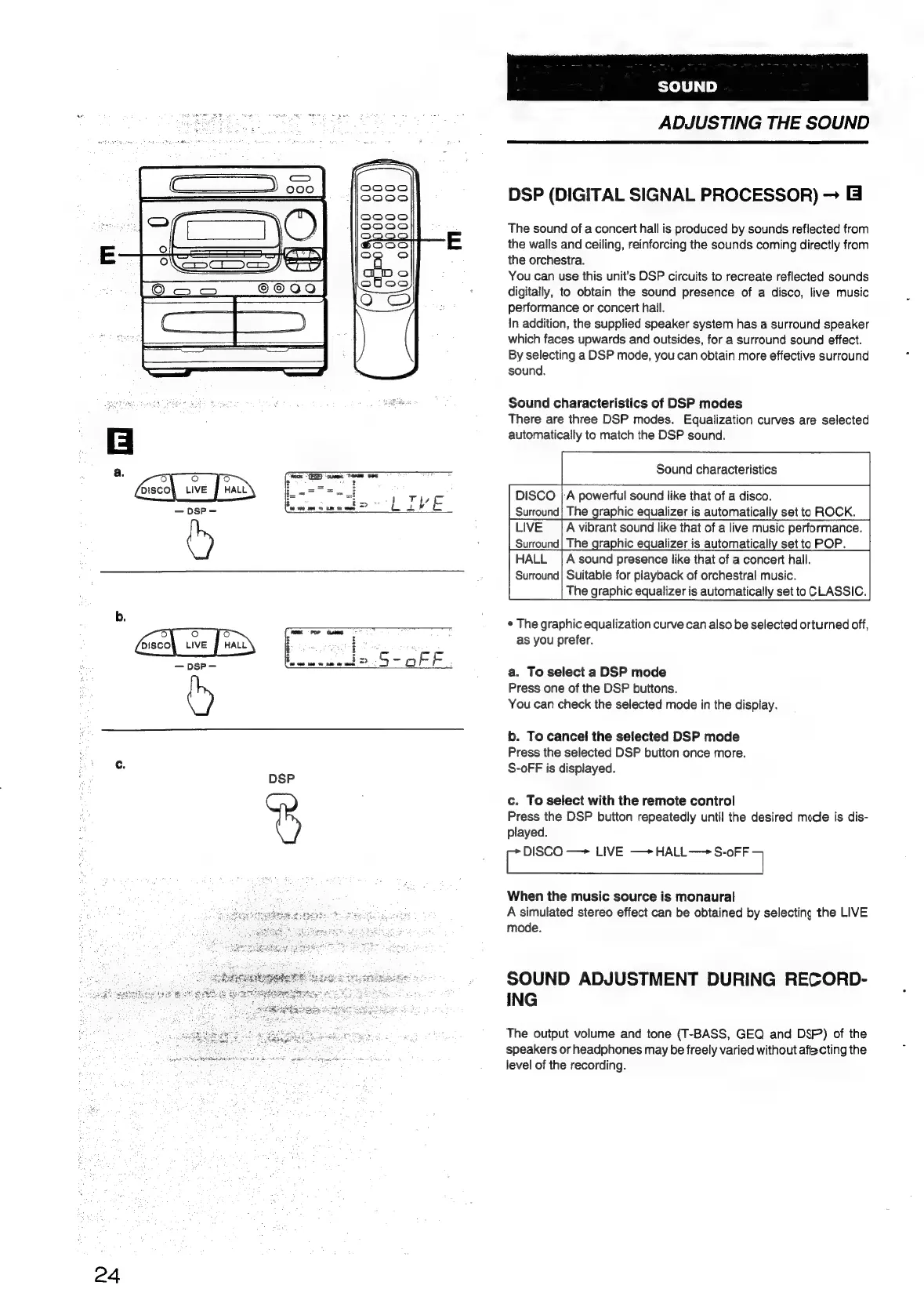
a.
To
select
a
DSP
mode
Press
one
of
the
DSP
buttons.
You
can
check
the
selected
mode
in
the
display.
b.
To
cancel
the
selected
DSP
mode
Press
the
selected
DSP
button
once
more.
S-oFF
is
displayed.
c.
To
select
with
the
remote
control
Press
the
DSP
button
repeatedly
until
the
desired
mode
is
dis-
played.
ie
DISCO
—>
LIVE
—+*HALL——
S-oFF
7
When
the
music
source
is
monaural
A
simulated
stereo
effect
can
be
obtained
by
selecting
the
LIVE
mode.
SOUND
ADJUSTMENT
DURING
RECORD-
ING
The
output
volume
and
tone
(T-BASS,
GEQ
and
DSP)
of
the
speakers
or
headphones
may
be
freely
varied
without
afiecting
the
level
of
the
recording.

Table of Contents

Related product manuals