EasyManua.ls Logo

Aiwa NSX-430 - SEARCHING FOR THE BEGINNING OF A TRACK (MUSIC SENSOR FUNCTION)

Aiwa NSX-430
84 pages
Print Icon
To Next Page IconTo Next Page
To Previous Page IconTo Previous Page
Loading...
34
K<DOWN
UP
PPI
Q
,
TAPE
PLAYBACK
BASIC
OPERATIONS
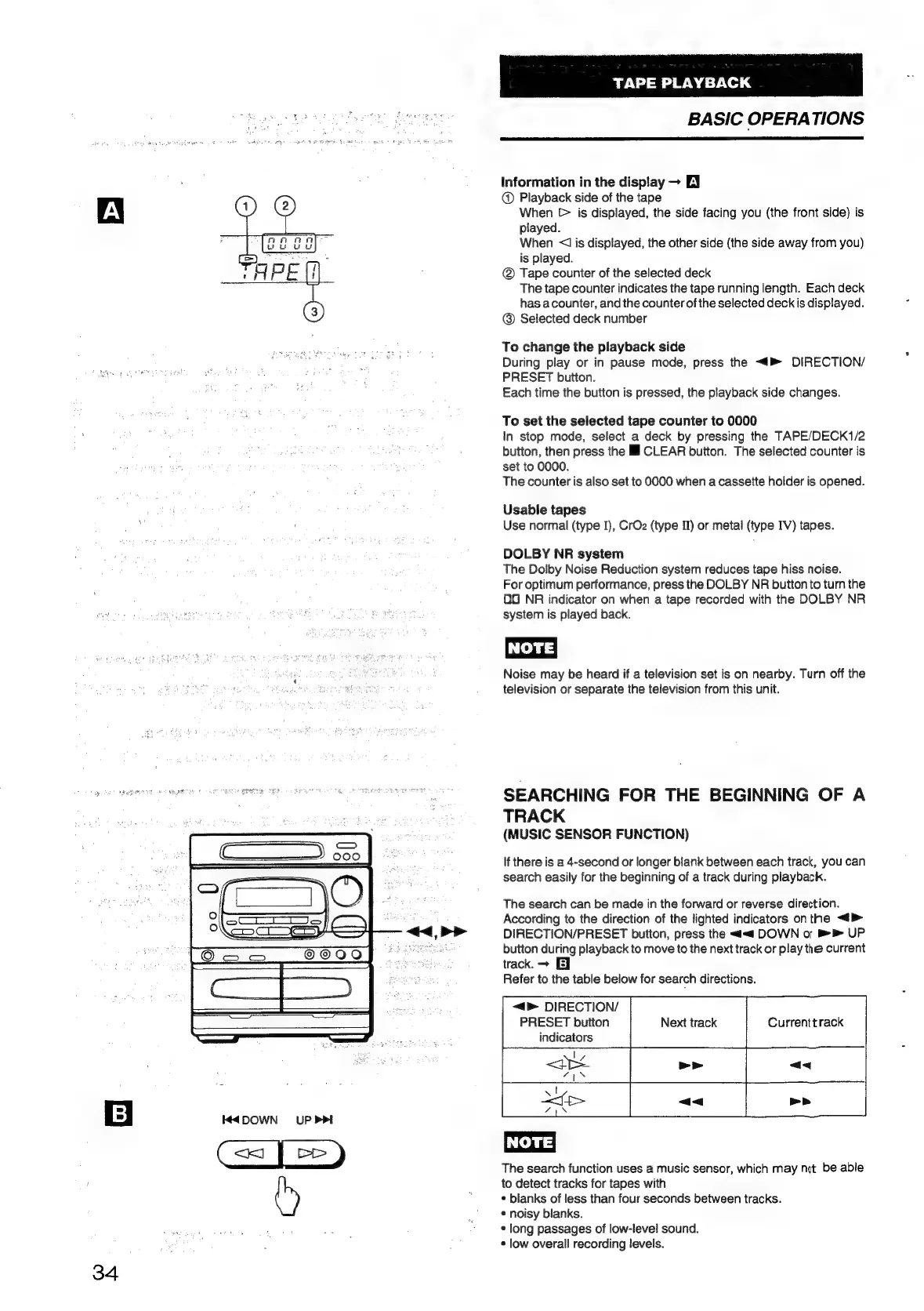
Information
in
the
display
EY
@
Playback
side
of
the
tape
When
[>
is
displayed,
the
side
facing
you
(the
front
side)
is
played.
When
<1
is
displayed,
the
other
side
(the
side
away
from
you)
is
played.
Tape
counter
of
the
selected
deck
The
tape
counter
indicates
the
tape
running
length.
Each
deck
has
acounter,
and
the
counter
of
the
selected
deck
is
displayed.
@
Selected
deck
number
To
change
the
playback
side
During
play
or
in
pause
mode,
press
the
<4
DIRECTION/
PRESET
button.
Each
time
the
button
is
pressed,
the
playback
side
changes.
To
set
the
selected
tape
counter
to
0000
In
stop
mode,
select
a
deck
by
pressing
the
TAPE/DECK1/2
button,
then
press
the
Il
CLEAR
button.
The
selected
counter
is
set
to
0000.
The
counter
is
also
set
to
0000
when
a
cassette
holder
is
opened.
Usable
tapes
Use
normal
(type
I),
CrOz
(type
II)
or
metal
(type
IV)
tapes.
DOLBY
NR
system
The
Dolby
Noise
Reduction
system
reduces
tape
hiss
noise.
For
optimum
performance,
press
the
DOLBY
NR
button
to
turn
the
OO
NR
indicator
on
when
a
tape
recorded
with
the
DOLBY
NR
system
is
played
back.
Noise
may
be
heard
if
a
television
set
is
on
nearby.
Turn
off
the
television
or
separate
the
television
from
this
unit.
SEARCHING
FOR
THE
BEGINNING
OF
A
TRACK
(MUSIC
SENSOR
FUNCTION)
If
there
is
a
4-second
or
longer
blank
between
each
track,
you
can
search
easily
for
the
beginning
of
a
track
during
playback.
The
search
can
be
made
in
the
forward
or
reverse
direction.
According
to
the
direction
of
the
lighted
indicators
onthe
<>
DIRECTION/PRESET
button,
press
the
<<
DOWN
or
>
UP
button
during
playback
to
move
to
the
next
track
or
play
the
current
track.
>
E]
Refer
to
the
table
below
for
search
directions.
<4
DIRECTION/
PRESET
button
Next
track
Currenttrack
indicators
The
search
function
uses
a
music
sensor,
which
may
not
be
able
to
detect
tracks
for
tapes
with
*
blanks
of
less
than
four
seconds
between
tracks.
©
noisy
blanks.
¢
long
passages
of
low-level
sound.
*
low
overall
recording
levels.

Table of Contents

Related product manuals