EasyManua.ls Logo

Aiwa NSX-430 - Page 70

Aiwa NSX-430
84 pages
Print Icon
To Next Page IconTo Next Page
To Previous Page IconTo Previous Page
Loading...
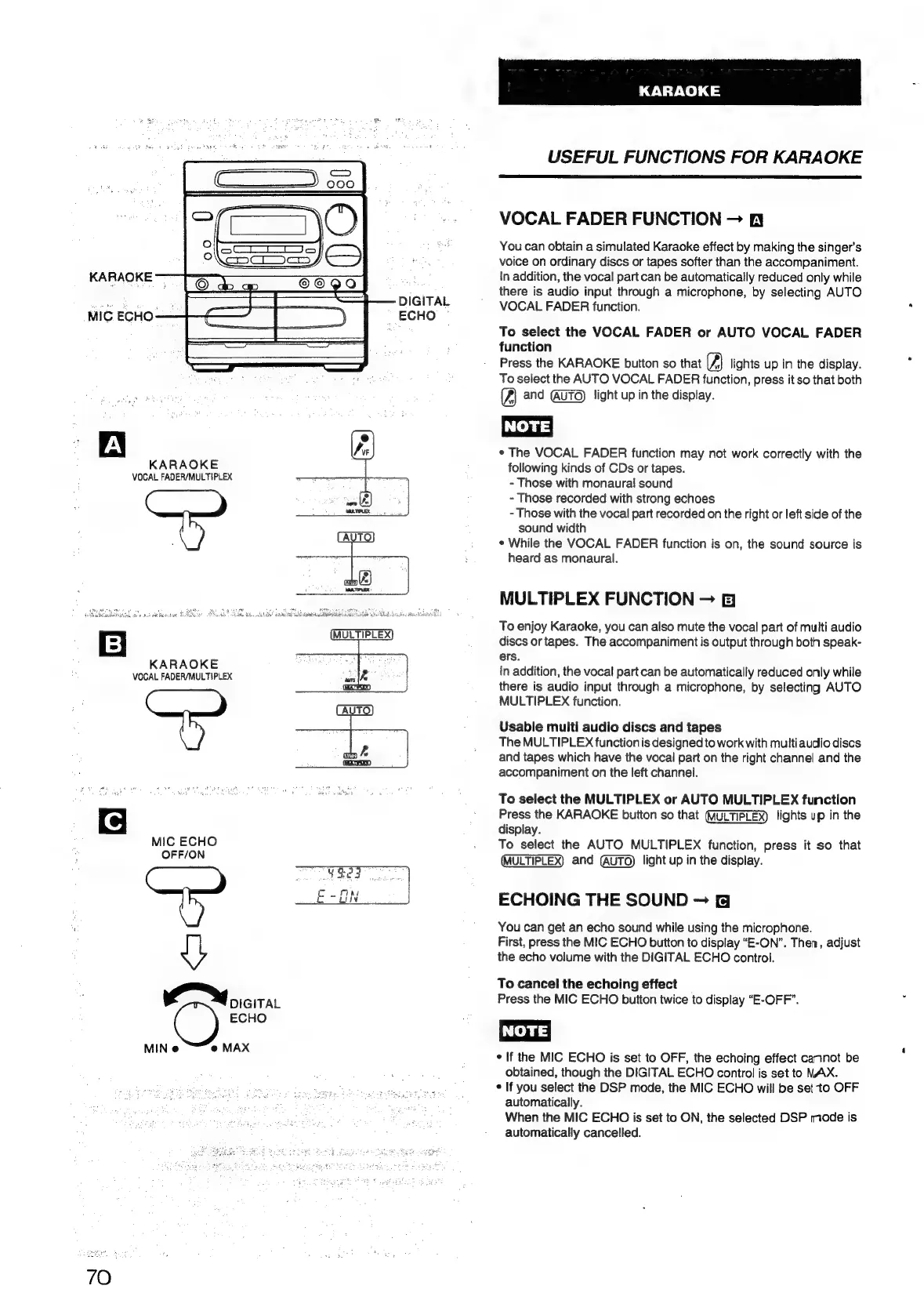
KARAOKE
8,
DIGITAL
MIG
ECHO-
ECHO
KARAOKE
VOCAL
FADER/MULTIPLEX
Sha!
Saanita
pale
icc
ew
Usb
be
Rbd
made
Rearkonda
SE
KARAOKE
VOCAL
FADER/MULTIPLEX
MIC
ECHO
OFF/ON
DIGITAL
@
ECHO
MIN
@ @
MAX
70
KARAOKE
USEFUL
FUNCTIONS
FOR
KARAOKE
VOCAL
FADER
FUNCTION
fy
You
can
obtain
a
simulated
Karaoke
effect
by
making
the
singer's
voice
on
ordinary
discs
or
tapes
softer
than
the
accompaniment.
In
addition,
the
vocal
part
can
be
automatically
reduced
only
while
there
is
audio
input
through
a
microphone,
by
selecting
AUTO
VOCAL
FADER
function.
To
select
the
VOCAL
FADER
or
AUTO
VOCAL
FADER
function
Press
the
KARAOKE
button
so
that
lights
up
in
the
display.
To
select
the
AUTO
VOCAL
FADER
function,
press
it
so
that
both
and
light
up
in
the
display.
NOTE!
¢
The
VOCAL
FADER
function
may
not
work
correctly
with
the
following
kinds
of
CDs
or
tapes.
-
Those
with
monaural
sound
-
Those
recorded
with
strong
echoes
-
Those
with
the
vocal
part
recorded
on
the
right
or
left
side
of
the
sound
width
¢
While
the
VOCAL
FADER
function
is
on,
the
sound
source
is
heard
as
monaural.
MULTIPLEX
FUNCTION
To
enjoy
Karaoke,
you
can
also
mute
the
vocal
part
of
multi
audio
discs
or
tapes.
The
accompaniment
is
output
through
both
speak-
ers.
in
addition,
the
vocal
part
can
be
automatically
reduced
only
while
there
is
audio
input
through
a
microphone,
by
selecting
AUTO
MULTIPLEX
function.
Usable
multi
audio
discs
and
tapes
The
MULTIPLEX
function
is
designed
to
work
with
multi
audio
discs
and
tapes
which
have
the
vocal
part
on
the
right
channel
and
the
accompaniment
on
the
left
channel.
To
select
the
MULTIPLEX
or
AUTO
MULTIPLEX
function
Press
the
KARAOKE
button
so
that
lights
up
in
the
display.
To
select
the
AUTO
MULTIPLEX
function,
press
it
so
that
and
light
up
in
the
display.
ECHOING
THE
SOUND
You
can
get
an
echo
sound
while
using
the
microphone.
First,
press
the
MIC
ECHO
button
to
display
“E-ON”.
Then,
adjust
the
echo
volume
with
the
DIGITAL
ECHO
control.
To
cancel
the
echoing
effect
Press
the
MIC
ECHO
button
twice
to
display
“E-OFF”.
¢
If
the
MIC
ECHO
is
set
to
OFF,
the
echoing
effect
cannot
be
obtained,
though
the
DIGITAL
ECHO
control
is
set
to
MAX.
¢
If
you
select
the
DSP
mode,
the
MIC
ECHO
will
be
set
to
OFF
automatically.
When
the
MIC
ECHO
is
set
to
ON,
the
selected
DSP
mode
is
automatically
cancelled.

Table of Contents

Related product manuals