Getting to know your telephone
8AL91432ENAD ed01.1 12/94
1.5.1.2 Description
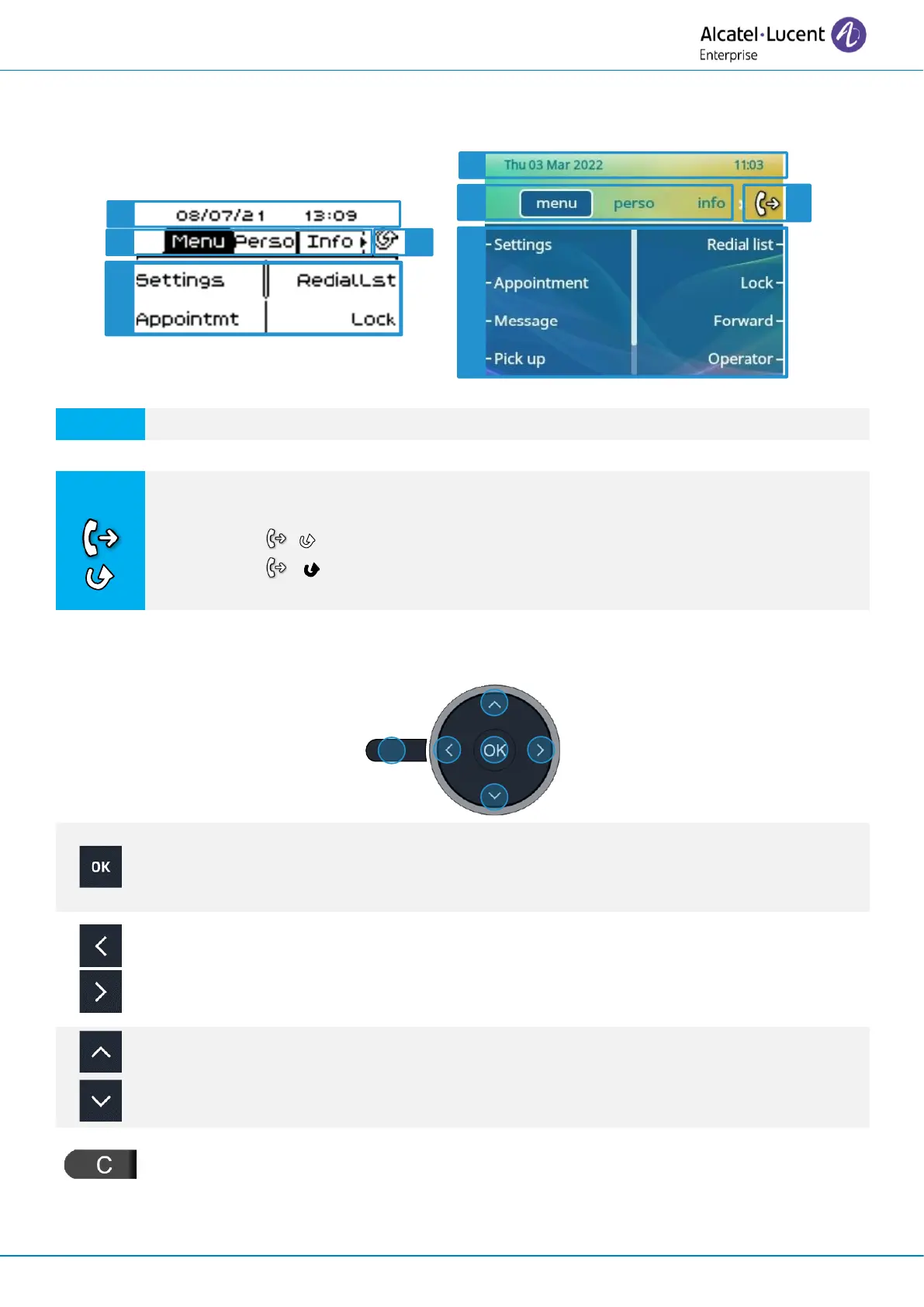
Top bar (date, time, status icons, user dynamic status).
Display the page by selecting the corresponding tab.
Forward icon.
Manage your call forwarding by pressing the key associated with the forward icon.
• / Stationary arrow: no forwarding activated.
• / Blinking or rotating arrow according to the skin: forwarding
activated.
Softkeys: menus and actions available depending on the selected page.
OK key
Use this key to validate your choices and options while programming or configuring.
In idle state, press the ok key to switch on/off the backlight.
Left-right navigator
In idle state, use this key to move from one page to another. In conversation, use this
key to move between tabs of current calls (call in progress, calls on hold, incoming call).
In the text edition, use this key to navigate into the text box.
Up-down navigator
Used to scroll through the content of a page.
Back/Exit key
Use this key to go back to the previous step. Use this key to go back to the homepage
(long press).












 To Next Page