Alfa Laval Micro
Installation, service and operating instruction
28
7 Binding/rebinding the CM721
The binding operation is required if:
Any of the system components (room thermostat or relay box) are replaced.
The relay box has incorrect or no binding data stored e.g. when pre-bound system pack components
have been mismatched.
Pairing the units
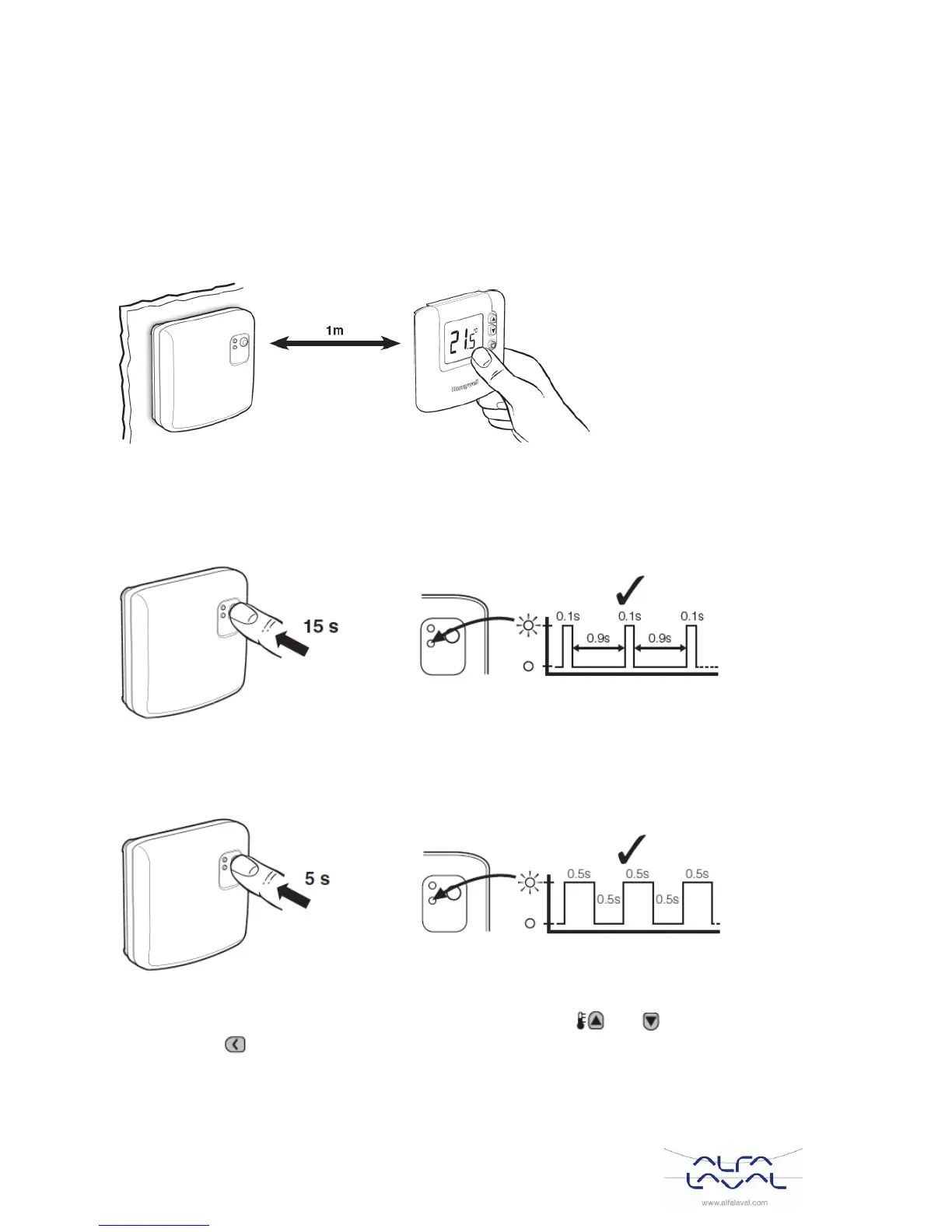
1. During the binding procedure keep approximately 1m distance between the room thermostat and the
relay box.
Reset stored data in the relay box
2. Press and hold the relay box push button for 15 seconds to reset any previously stored data.
After 15 seconds the red LED will change to flashing 0.1sec on/0.9sec off.
NOTE: After 5 seconds the red LED will start to flash 0.5sec on/0.5sec off, but continue to hold the
button.
3. Release the push button.
Put Relay Box into Binding mode
4. Press and hold the relay box push button for 5 seconds to enter the binding mode. The Red LED will
start flashing at 0.5sec on/0.5sec off to confirm the binding mode has been entered
Reset stored data in the room unit (if required)
5. Press the OFF button on the room thermostat. Then press the and buttons together along
with the button. The unit will display InSt and ‘CONTROL BINDING’.



 To Next Page