Alfa Laval Micro
Installation, service and operating instruction
36
12 Activation of installer parameters
Installer Mode is used to alter the system settings for specific applications, to use the special features of the
room thermostat in a different way or to alter the factory present parameters. Parameters are divided into
groups:
Category 1 Room Thermostat Setup
Category 2 System Setup.
Category 3 Boiler Settings, only available for H737
Category 4 Transparent Boiler Parameter, only available for H737
Category 5 Fault History, only available for H737
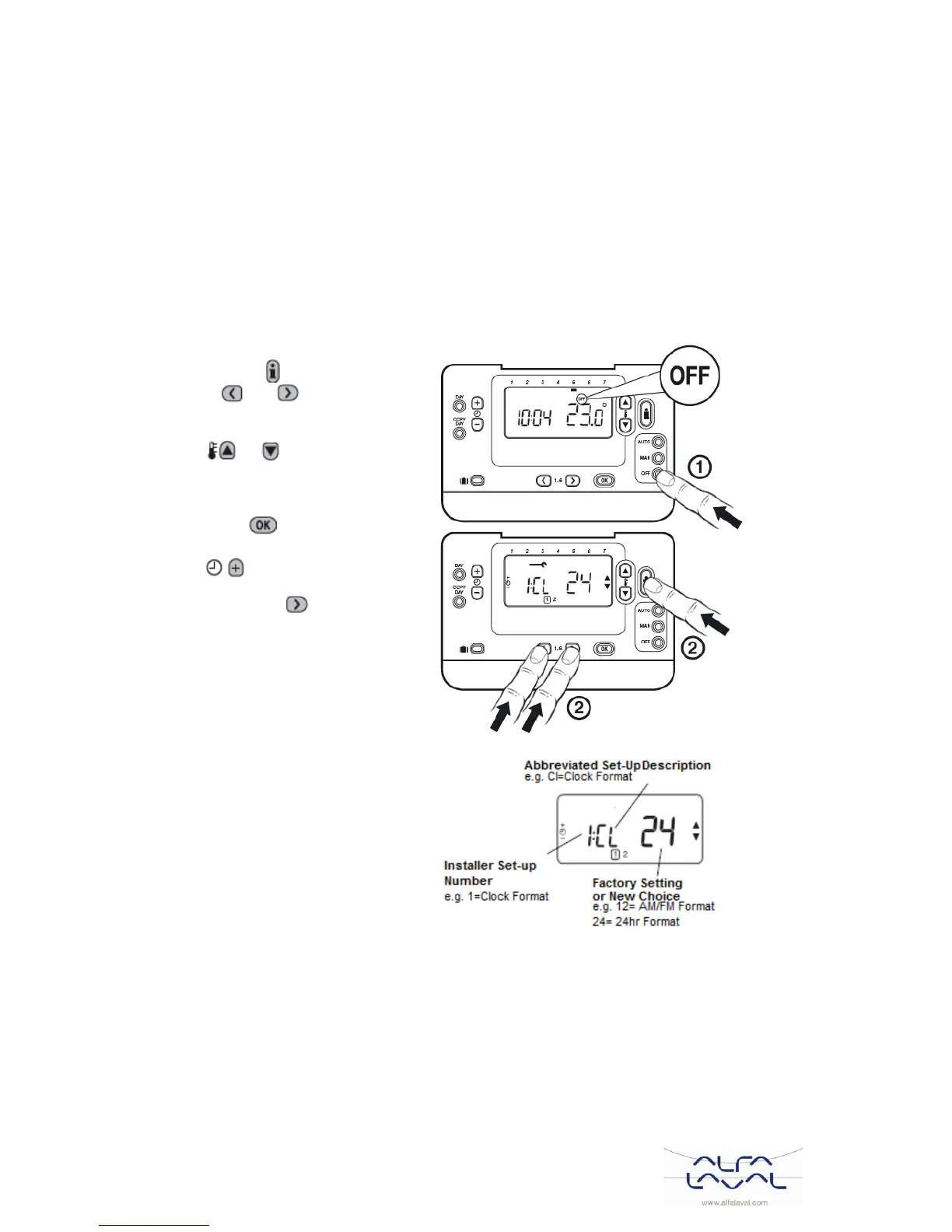
Entering the installer set-up mode 12.1
1. Press the OFF button.
2. Press and hold the button and the two
PROGRAM and buttons together.
3. The unit will display the first parameter of
installer parameter group category 1.
4. Press the or button to change
the factory setting.
The display will flash indicating that a
change has been made.
5. Press the green button to confirm the
change. The display will stop flashing.
6. Press the button to go to the next
parameter.
7. Press the PROGRAM button to go to
the next parameter category.
8. To exit installer mode, press the AUTO,
MAN or OFF button.



 To Next Page