Alfa Laval Micro
Installation, service and operating instruction
33
9 Special functions for the CM737
OTC heating curve 9.1
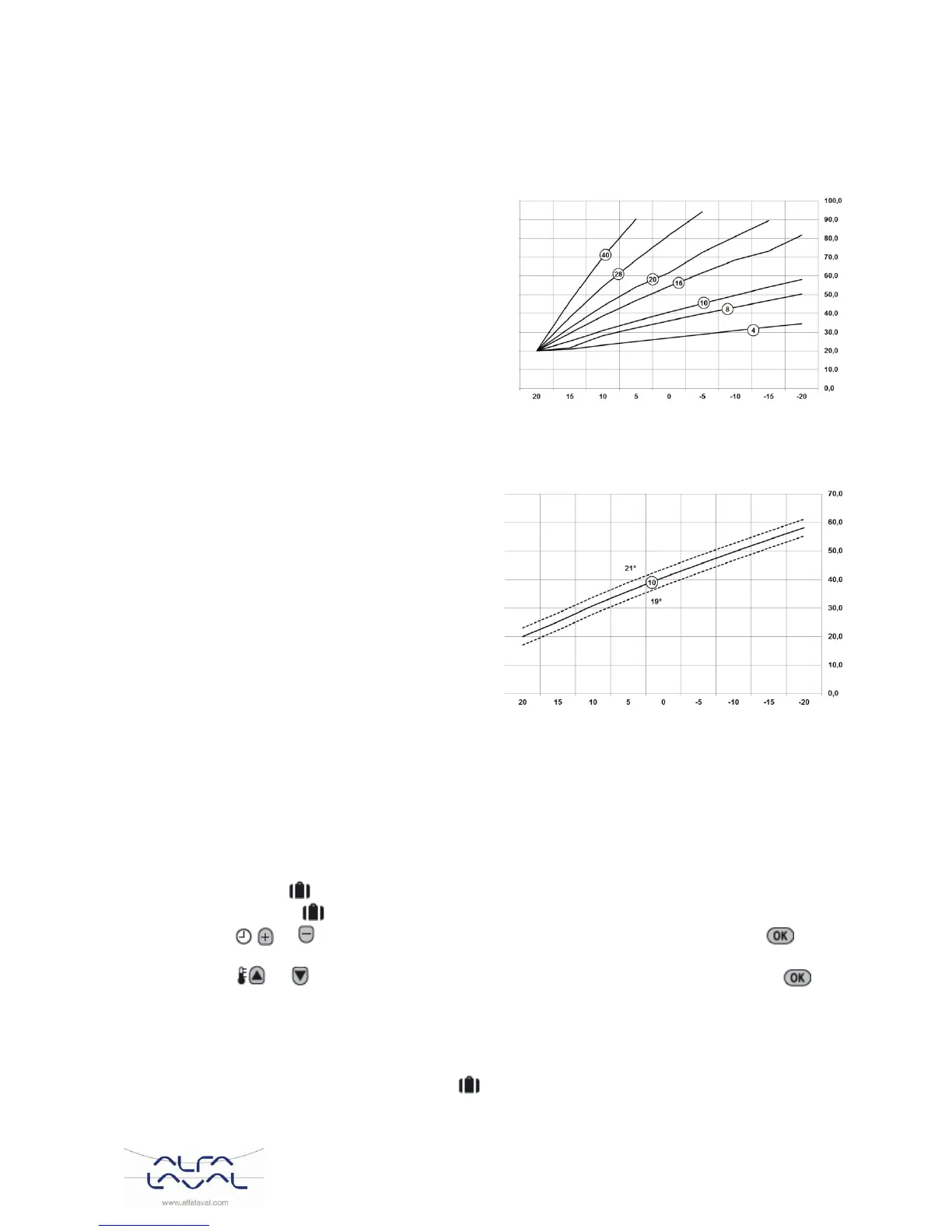
The CM737 controls the indoor temperature as a
function of the measured outside air temperature.
The heating curve is the ratio between the measured
outside air temperature and the calculated supply
water temperature.
The ideal heating curve is dependent on the type of
installation (radiators, convectors, etc.), the thermal
properties and the location of the property. A heating
curve ratio of 1 to 40 can be set. The figure shows
several heating curve ratios for a room temperature
setting of the 20°C without room temperature
compensation.
Supply water temperature (°C)
Heat curve 10 (15:OC) has been set at the factory.
.
Outside Temperature (°C)
Heating curve ratio is at room temperature setting of 20°C
Picture 26.
Parallel adjustment of heating curve 9.2
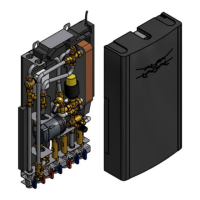
If any other room temperature set point than 20
o
C
is used the selected curve will be parallel
compensated.
Every change of the room temperature set point
from 20
o
C will change the supply temperature with
approximately 3
o
C. If the room temperature set
point is increased from 20
o
C to 21
o
C the supply
temperature will increase with approximately 3
o
C.
This example shows parallels of curve 10 by 19
o
C
and 21
o
C.
Supply water temperature (°C)
Outside Temperature (°C)
Picture 27)
Holiday function 9.3
The holiday function allows you to set a constant temperature (default = 10°C) for a specified number of days
(from 1 - 99 days). This saves energy and related costs when the house is empty, but resumes normal
operation on the day of return.
To set the Holiday function:
a) Ensure the CM737 is running in AUTO or MAN operating modes.
b) Press the holiday button to display the holiday day’s counter and temperature setting, along with
the holiday indicator .
c) Press the or time buttons to set the holiday time (1-99 days) and press the green
button to confirm.
d) Press the or buttons to set the holiday temperature (5°C - 35°C) and press the green
button to confirm.
The CM737 will now control to the new temperature for the set number of days that the home is vacant. At
midnight the holiday counter will be reduced by one until the selected number of days have passed. The
CM737 will then return to normal operation as set by the MAN or AUTO mode. To cancel the HOLIDAY
function or to exit the function at any time: press the button a second time.



 To Next Page