Allworx
®
Verge™ IP Phone Series User Guide
Page 4 866.ALLWORX * +1 585 421 3850
www.allworx.com
Version: D Revised: June 1, 2017
2.1 Verge IP Phone Screen
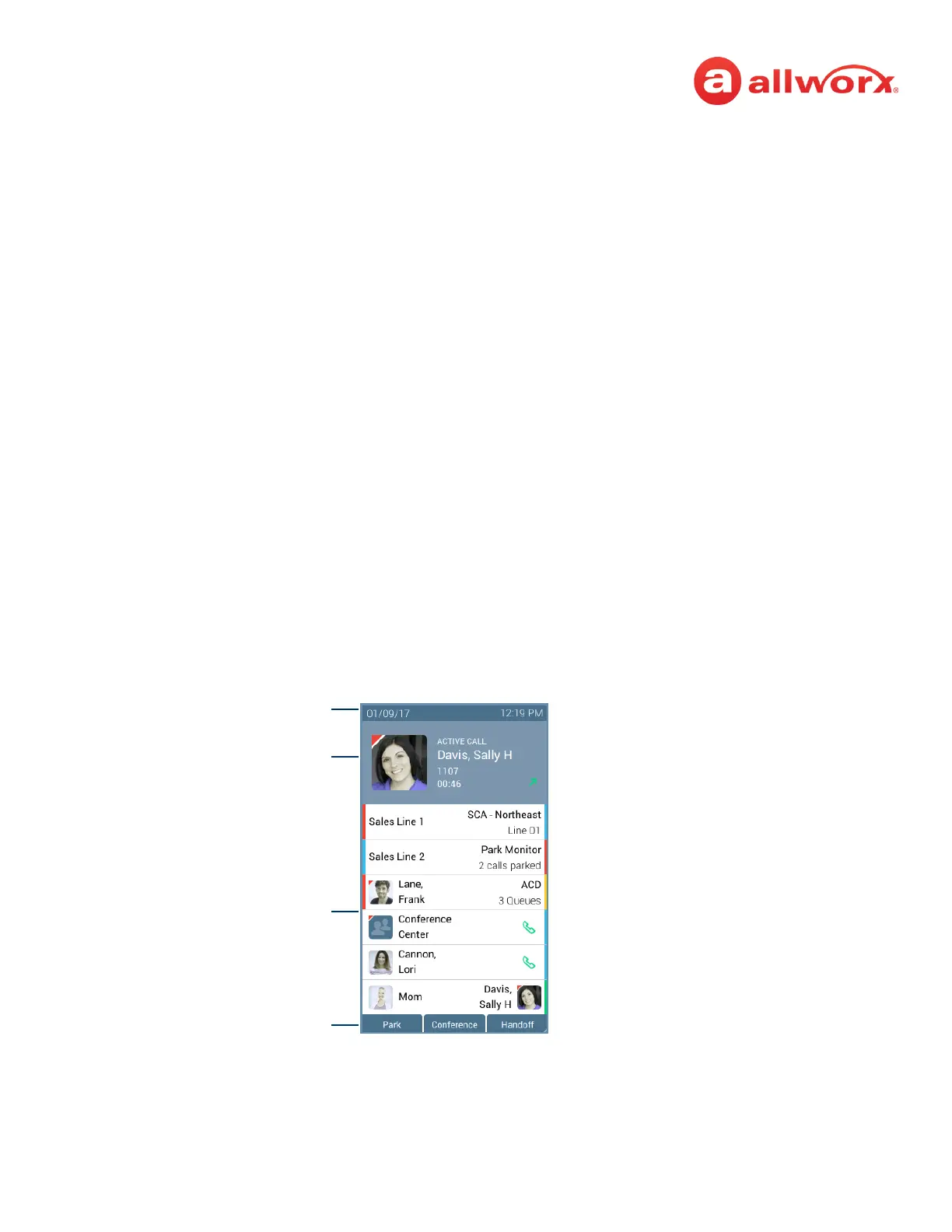
The Verge IP phone screen displays visual cues (such as icons and colors) relevant to the user or phone
status, call status, programmable buttons, soft keys, and feature instructions that are each defined in
more detail in later sections of this document.
• Phone Status area - about the phone such as Bluetooth connectivity or user Presence/DND
status.
• Call Status area – about the call state:
• idle - user presence, caller ID name/number, missed call and/or message notifications.
• incoming or active call - contact image (if available), call status, caller ID name / number,
call duration.
• programmable buttons - about contacts, appearances, and access to phone features.
• Soft Keys - manage the Verge IP phone or call. The soft key names and behaviors are dependent
on the current phone state.
• Feature Instructions - directions to complete a specific task (not shown in example below).
In addition to English, the Verge IP phone supports Canadian French and Castilian Spanish on the
phone screen. Contact the Allworx Server Administrator to configure the phone screen to display the
preferred language; users cannot change the phone display language within the Verge IP phone
Settings menu.
Verge IP phone screen example:
Phone Status Area
Call Status Area
Soft Keys
Programmable Buttons Area



 To Next Page