Allworx Verge IP Phone Series User Guide
866.ALLWORX * +1 585 421 3850 Page 57
www.allworx.com
Version: D Revised: June 1, 2017
4.13 Call Supervision
Enable supervisors to monitor Allworx Users handling calls in three modes using one of the modes
assigned to the assigned programmable button. The supervisor can transition between the assigned
mode and the silent monitoring mode by pressing the phone Mute function button. There is no
indication to the Allworx User that Call Supervision is in progress. While in Call Supervision mode, all
call management features (hold, transfer, etc) are available.
• Barge in - after connecting the call, both participants in the call hear the supervisor.
• Whisper - only the Allworx user hears sounds from the supervising phone, not the other
participant. The supervisor cannot initiate two-way communications with the other participant.
• Silent Monitor - Neither party in the call can hear the supervisor.
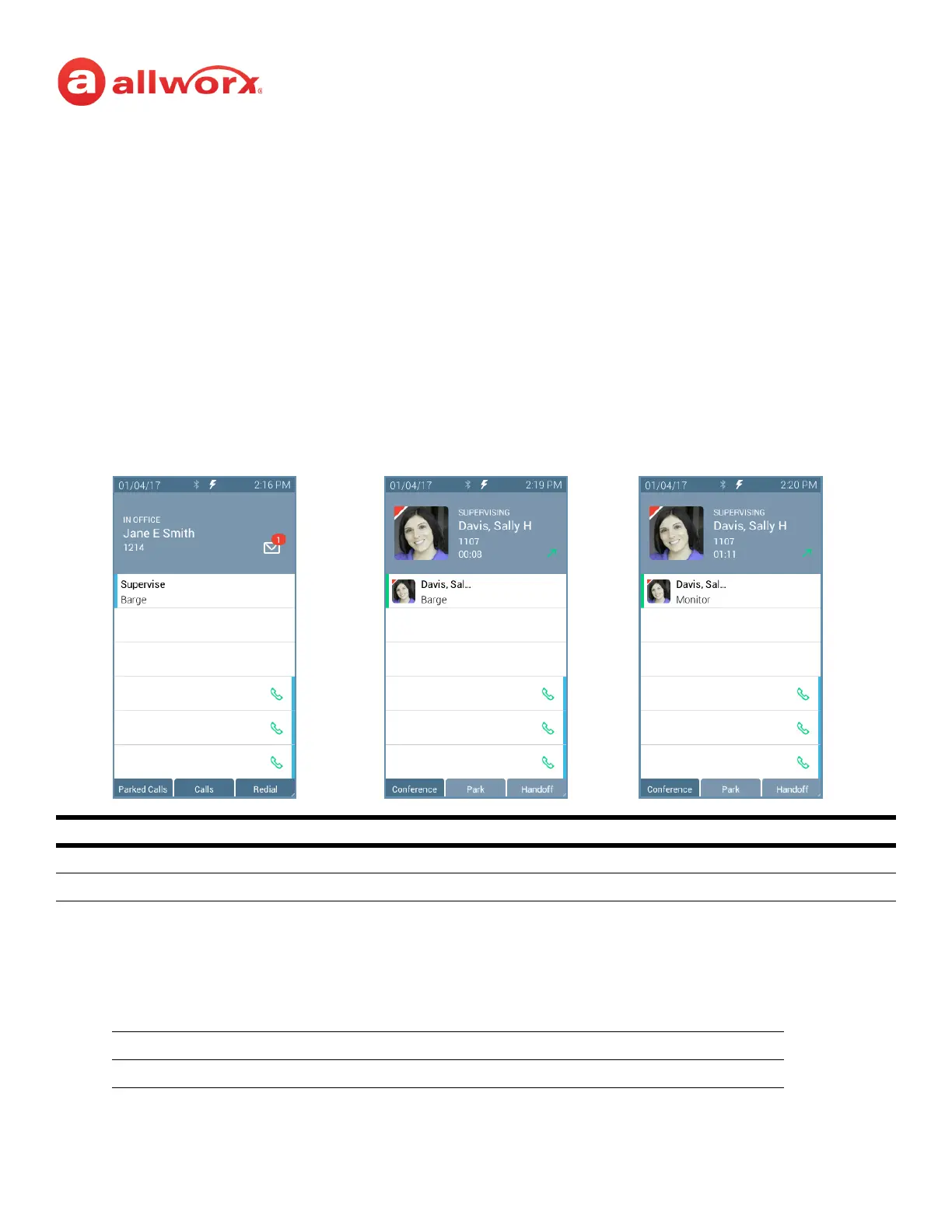
Verge IP phone Call Supervision programmable button example:
To supervise the call:
Press the Call Supervision programmable button, and then enter the agent extension or press the
agent Contact or BLF programmable button. To change the mode during a call, press the MUTE
feature button. Example:
Call Supervision LED Button
solid green call supervision is active.
flashing green call supervisor pressed the hold button to pause the feature.
Silent Barge In Silent
Whisper Silent Whisper
Call Supervision Idle Call Supervision Active Call Supervision Toggle



 To Next Page