Allworx Verge IP Phone Series User Guide
866.ALLWORX * +1 585 421 3850 Page 59
www.allworx.com
Version: D Revised: June 1, 2017
4.15 Push To Talk
A one-way, walkie-talkie-like capability programmable button to a specific phone extension. To use the
Push to Talk feature, press and hold the programmable button, and then begin speaking. To respond,
the recipient must place a call back to the originator.
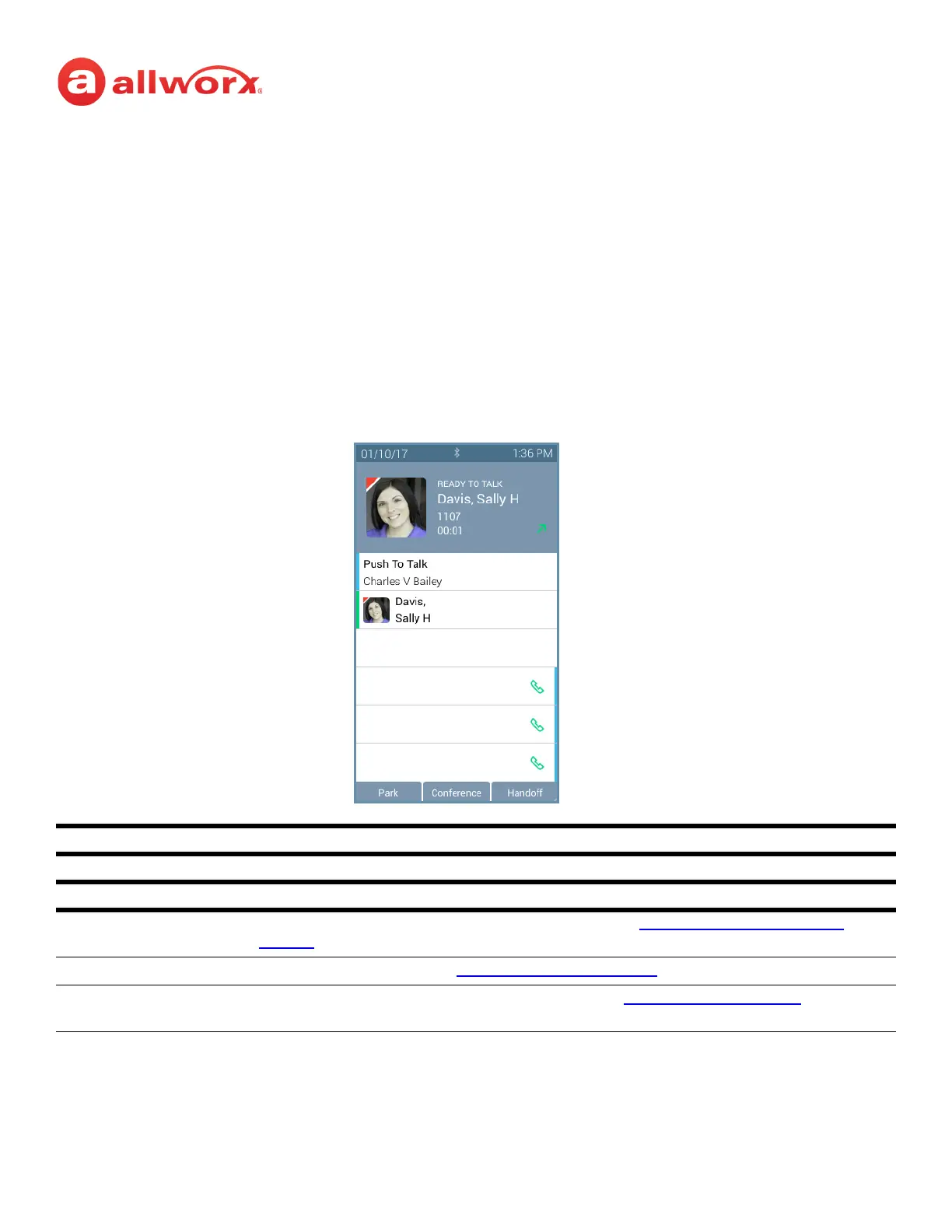
Verge IP phone Push to Talk Button example:
Push to Talk Programmable Button LED
Green Target phone extension is active during Push to Talk.
Soft Keys
Park place the call on the lowest available parking orbit. See “
Park a Call/Park Monitor” on
page 18 for more information.
Conference create a conference call. See “
Conference Call” on page 23 for more information.
Handoff transition the call to a Reach device (if available). See “
Call Handoff” on page 28 for more
information.
Target Active
Target Idle
Push To Talk Active
Information area displays:
• the recipient of the Push To Talk
• contact image with Allworx badge
• status of the Push To Talk feature (READY TO TALK)
• contact name / number
• Push To Talk duration



 To Next Page