Allworx
®
Verge™ IP Phone Series User Guide
Page 68 866.ALLWORX * +1 585 421 3850
www.allworx.com
Version: D Revised: June 1, 2017
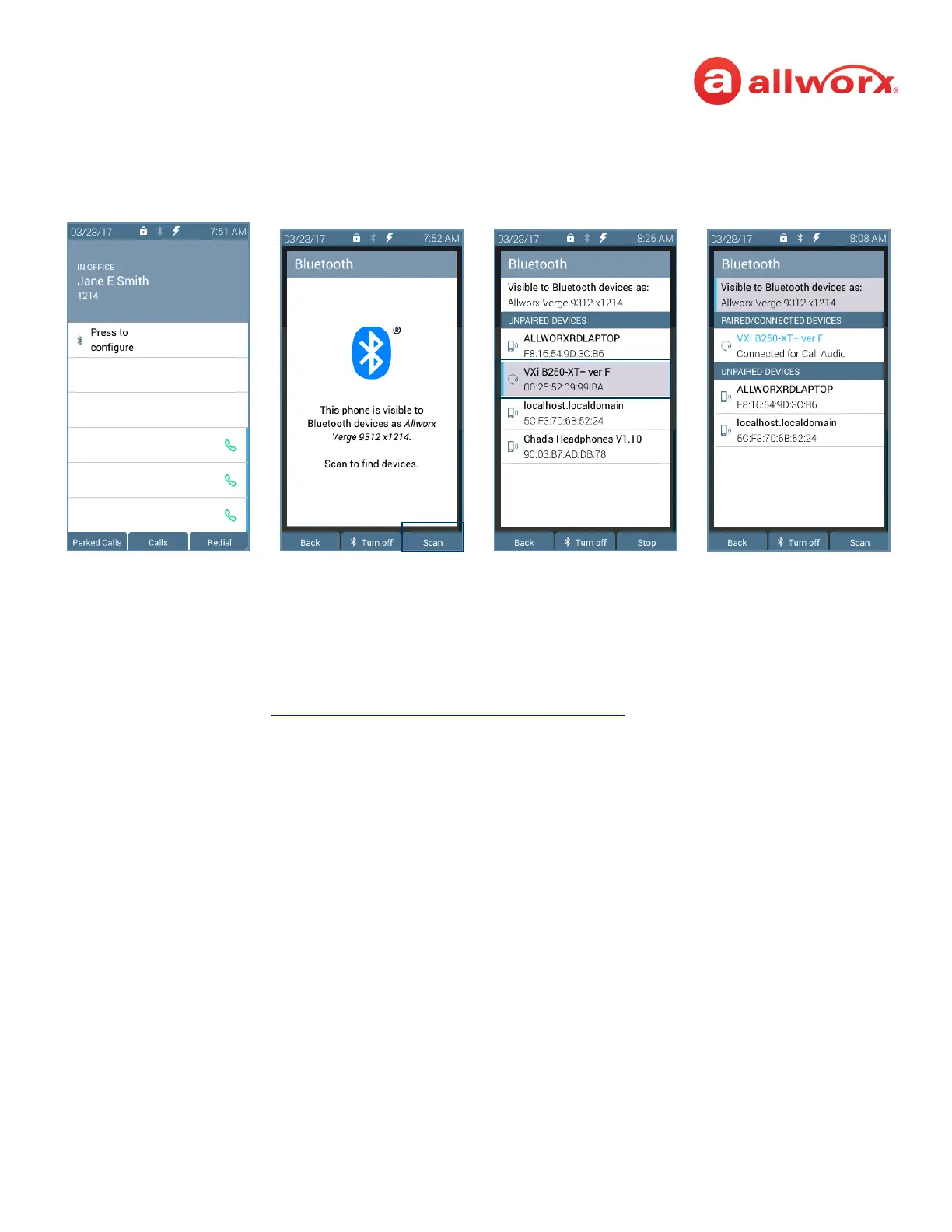
Verge 9312 IP phone Bluetooth headset example:
To disconnect a Bluetooth mobile device:
Unpair using the mobile device Bluetooth option. The Verge IP phone indicates the devices will no
longer communicate. Follow the steps above to reconnect the Bluetooth mobile device.
To Forget a Bluetooth enabled device:
1. Follow the steps in “To access the setting options:” on page 65. Open Bluetooth. The device
displays highlighted in the PAIRED/CONNECTED DEVICES section.
2. Highlight and select the device to forget, and then press the Yes soft key. The Verge 9312 phone
is ready to scan for devices.
3. See the mobile device manual for instructions to Forget the Verge IP phone on the mobile
device.
Press the Bluetooth
Hands-Free programmable
button.
Press the Turn on soft key,
and then the Scan soft key.
Highlight and select the
Bluetooth device.
NOTE: if selecting a headset,
the Bluetooth headset uses
the Headset Function Key.



 To Next Page