MU-100A
13. Data Communication
13-2
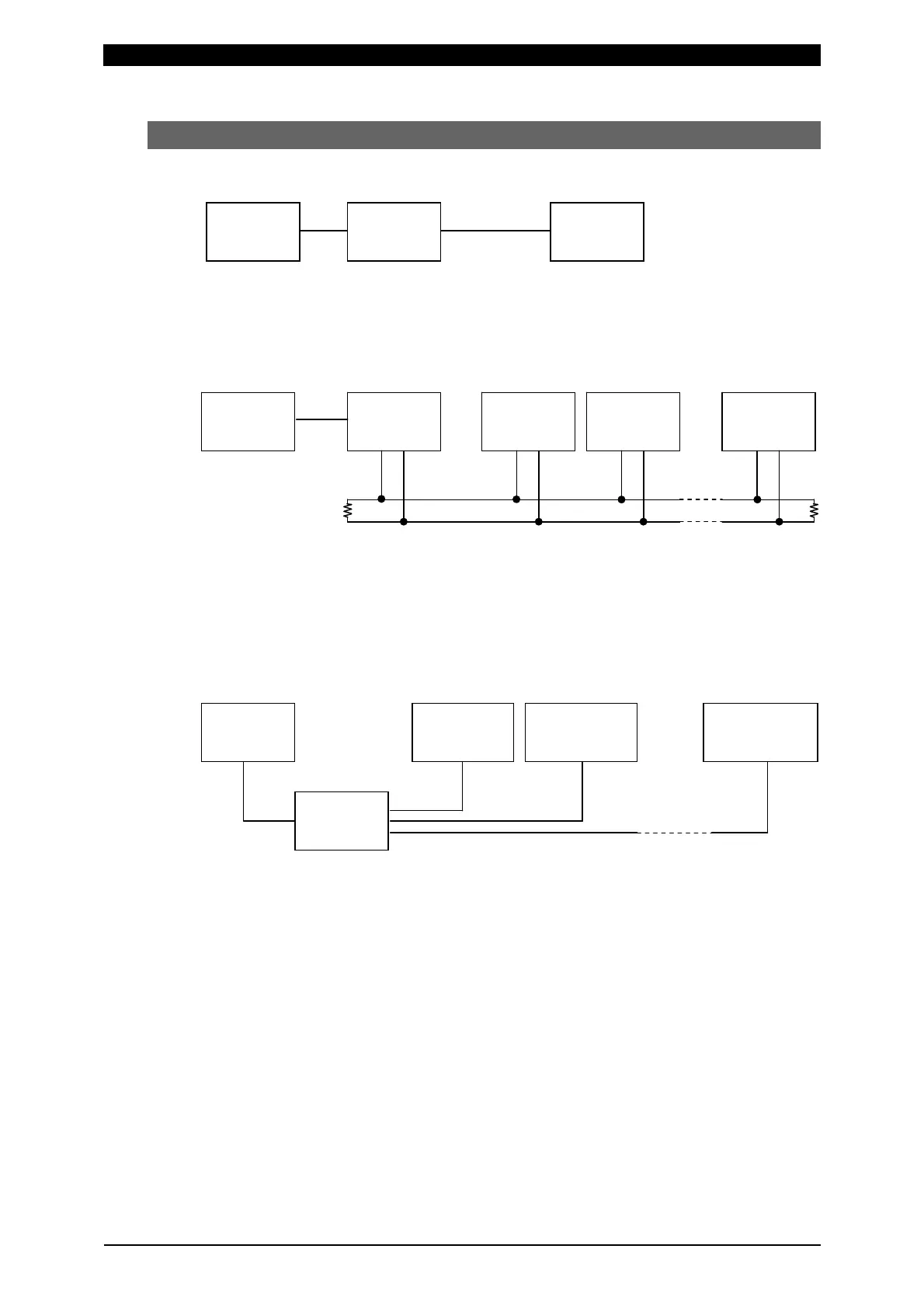
(2) Configuration
a. RS-232C
* Prepare the USB-RS232C conversion adapter at customer’s side.
* The RS-232C harness is optional.
b. RS-485
* Prepare the USB-RS232C conversion adapter and cable at customer’s side.
* Mount 100Ω of termination resistance at either end of the RS-485 cable.
* The RS-485 connector (with termination resistance) is optional.
* Up to 31 devices can be connected.
* In the single-directional communication, only one device can be connected.
c. Ethernet
* Prepare the switching hub at customer’s side.
* The LAN cable is optional.
Host
computer
IP address:
192.168.***.1
IP address:
192.168.***.2
IP address:
192.168.***.nn
Switching
hub
LAN
Host
computer
RS485
address
No.: nn
USB-RS485
conversion
adapter
USB
RS485
address
No.: 1
RS485
address
No.: 2
Host
computer
Device
USB
USB-RS232C
conversion
adapter
RS-232C harness


 To Next Page