CHAPTER 1: DESCRIPTION
UB25 LINEAR DC RESISTANCE WELDING CONTROL
990-665 1-5
Menu Screens
Menu screens are text screens that allow you to select and customize the operating parameters of the
Power Supply and performance of the welding equipment. Each menu screen lists several choices, with
some offering additional menu screens listing more choices. The numeric keypad is used to select
choices from the menu.
Data Screens
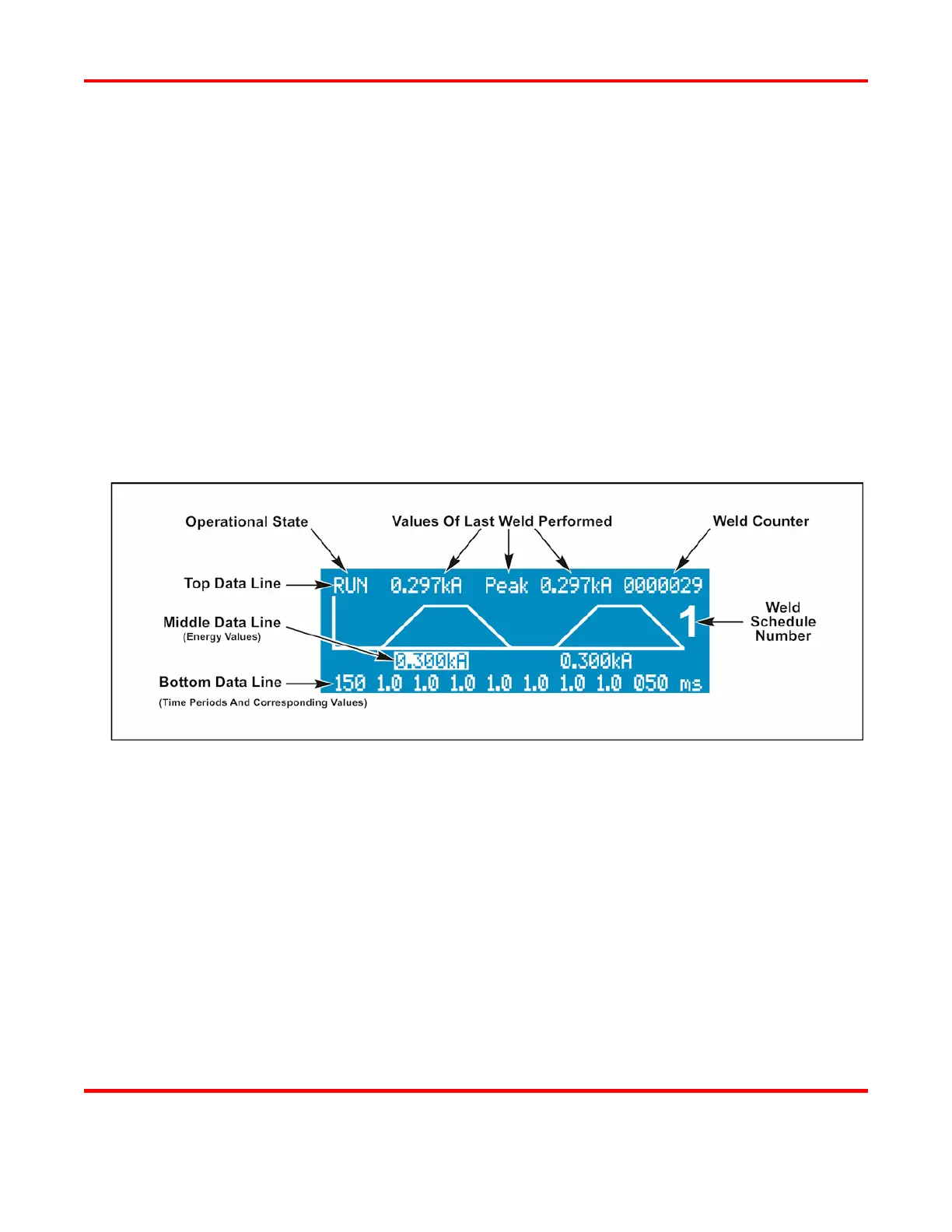
The Data screens display the information necessary to program, run, and monitor welds. Data is
displayed in both alphanumeric and graphic form on the same screen. The graph displays time values
from left to right, and energy values from bottom to top, showing the waveform of the weld schedule.
The waveform gives you an easy-to-see "before and after" comparison of how you programmed the
weld, and how the weld was actually performed.
Alphanumeric Data
Alphanumeric Data
Alphanumeric data is displayed on three lines. Operating instructions will refer to alphanumeric data
as the Top Line, Middle Line, and Bottom Line as shown above. Chapter 4, Operating Instructions,
describes how to enter alphanumeric data, and how to select between voltage, current, power,
peak/average display, and operational states.
Operational States
Each Data Screen displays the current operational state of the Power Supply in the Top Line of data
(left side). Menu Screens do not display the operational state, but the menu itself indicates the Power
Supply is in the MENU state. The following table describes each of the Power Supplies operational
states.



 To Next Page