CHAPTER 1: DESCRIPTION
UB25 LINEAR DC RESISTANCE WELDING CONTROL
1-8 990-665
Section IV. Controls and Indicators
Introduction
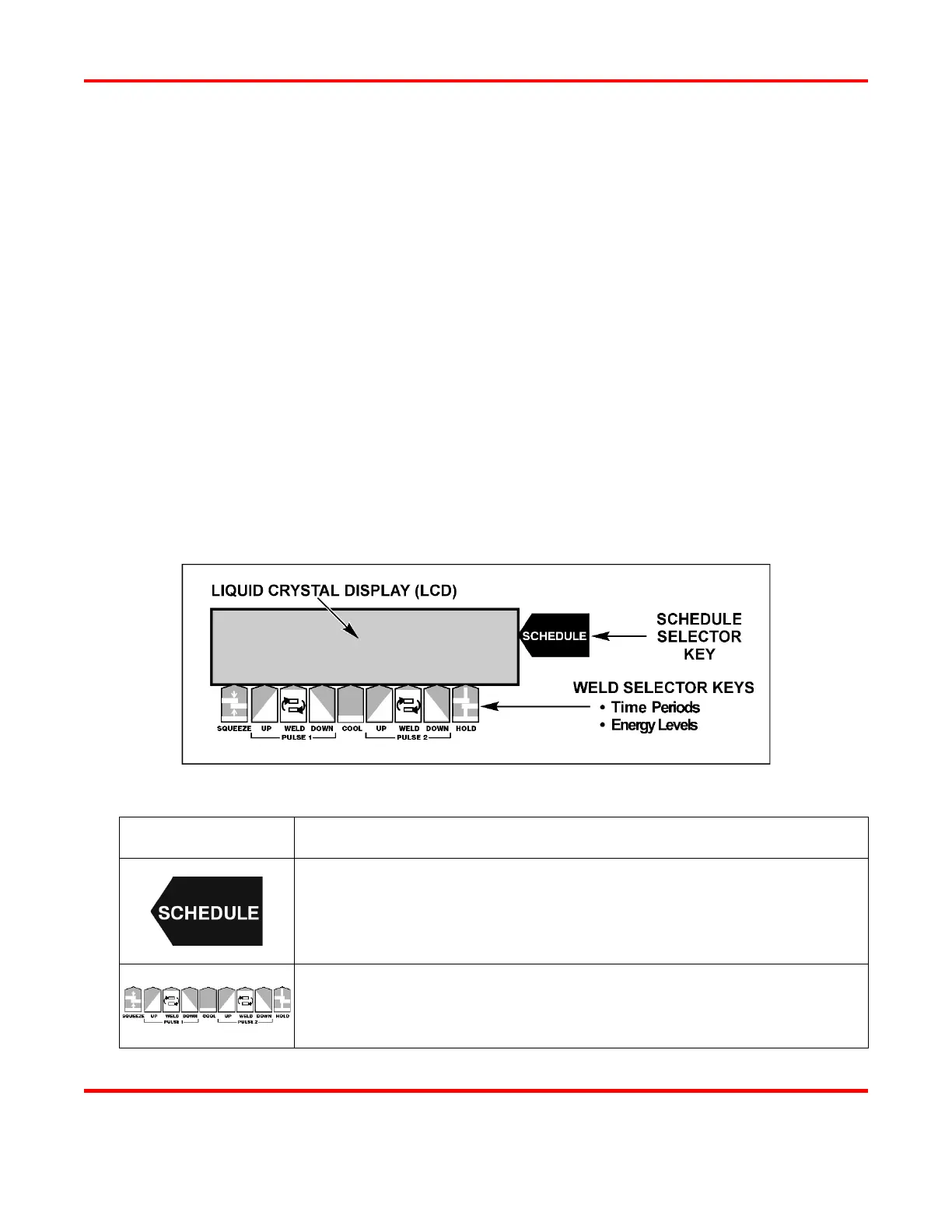
The Controls and Indicators on the front panel of the Power Supply are grouped in two clusters:
• Liquid Crystal Display (LCD) and Weld Selector Keys
• Numeric Keypad and Operational Controls
Various functions of the Power Supply may require the use of buttons or keys from each cluster. This
section describes each button and key on the front panel. Descriptions are given in the order they appear
on the front panel from left-to-right, and from the top of the panel to the bottom.
Step-by-step instructions on how to use the controls and indicators are in Chapter 4. Operating
Instructions. Operating Instructions will list the buttons and keys in the sequential order necessary to
perform each task.
Liquid Crystal Display (LCD) and Weld Selector Keys
LCD and Weld Selector Keys
KEY FUNCTION
Press to view and select a Weld Schedule. After pressing the SCHEDULE
key, you can use either the ▲▼ (up/down) keys on the front panel to
scroll through the 99 stored Weld Schedules, or use the numeric keypad to
enter the two-digit number of the desired schedule.
Weld Selector Keys. A group of nine keys used to program the time
periods and energy levels for each complete weld schedule.



 To Next Page