ERROR MESSAGES
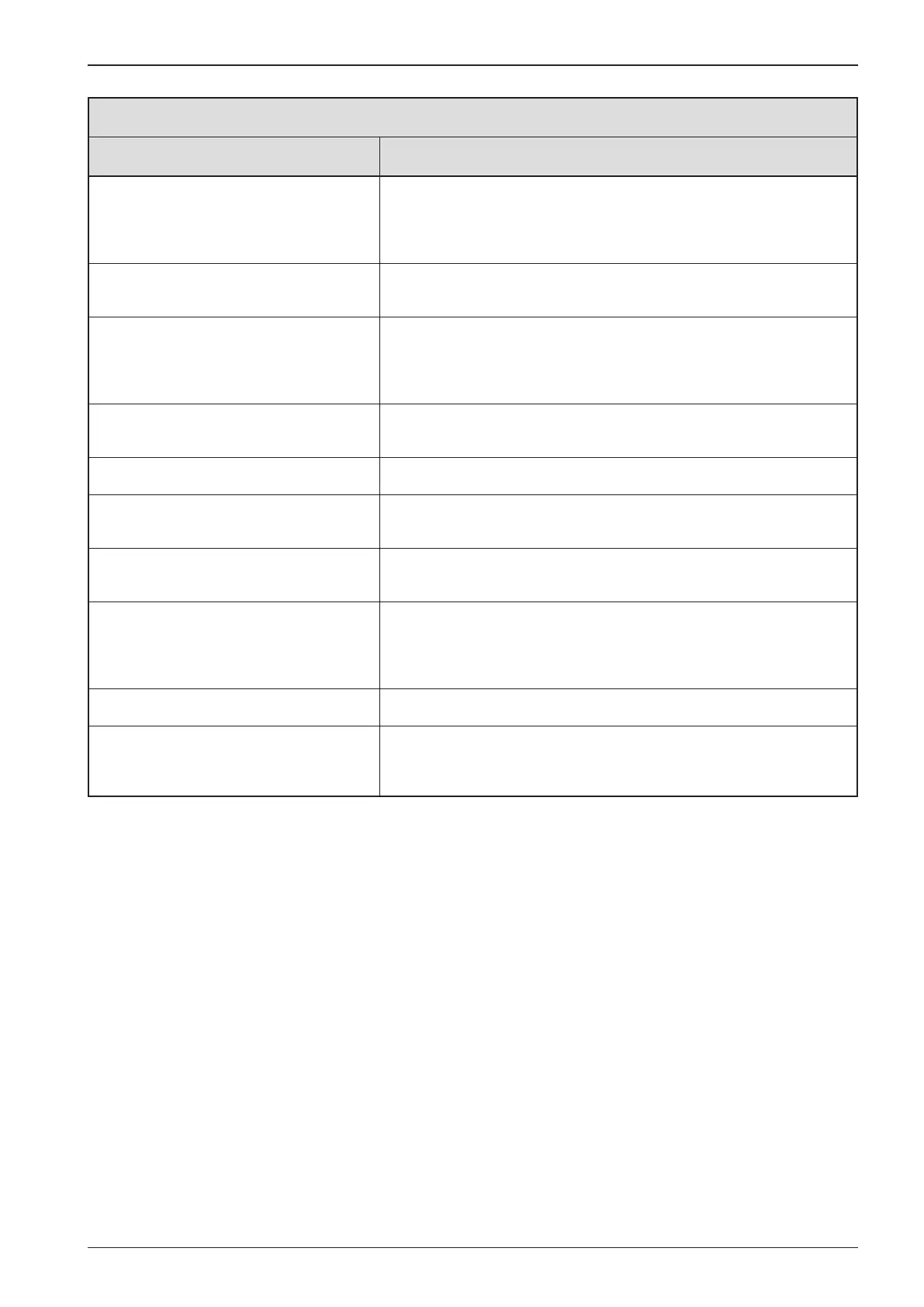
Error message Signature
“WAIT TO START PREHEATING” is displayed The ECU is broadcasting a ‚Wait To Start‘message. Engine manufacturers
typically recommend against starting the engine while the ECU is
broadcasting this message. Once the ECU stops broadcasting this
message,this screen will no longer be displayed on the Power View.
“
CANBUS FAILURE” is displayed The Power View has not received any valid J1939 CAN messages for at least 30
seconds.
“
TIMEOUT ECU NOT RESPONDING” is
displayed
The Power View sent a request to the ECU for Stored Fault Code (DM2)
information, and the ECU did not respond to the request. This message on
the PowerView indicates the ECU may not support Stored Fault Code (DM2)
functionality over J1939.
“
NO STORED CODES” is displayed The Power View sent a request to the ECU for Stored Fault Code (DM2)
information, and the ECU responded. There are zero stored codes.
“
NO GAGE DATA” is displayed The Power View has no record of gages connected to the RS485 bus.
“NO DATA” is displayed in place of
a parameter value
The Power View has not received data for the selected parameter for at least
5 seconds.
“
NOT SUPPORTED” is displayed in place of
a parameter value
The ECU is sending a message that it does not support this parameter.
“DATA ERROR” is displayed in place of
a parameter value
The ECU is sending a message that there is a data error with this parameter.
Or (PV101 only) FUEL LEVEL has been selected for display, ANALOG INPUT has
been set to FUEL LEVEL, but no Murphy Fuel Sender has been connected to
the analog input.
One of the 4-UP quadrants is empty No parameter has been selected for display in this quadrant.
Display is not readable, either very dim or
very dark
The LCD contrast may have been over or under adjusted. Press and hold
the MENU key for approximately 5 seconds. This will reset the LCD contrast
setting to factory default.


 To Next Page