Optics 139
Use the lever next to the level bubble to pivot the contrast filter into the
optical path.
Releasing the lever pivots the contrast filter back out of the optical
path.
Ground glasses
The ground glass is the equivalent to the image sensor for the optical
viewfinder. The image created by the lens is projected to the ground glass,
from where it is picked up by the optical viewfinder.
Ground glasses contain frame and format markings to show the recorded
image area and the area of interest. As the sensor aperture of the ALEXA
Studio is different from the camera aperture of ANSI and DIN Super35
formats, only ground glasses made specifically for ARRI digital cameras
provide exact format markings.
To exchange a ground glass:
Press the VIEW button so that the sensor is protected by the mirror
shutter.
Turn off the camera and disconnect it from power supply.
Remove the lens or protective cap.
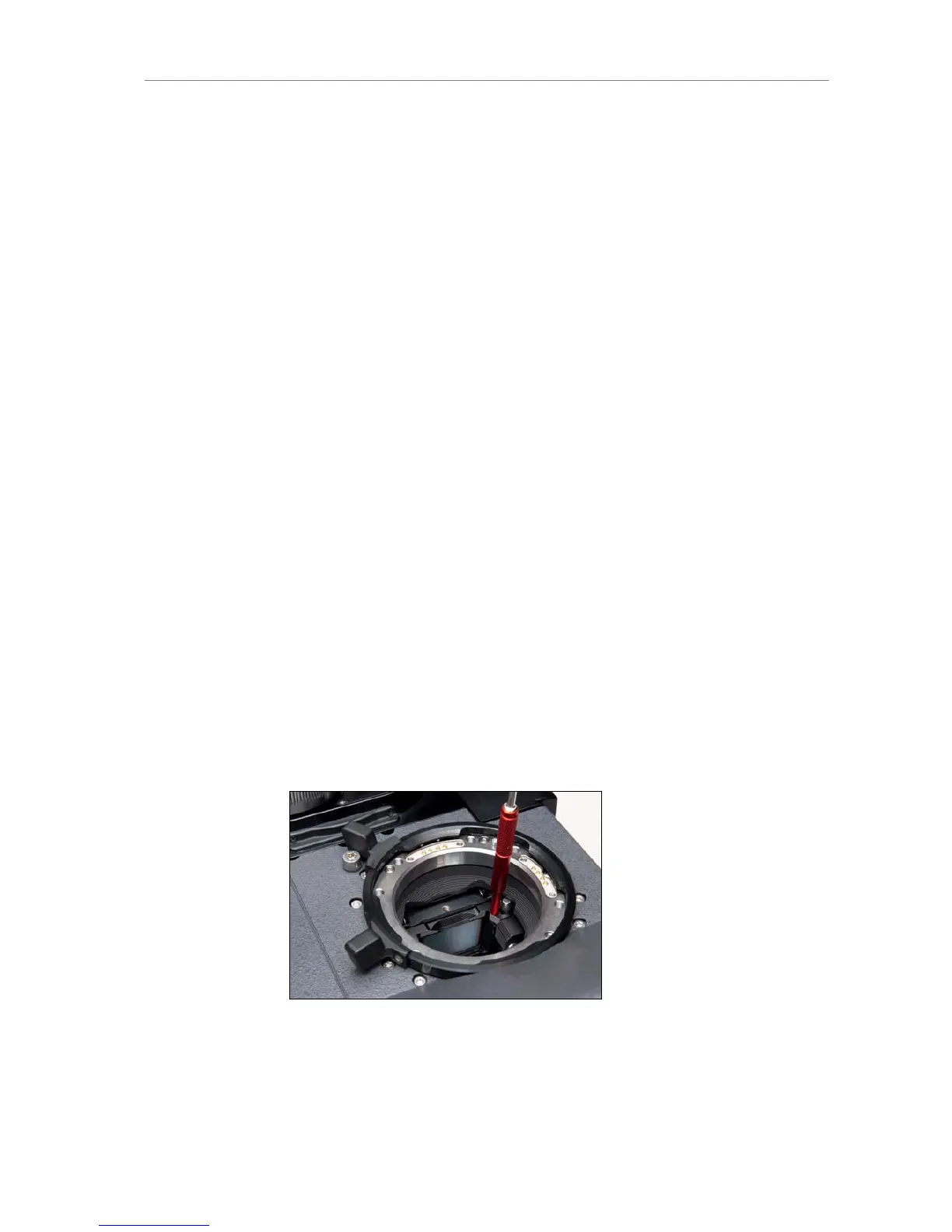
Screw the ARRI Ground Glass Puller into the ground glass.
Carefully pull out the ground glass.
Check that the new ground glass and the ground glass holder are
clean.
Screw the ARRI Ground Glass Puller into the new ground glass and
push it into the holder.
Make sure the ground glass is inserted completely and correctly
locked in place.
Attach a lens or a protective cap to the lens mount.
Figure 102: Ground glass in camera with Ground Glass Puller attached











 To Next Page