Main Controls 49
11.1.1 Display
The LCD display on the right side has a size of 3" and a resolution of
400x240 pixels. The display is back illuminated and transflective which
results in exceptional contrast even in bright sunlight. When the Homescreen
is displayed, the brightness of the display can quickly be adjusted by turning
the jogwheel while pressing the BACK button.
A removable plastic shield protects the display from scratches and can
simply be removed by pulling it off the four pins on its corners that hold it in
place.
11.1.2 Screen Buttons
Six screen buttons are located above and below the display. They change
their behavior depending on the screen content. The function related to each
button in a screen is shown by a black label in the screen located below or
above the button. Buttons without a black label have no function in that
screen.
Operations that cannot be reversed and can result in the loss of data require
the simultaneous pressing of two buttons to prevent accidental use.
11.1.3 HOMESCREEN
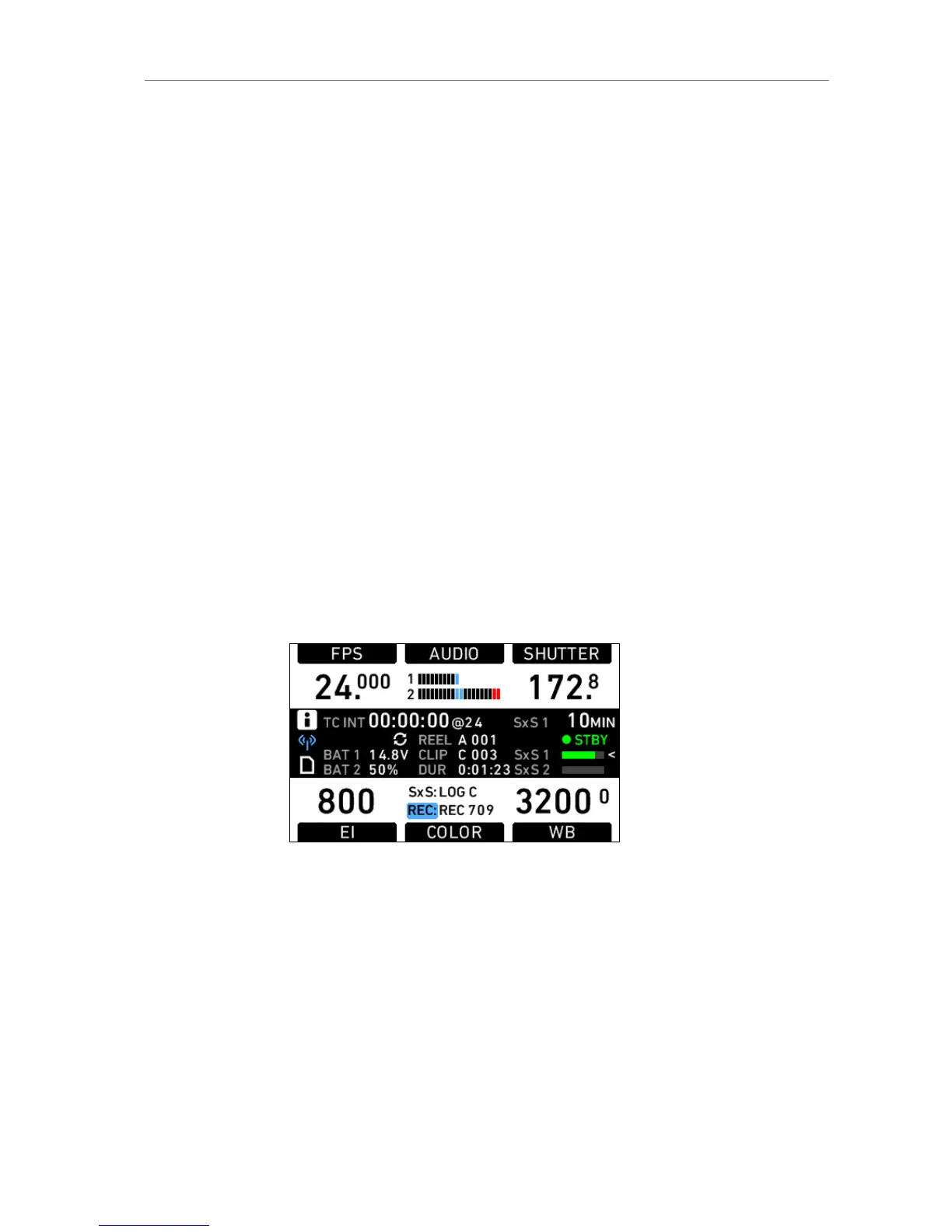
Figure 31: Homescreen
The HOMESCREEN is the default screen of the camera. It shows the most
important camera parameters and gives quick access to changing them
through the screen buttons. To return to the HOMESCREEN from anywhere
in the camera controls, press the HOME button.
While the Homescreen is active, the display brightness can be changed with
the jog wheel when the BACK button is pressed simultaneously.
Screen content
Screen Buttons











 To Next Page