88 Camera Controls
Set rect 1 Set the shape of rectangle 1. Activate it through User
rectangles.
Set rect 2 Set the shape of rectangle 2. Activate it through User
rectangles.
Note: Default frame lines have "User" specified as color for all content.
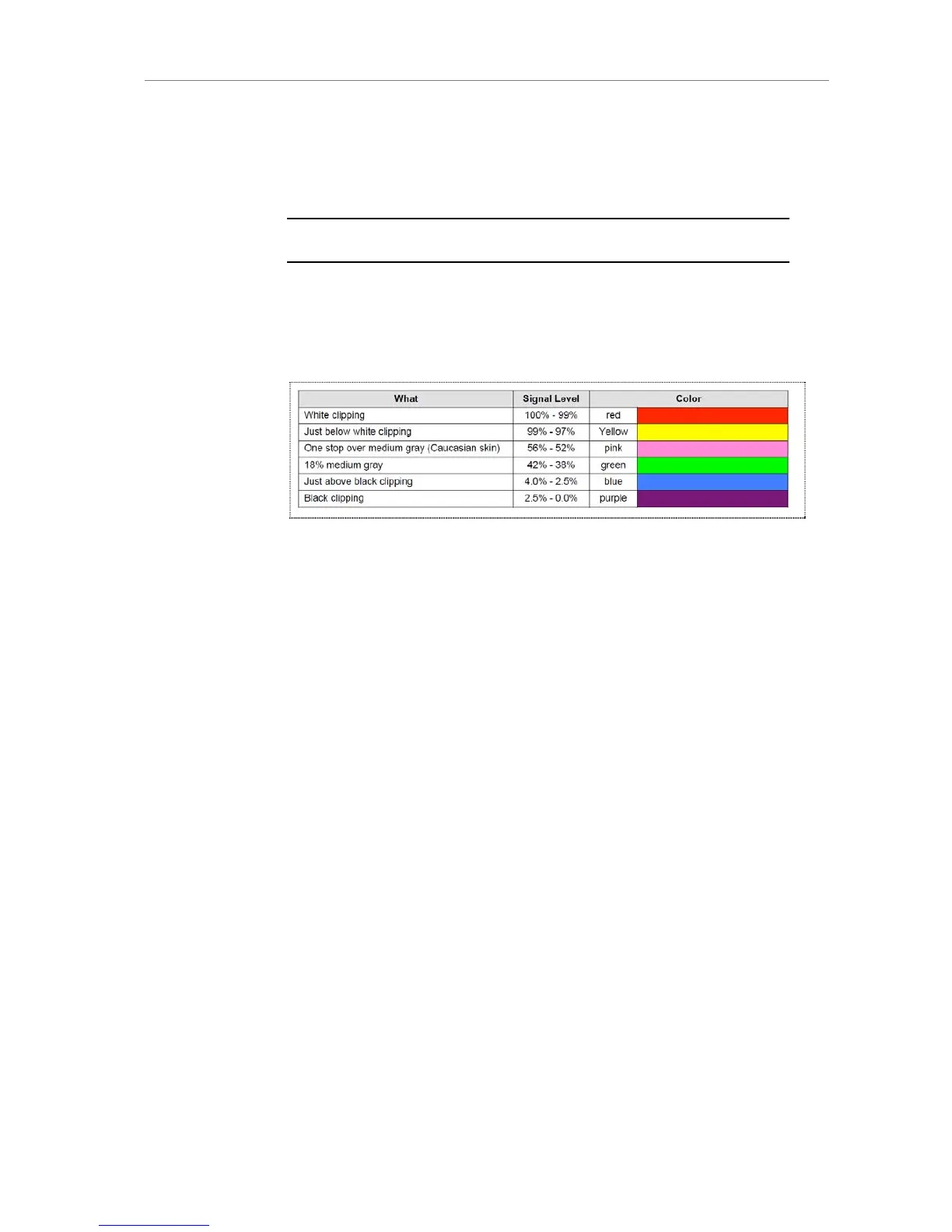
False Color Index
The false color index screens contains a visual reference for the false color
mode available for EVF and MON OUT. It shows which signal levels the
colors are related to.
Figure 65: False Color Encoding
11.1.5.3 Project
Project fps Sets the timebase of the time code, which determines
how many frames the time code counts per second.
Also sets the frame rate of Quicktime clips recorded
to SxS PRO cards during playback.
Camera index Identifies camera unit in clips. Influences clip names
on SxS PRO cards.
Next reel count Counter assigned to the next new card used for
recording. Automatically increased by the camera.
Influences clip names on SxS PRO cards.
Production info Redirects to a screen where the user can enter info
metadata regarding the production.











 To Next Page