4 - 24
Setting the load values
By default, the Hand-held allows you to set the load as a percentage of the Supply-on-Test
from 0% up to a maximum of 120%. The actual load applied is based on the Supply-on-Test
and load bank settings made on the Settings 1 and 2 Pages.
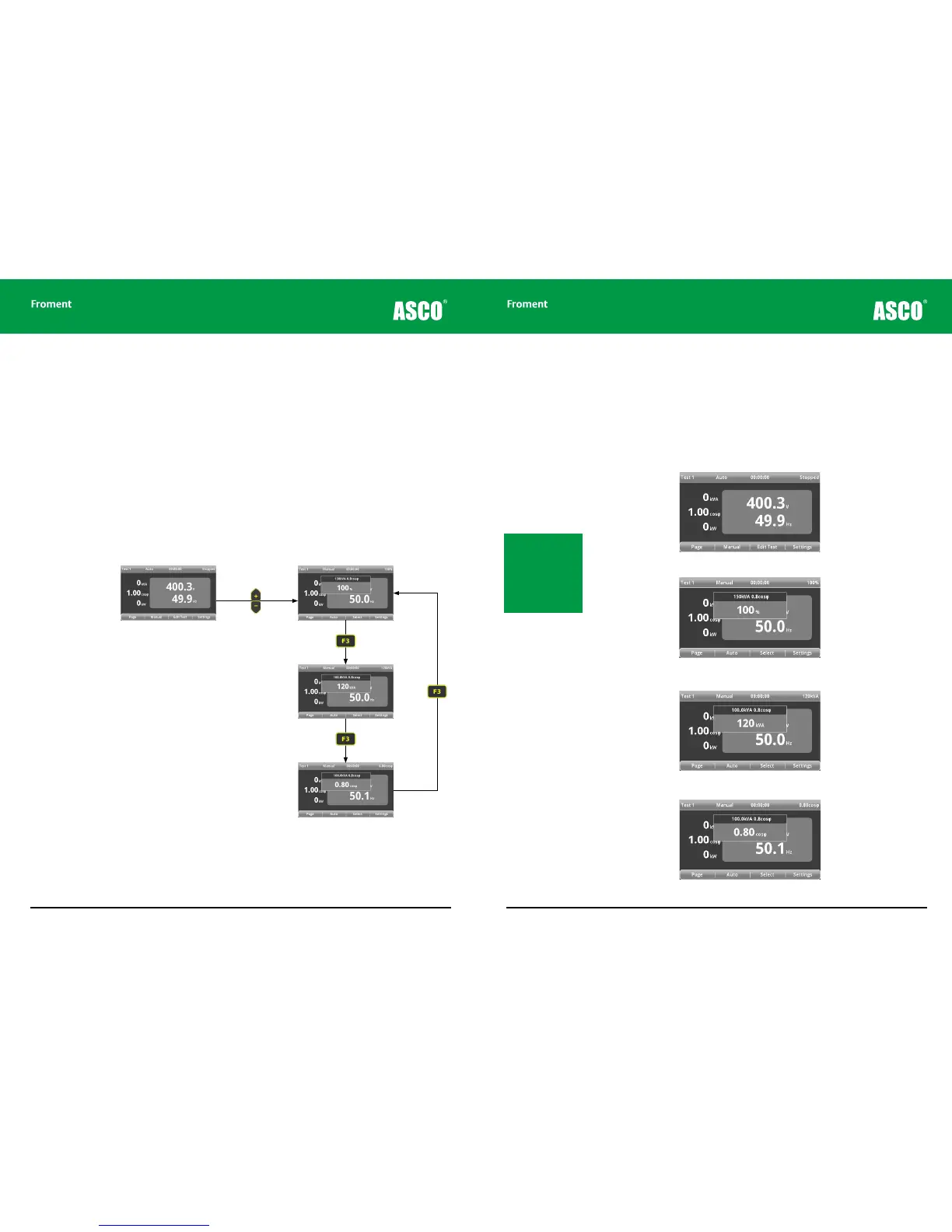
However, by pressing F3 (SELECT) you can choose between setting the load using kVA,
Power Factor or Percentage load values (If a resistive-only load bank is used, then the
selection will be percentage load and kW only).
Power factor can be set between 0.00 and 1.00 cos φ on the Hand-held (most generators
are rated at 0.8 cos φ). However, non-unity power factor values are dependant on the load
bank capacity and the supply size.
Figure 4-19 Setting load values for the manual test sequence
Use the + or - keys to set the
percentage of load to be applied.
Use the + or - keys to set the kVA
value of the load to be applied.
Use the + or - keys to set the power
factor of the load to be applied.
Hand-held Reference Guide
4 - 25
To set the load:
Begin by setting the value of the load that is to be applied by using the Hand-held’s + and -
keys. The load resolution is set according to the load bank size, and the minimum load step
(typically 1kW). The load resolution can be adjusted in the OPTIONS pages if you require
finer load steps.
1. On the Hand-held unit press F4 (TEST) from either of the Settings screens to get to
the Test 1 page.
2. Use the + and - keys to select the percentage size of the required load.
3. The pop up window will disappear after a few seconds, but the newly set value will be
shown at the top right of the status bar.
4. Press F3 (SELECT) and use the + and - keys to adjust the kVA value.
5. Press F3 (SELECT) and use the + and - keys to adjust the power factor value.
Note: The load select
pop-up appears when
either the +,- or F3 (SE-
LECT) key is pressed.
The supply settings
(kW or kVA, and power
factor) are displayed in
the pop-up header.
Chapter Four



 To Next Page