4 - 26
Applying the load
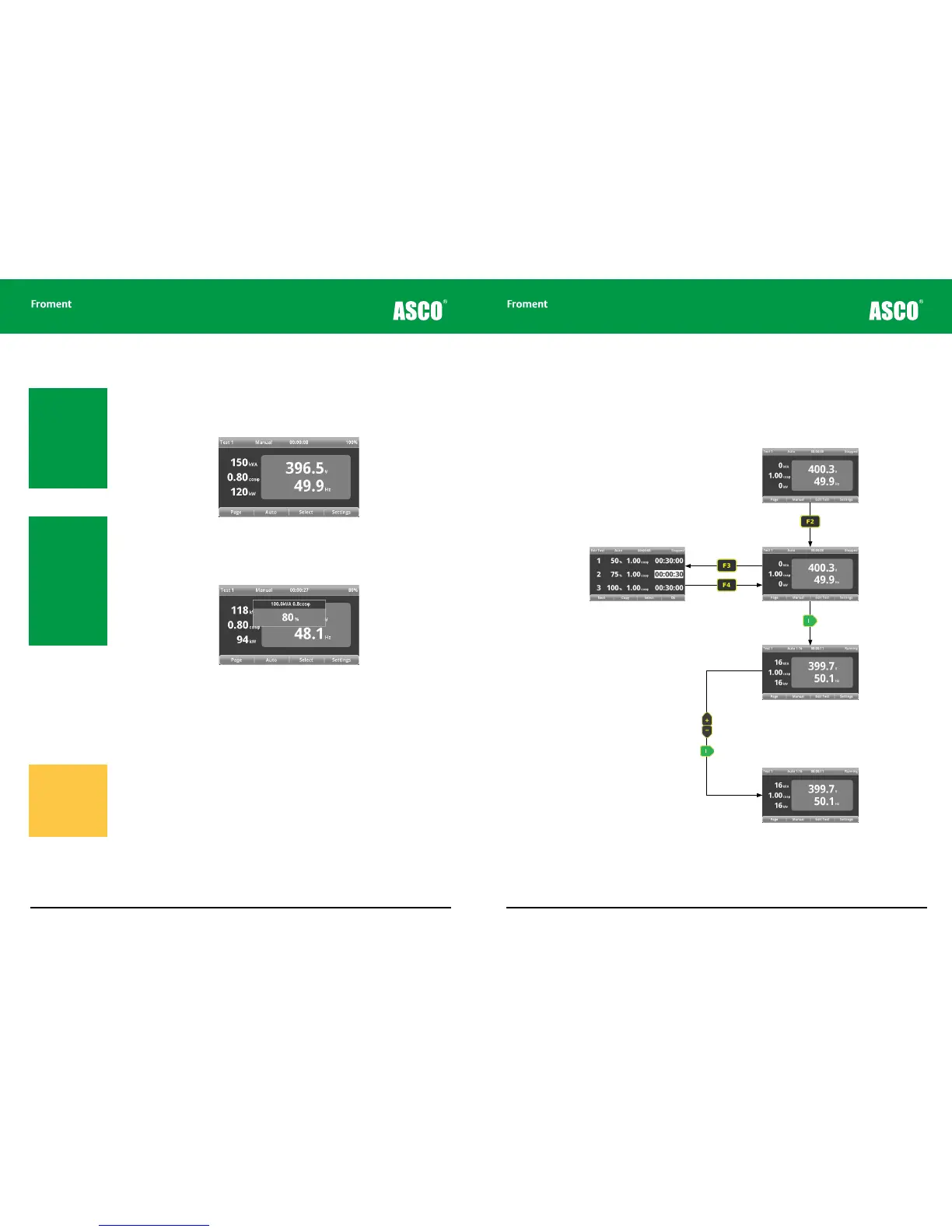
1. Press I to apply the load selected. The Hand-held will calculate the correct load to
apply and distribute this between all the connected load banks. The green LED on the
Hand-held will light to indicate that a load is applied and the instrumentation screen
will reflect the new load.
2. If the power values shown are not as anticipated, press I again to re-calculate and
apply a load correction.
3. You can adjust the value of the load applied as the test is running by using the + and
- keys.
4. The new value is shown in a popup window Press I to apply the new value.
5. Press F1 (PAGE) to sequence through the dierent instrumentation pages as the test
proceeds (page 4 - 18).
Rejecting the load
Press O to reject the load and start the fan delay. The load bank should be allowed to run
on for a few minutes until the fan delay has completed. This will allow the equipment to
cool.
If the Ramp Down on Reject function is enabled (see page 4 - 16) the load will ramp down
for 12 seconds before the fan delay starts. The Hand-held’s LED will flash to indicate this.
Press O a second time to reject the load immediately.
Note: If load correction
is turned on, then the
load applied will be
adjusted for voltage
droop. If contactor delay
is turned on then the
contactor timing will be
synchronised such that
all contactors will con-
nect simultaneously.
Note: The fan(s) can
be started without any
load being applied by
selecting zero load and
pressing I. This can be
a useful feature if you
are using the Supply-
on-Test to power the
load bank - the fans can
be started without any
transients created dur-
ing the startup having
any eect on the test.
Warning! Ensure the
Supply-on-Test is fully
isolated and protect-
ed before starting to
remove the power
cables from the terminal
compartment.
Hand-held Reference Guide
4 - 27
Automatic Test Mode
The Hand-held’s automatic load control function will allow you to set up a pre-programmed
sequence of up to 16 dierent loads of up to 99 hours duration. Once configured the test
sequence can then be repeated as often as is required. This is useful for transient testing,
fault finding or any other situation where a precisely controlled repeated test sequence is
required.
Figure 4-20 The Hand-held automatic test sequence
Press F2 (AUTO) to select
automatic testing mode.
Press I to apply the load
and start the automatic test
sequence.
When the test is running, use the
+ and - keys to adjust the load.
Press I to apply the
new load.
If necessary, press O to
remove the load before the
end of the automatic test
sequence.
Use F3 (SELECT) and the + or - keys to
edit values.
F1 (NEXT) moves to the next stage of the
sequence.
F2 (COPY) copies the current value to the
next stage.
Press F4 to return to the Test page.
Chapter Four



 To Next Page