CHAPTER 4 REFERENCE GUIDE
EFD1000 PRO MAX PFD Pilot’s Guide
Page 4-85
091-00005-002 ()
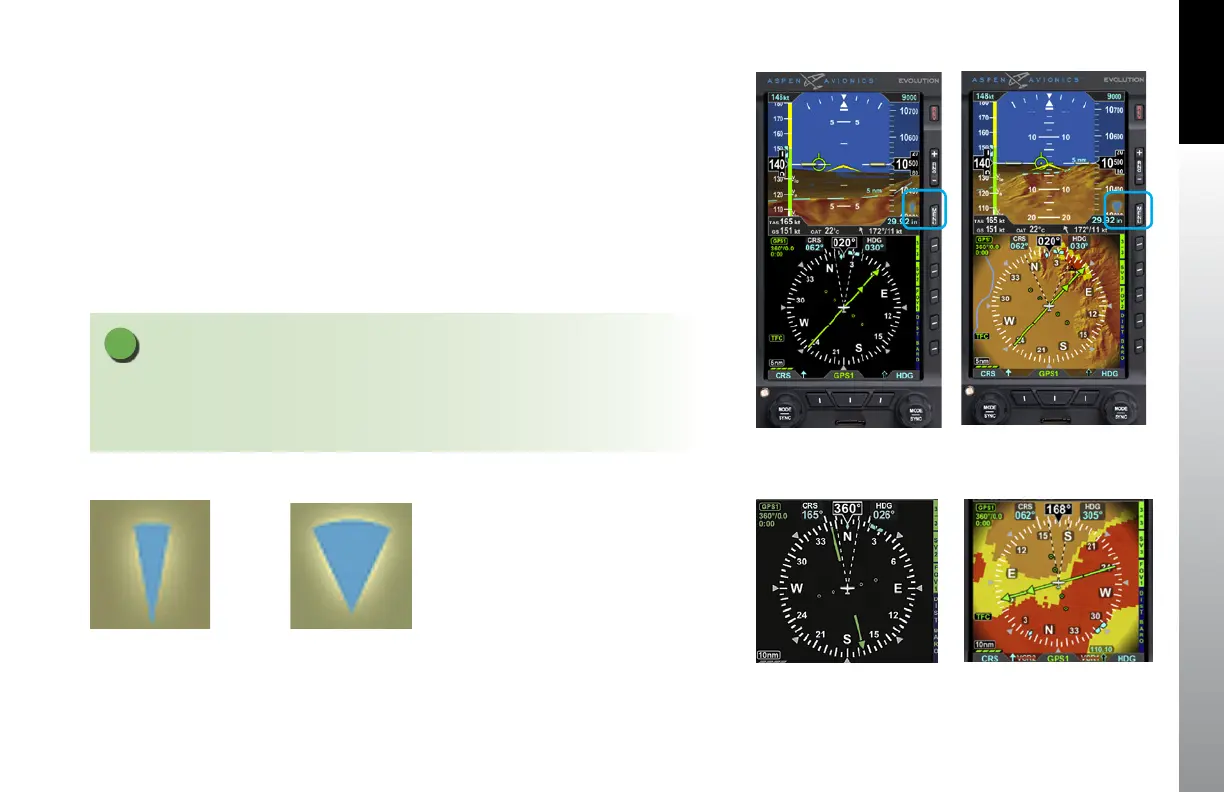
Figure 4-128
Narrow Field of View (FOV1)
Figure 4-132
Narrow Horizon FOV
Figure 4-130
Narrow FOV Icon
Figure 4-131
Wide FOV Icon
Figure 4-129
Narrow Field of View (FOV2)
Figure 4-133
Wide Horizon FOV
4.10.5 Field of View
ESV can be presented in a Narrow Field of View or in a Wide Field of View by pressing
the FOV1 (Narrow Field of View) or FOV2 (Wide Field of View) Hot Key. A quick glance at
the FOV Icon (Figure 4-130 and Figure 4-131) presented at the bottom right corner of
all Synthetic Vision VIEWs indicates which field of view is currently displayed.
The FOV Icon correlates with the two-dashed lines radiating from the center of the
ownship symbol on the Nav Display, indicating if a narrow horizontal field of view
(Figure 4-132) or a wide horizontal field of view has been selected (Figure 4-133).
NOTE
The ends of the dashed lines do not imply a Synthetic Vision range limit. The range limit
presented for the Synthetic Vision horizon is always 40 nautical miles.



 To Next Page