CHAPTER 4 REFERENCE GUIDE
EFD1000 PRO MAX PFD Pilot’s Guide
Page 4-92
091-00005-002 ()
4.10.6.4 Pop-up TERR Warnings
Unless inhibited, TWS operates in the background even when Synthetic Vision is not
selected. If a caution or warning is generated (non-TAWS aircraft) the conflict can be
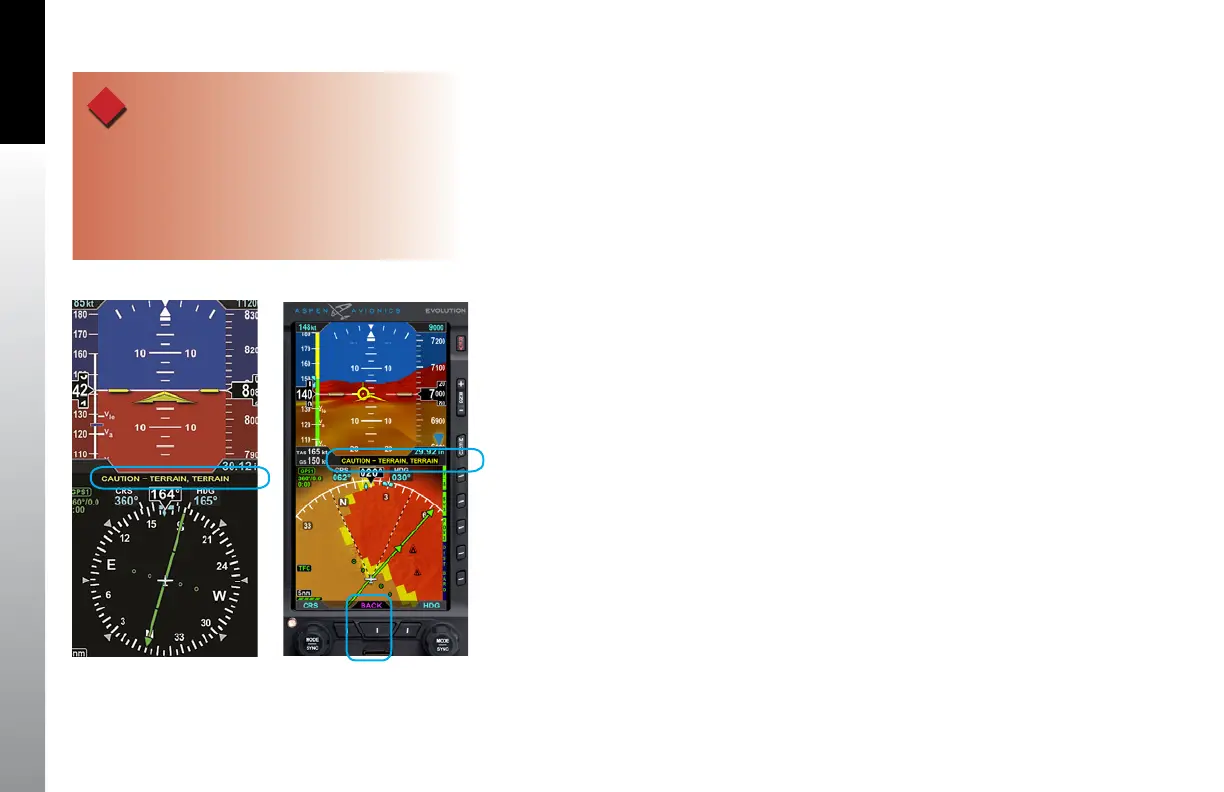
instantly displayed by pressing the Lower Middle button labeled TERR (Figure 4-147
and Figure 4-148).
When a terrain alert occurs with Synthetic Vision not displayed on the PFD, pressing
the Lower Middle button will switch the display to SV3 for situational awareness. SV3
automatically presents the ARC mode with a 5nm range set on the HSI. After selection,
the Lower Middle button changes to BACK (Figure 4-148) to enable the pilot to quickly
return to the previous display.
If the BACK button is not pressed, the BACK label will be removed after 30 seconds and
the SV3 display remains. Press the SV3 Hot Key to return to the previous display.
4.10.6.5 Airport Area Operation
When on approach to a runway, the terrain coloring is reduced. Only obstacles over
200 feet AGL, and terrain higher than 100 feet above the runway elevation will elicit a
caution or warning indication. The terrain 100 feet above the aircraft will be red-colored.
A white Flight Path Marker indicates that the system is operating within the airport
environment where reduced terrain colorization and alerting is used. (TWS is operating
at the in-range warning level).
On takeoff, the Flight Path Marker appears at 40 knots and is white in color until leaving
the immediate runway vicinity or at 300 feet AGL.
What this means is under normal circumstances there should not be a terrain
or obstacle conflict. In abnormal circumstances, cautions and warnings can be
very helpful.
WARNING
Accurate terrain information is predicated on the correct
barometric pressure. Always ensure that you have
accurate and timely barometric pressure information
otherwise the terrain and obstacle elevation data
could be erroneous.
Figure 4-147
Terrain Alert, Synthetic Vision
Not Selected
Figure 4-148
Terrain Alert, Synthetic Vision VIEW



 To Next Page