CHAPTER 4 REFERENCE GUIDE
EFD1000 VFR PFD Pilot’s Guide
Page 4-19
091-00028-001 ( )
4.2.3.6. Altitude Display
In some congurations, such as a stand-alone PFD, the altitude tape can be turned o,
at the pilot’s discretion, to facilitate screen declutter. Both Airspeed and Altitude tapes
are aected by this action.
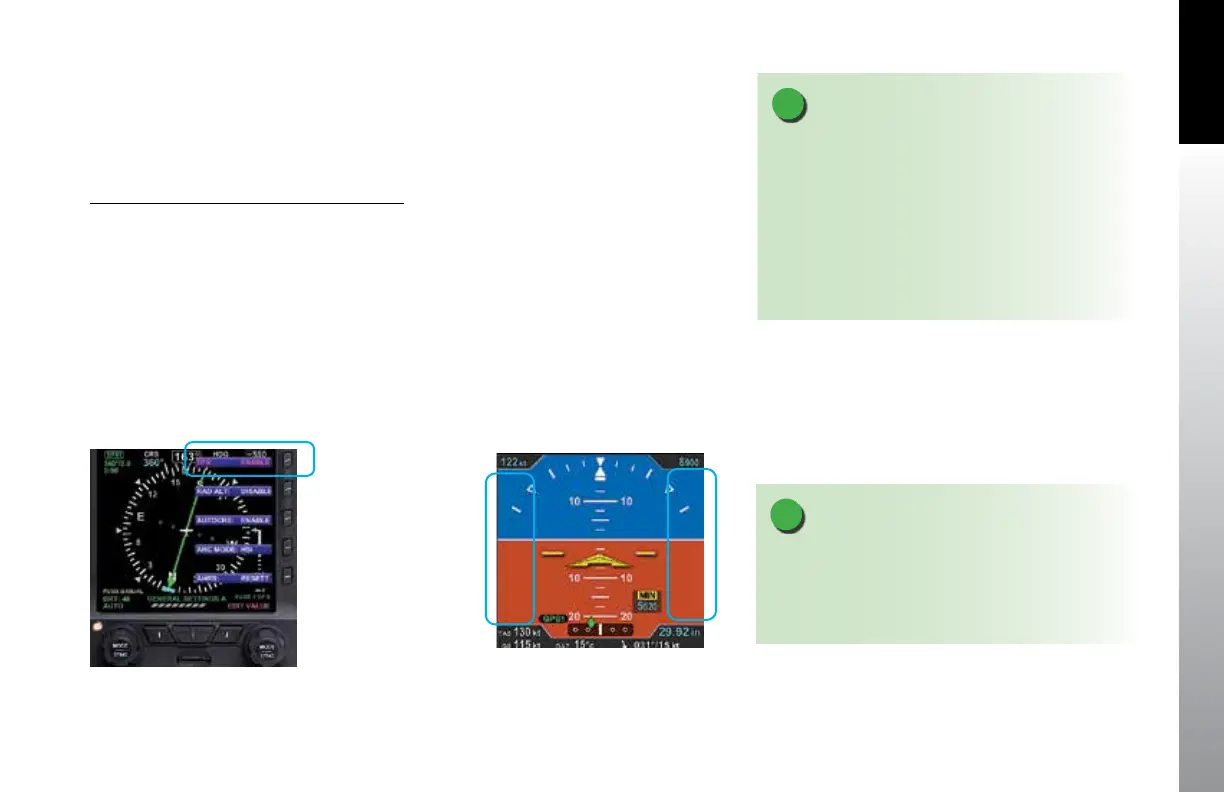
Hide/Display Airspeed and Altitude Tape
1. Press the MENU Button.
2. Rotate the Right Knob counterclockwise until GENERAL SETTINGS A page
displays (Figure 4-34).
3. Press the TPS Menu Key.
The Menu label turns magenta, and the EDIT VALUE label displays above the Right
Knob.
4. Rotate the Right Knob to the desired value, ENABLE (On) or DISABLE (O )
(Figure 4-35).
5. Press the MENU Button to exit.
NOTE
When the Altitude tape is disabled, the numerical
display of the selected altitude remain on. However, an
installer can disable and remove the Selected Altitude
Fields, and Markers from the display.
NOTE
A typical PFD only installation sets the tapes display
to UNLOCKED, allowing the pilot to display or hide
the Airspeed and Altitude tapes as desired. If the
Airspeed and Altitude Tapes were LOCKED ON during
installation, such as the case with a PFD and MFD
conguration, then the tapes must remain on. If the
Airspeed and Altitude Tapes were LOCKED OFF during
installation, the tapes will not display.
Figure 4-34
Editing Airspeed and Altitude Tape Display
Figure 4-35
Airspeed and Altitude Tape Disabled



 To Next Page