CHAPTER 2 CONTROLS AND DISPLAY
EFD1000 VFR PFD Pilot’s Guide
Page 2-17
091-00028-001 ( )
2.2.4.2. Display Lighting
When the MENU button is pressed and the Menu is active, the Left Knob can be used to
adjust the PFD display brightness.
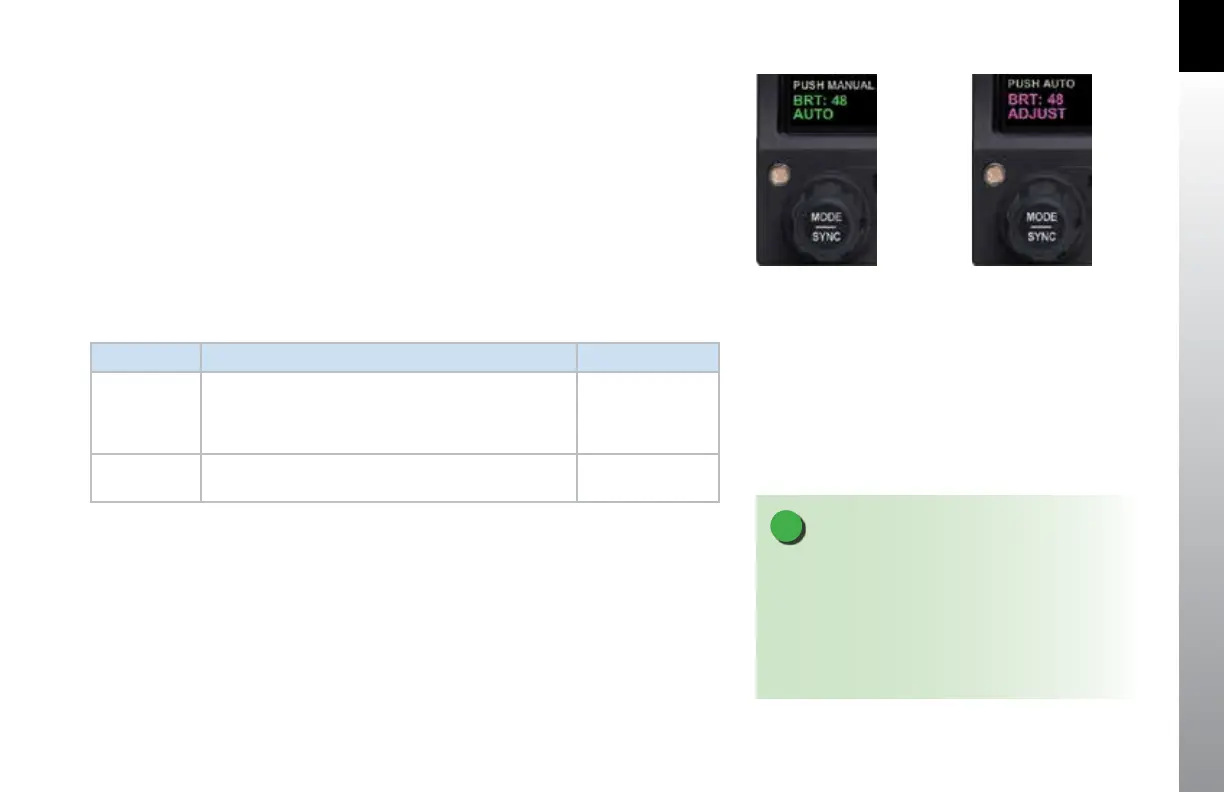
By default, the LCD brightness operates in AUTO mode, and is adjusted based on
photocell sensing of ambient lighting conditions. When the MENU is active and the
LCD is in the BRT AUTO mode, the word, “AUTO”, and a brightness level of 1-100 will be
displayed in green above the Left Knob (Figure 2-24).
To override the AUTO brightness setting, press the Left Knob once to switch to the BRT
ADJUST mode, and then rotate the Left Knob to set the brightness to the desired level
(Figure 2-25). To return to AUTO brightness control, press the Left Knob again.
LCD MODE DESCRIPTION DISPLAY
Automatic
BRT AUTO
LCD backlight intensity is automatically adjusted based
on the ambient lighting conditions sensed by the
Automatic Dimming Photocell. The maximum intensity
in AUTO mode is 70%.
Figure 2-24
Manual
BRT ADJUST
Allows the pilot to adjust the PFD display brightness
from 1-100%
Figure 2-25
Table 2-5
Brightness Control
Figure 2-24
Display Brightness in BRT AUTO Mode
Figure 2-25
Display Brightness in BRT ADJUST Mode
NOTE
The BRT AUTO display brightness level is determined
by the amount of light detected by the photocell on
the front of the PFD. If a light is used to illuminate the
instrument panel, the photocell will respond, resulting
in a bright display. When this happens, use the manual
BRT ADJUST mode to reduce the brightness.



 To Next Page