CHAPTER 4 REFERENCE GUIDE
EFD1000 VFR PFD Pilot’s Guide
Page 4-59
091-00028-001 ( )
4.8.3.1. Trac Symbols
1
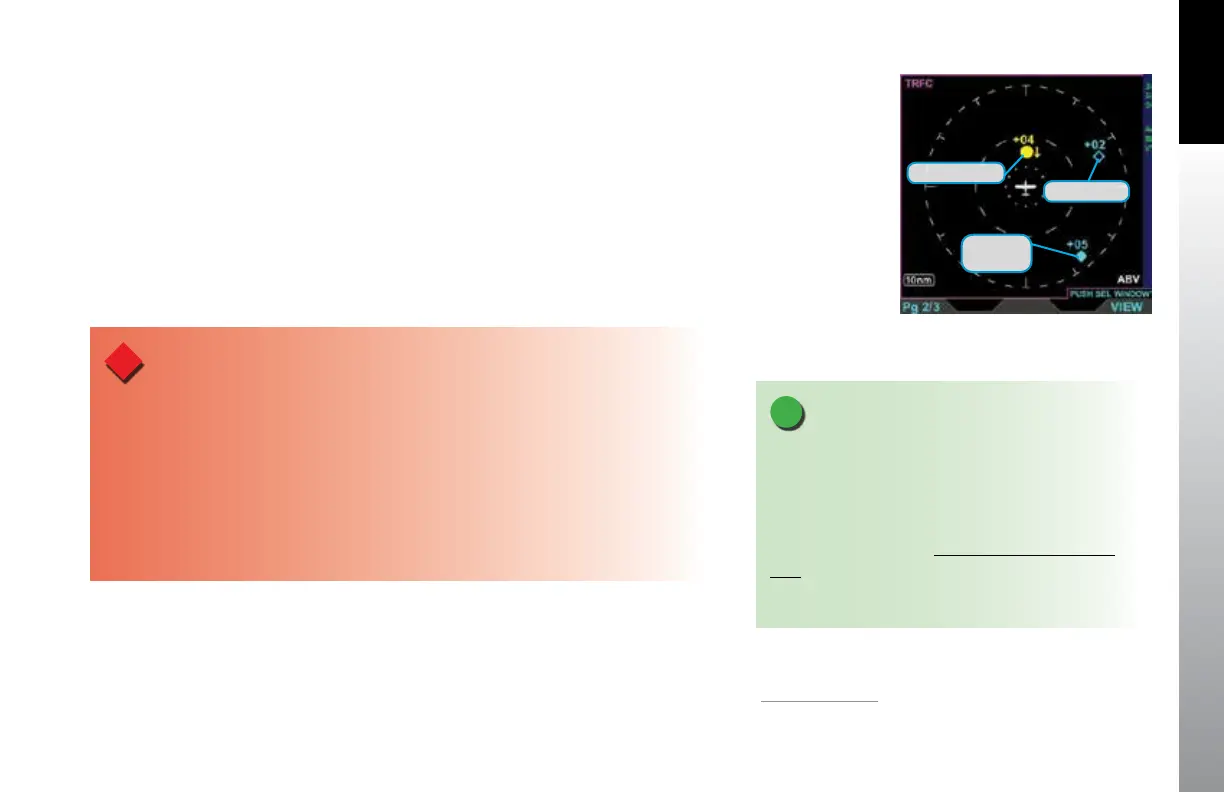
The PFD will display trac symbols prioritized in the order received from the
congured trac sensor. The PFD includes three threat levels using TCAS symbology;
Trac Advisory (amber circle), Proximity Advisory (cyan diamond), and Other Trac
(hollow cyan diamond). All trac symbols within the current display range and the
selected altitude lter are shown relative to the Ownship Symbol (Figure 4-128).
The Trac Advisory System (TAS) use an airborne interrogator with a half-second
update rate; coverage follows the aircraft. The Trac Information Service (TIS) system
use a GTX 330 transponder with a ve-second update rate; coverage is limited to
specic areas listed in the Aeronautical Information Manual(AIM).
WARNING
Do not rely on the PFD as the sole source of data for collision avoidance. It is the pilot’s
responsibility to visually acquire other aircraft for safe ight. Maneuver your aircraft based
only on ATC guidance or positive acquisition of conicting trac. Trac information is:
• Provided as a proximity warning only
• Intended to assist the pilot in the visual acquisition of other aircraft
• Not intended to provide recommended avoidance maneuvers
• Not provided for aircraft that are not transponder equipped, experiencing a
transponder failure, or out of radar coverage
Figure 4-128
Trac Symbology
NOTE
Refer to your trac sensor’s Pilot Guide for detailed
information about the sensor limitations and
operational ranges.
Additionally, see the Aeronautical Information
Manual section entitled Trac Information Service
(TIS) for detailed information about TIS requirements,
capabilities and limitations..
Trac Advisory
Proximity
Advisory
Other Trac
1.
VFR / Pro PFD option



 To Next Page