CHAPTER 2 CONTROLS AND DISPLAY
EFD1000 VFR PFD Pilot’s Guide
Page 2-8
091-00028-001 ( )
2.2.1.4. Using the Knobs (Example)
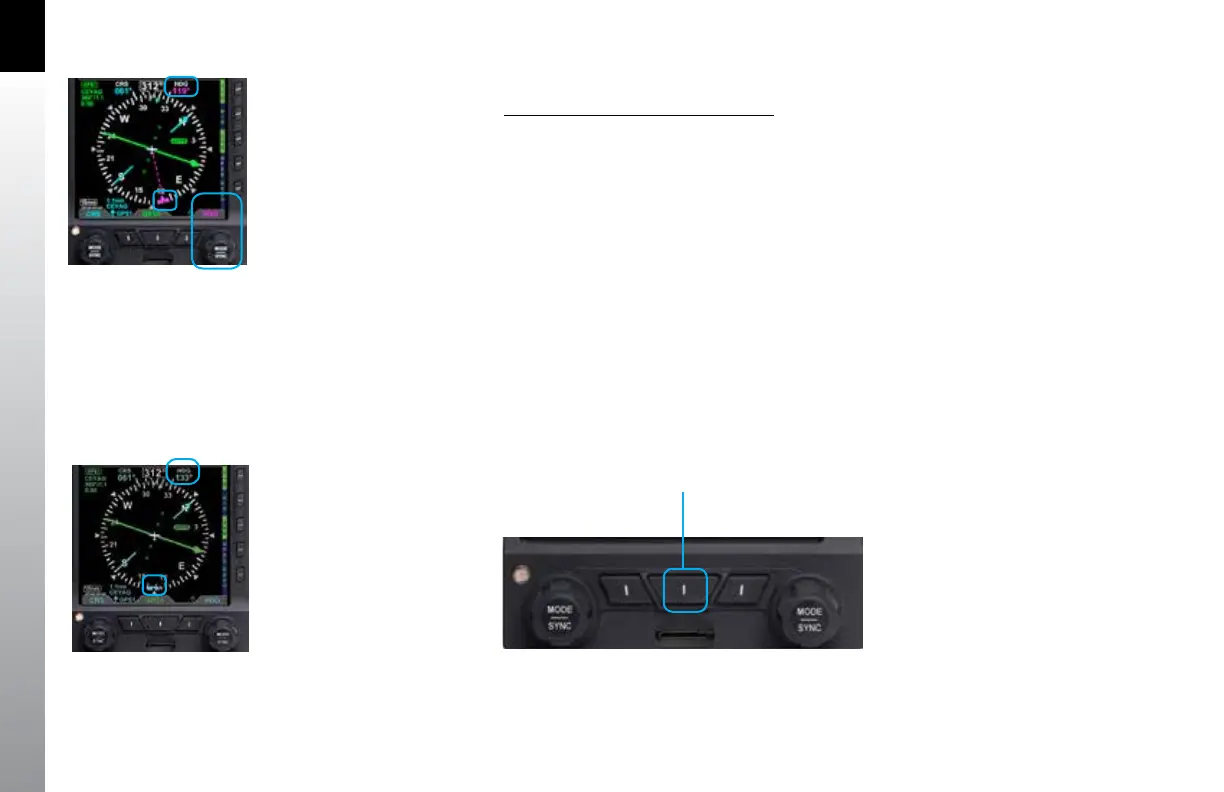
How to Set the Heading Bug (HDG)
1. Rotate the Right Knob to the desired heading value, shown both by the
position of the Heading Bug and the numeric value in the Selected Heading
Field (Figure 2-5). The HDG label, Heading Bug and the Selected Heading
Field appears in magenta
2. After 10 seconds of inactivity, the knob defaults to HDG. The HDG label,
Heading Bug and Selected Heading Field value will appear in cyan (Figure
2-6).
2.2.2. Navigation Source Select Buttons
The center button on the bottom of the PFD (Figure 2-7) allow the pilot to select the
navigation source for the CDI (see Section 4.4.5. CDI Navigation Source for more
detailed information).
Figure 2-5
Editing the HDG eld
Figure 2-6
HDG eld updated and inactive
Figure 2-7
CDI Source Select Buttons
CDI Nav
Source



 To Next Page