CHAPTER 4 REFERENCE GUIDE
EFD1000 VFR PFD Pilot’s Guide
Page 4-39
091-00028-001 ( )
4.4.12.1. Basemap Declutter and Range
To turn the Basemap on or o, the pilot selects one of the declutter levels as described
in Section 5.2. The default map declutter level is Level 4. The map range corresponds
to the outside radius of the compass scale, 2, 3, 5, 10, 15, 20, 30, 40, 60, 80, 100, or 200
nautical miles from the aircraft Ownship Symbol. The default range is 15nm. Both the
map declutter level and range are pilot-adjustable.
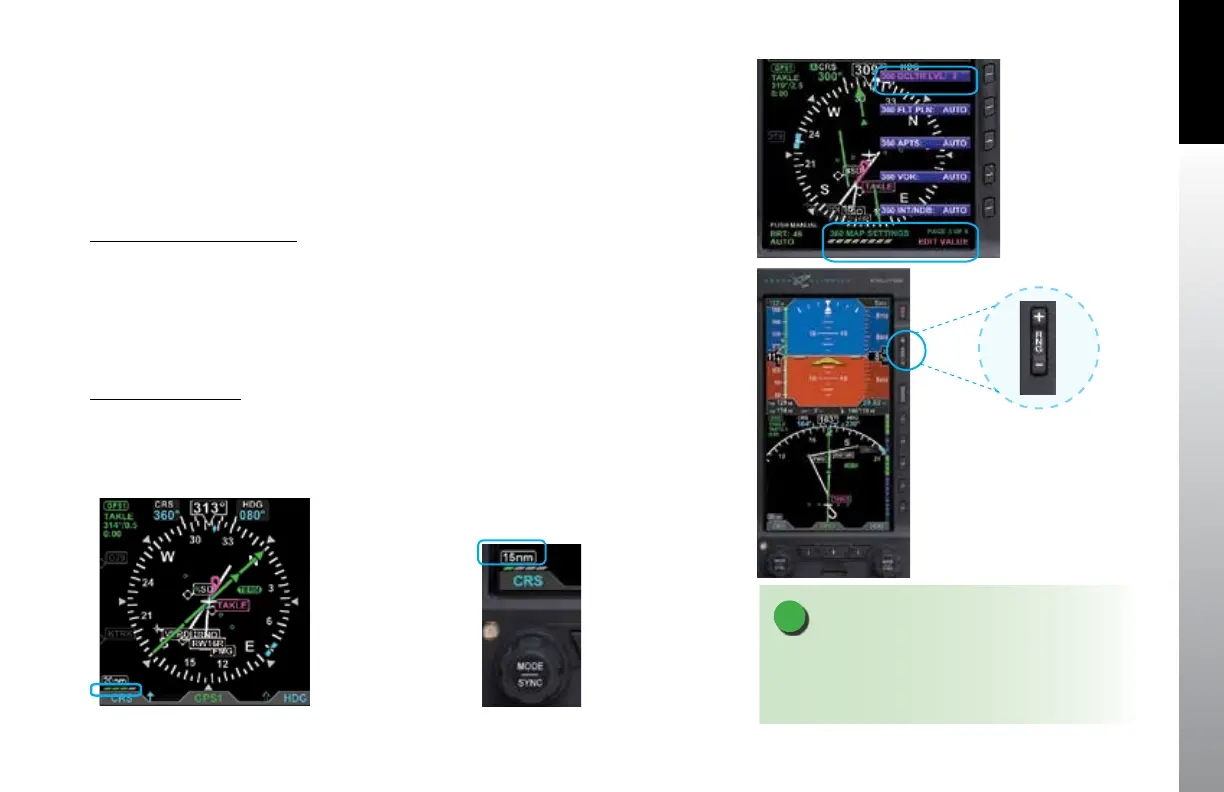
Select Map Declutter Level
1. Press the MENU Button and rotate the Right Knob to MAP SETTINGS page.
2. Press the DCLTR LVL Menu Key (Figure 4-91) and rotate the Right Knob to
select the desired map declutter level.
3. Press the MENU Button to exit.
The new Basemap display level appears above the Left Knob (Figure 4-92).
Change Map Range
1. Press the Range Up (RNG +) or the Range Down (RNG -) Button (Figure 4-93).
until the desired range is displayed (Figure 4-94).
NOTE
When connected to a GPS that does not provide
compatible Basemap data, only OFF and FP ONLY
declutter levels are available.
Figure 4-93
Basemap Range Buttons
Figure 4-91
MAP Hot Key
Figure 4-94
New Basemap Range
Figure 4-92
New Basemap Display Level



 To Next Page