CHAPTER 3 FLYING THE EFD1000 PRO PFD
EFD1000 VFR PFD Pilot’s Guide
Page 3-16
091-00028-001 ( ) EFD1000 VFR PFD Pilot’s Guide
Page 3-17
091-00028-001 ( )
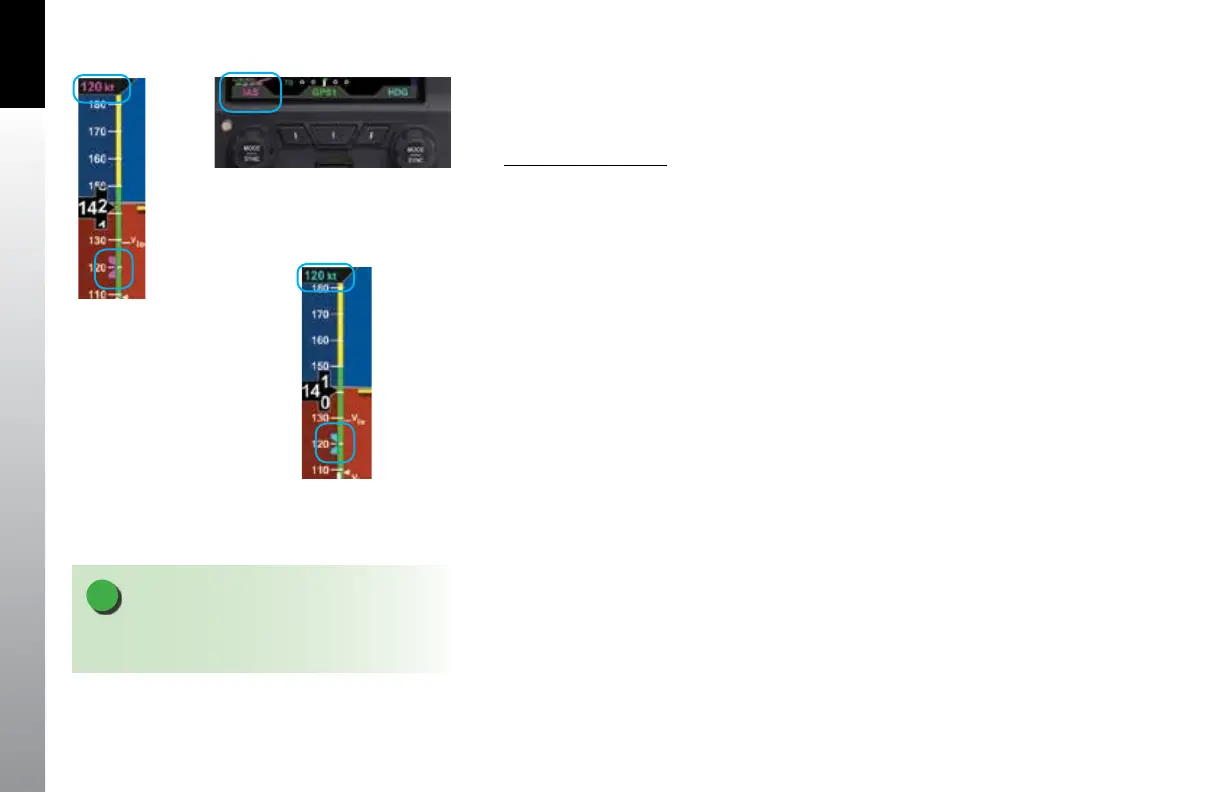
Our normal climb speed is 120 KIAS, so we set the Airspeed Bug as a reminder. To do so,
we press the Left Knob twice, until it shows IAS in magenta above the knob. Then turn
the knob until 120 shows in the Selected Airspeed Field.
Set the Airspeed Bug
1. Press the Left Knob until IAS displays above the Left Knob and the Selected
Airspeed eld and bug are enabled for editing, all three rendered in magenta
(Figures 3-23 and 3-24).
2. Rotate the Left Knob to change the value of the Selected Airspeed eld.
Rotate clockwise to increase, or counterclockwise to decrease, the value.
3. Once the correct value is selected, and after 10 seconds of inaction, the eld
is disabled, and the label and eld are rendered in cyan (Figure 3-25).
We plan to hand-y the plane until reaching our nal enroute altitude of 10,000 feet,
(Figure 3-26). So, as part of our Before Takeo set-up, we press the FD button on the
autopilot mode selector, and the magenta V-bars display on the PFD. As an easy way to
give us guidance on the takeo, we press the Go Around button. This commands wings
level and about a 10º pitch-up attitude, which works well for our initial climb.
Now our avionics are all set, so we taxi out to the runway, do our run-up, and call tower,
ready for departure. As we taxi into position and hold on Runway 8, we verify that our
PFD compass shows 080º, lined-up with our pre-set Heading Bug. As tower clears us for
takeo, it tells us to wait until reaching the end of the runway, and then to turn left to
heading 250º. Rotate the Right Knob to set the Heading Bug to 250°.
Figure 3-23
Selected Airspeed Field Enabled
Figure 3-25
Selected Airspeed Field Disabled
Figure 3-24
Selected Airspeed Field Enabled
NOTE
Synchronizing the airspeed sets the selected airspeed to
the current airspeed (see Chapter 2, Section 2.2.1.3.)



 To Next Page