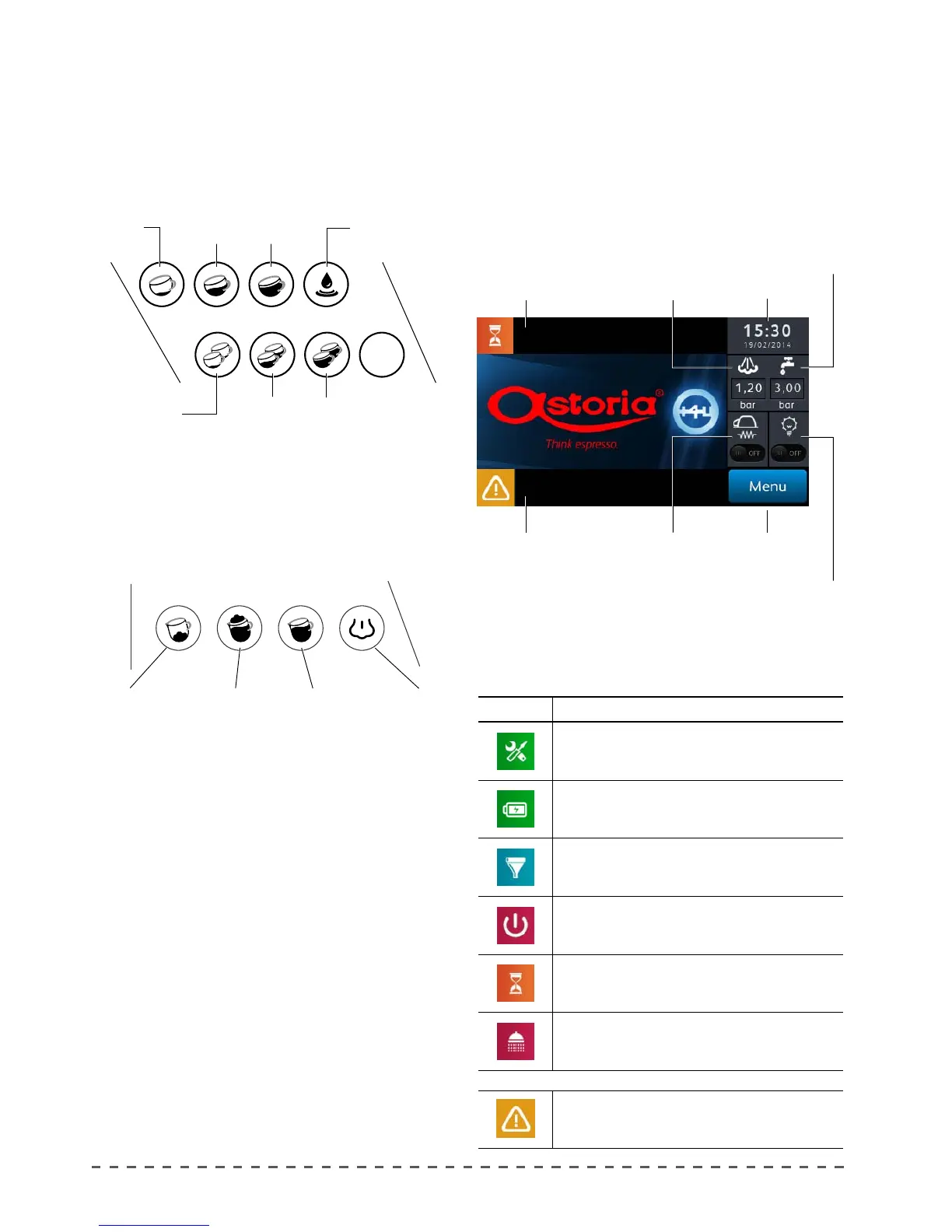
1.3 Push-buttons panels
Push-button panel for coee and tea selections.
The push button panel is connected to the electronic
control unit, and allows selection and programming of
the doses of coee and tea.
Autosteamer push-button panel.
the autosteamer push-button is connected to the
electronic unit, and allows selection and programming
of the milk-based bevarages.
1.4 Touch screen display.
All programming operations of the machine are made
using the touchscreen display as described in the chapter
"Programming".
The gure below provides a description of the "Idle"
screen.
Prog
Stop
1 Espresso
coee
2 Espresso
coee
1 Long
coee
2 Long
coees
1 Medium
coee
2 Medium
coees
Short
autosteamer
dose.
Large
autosteamer
dose
Automatic
heating
Manual
steam
Tea
Stop / Pro-
gramming /
Continuous
Boiler
pressure
Service
messages area Time / Date
Hydraulic
circuit
pressure
Work surface
led button
Programming
menu button
Cup heater
start button/
light
Alarm
messages area
Reports an error or a machine failure (see text on the
screen).
LIGHT DESCRIPTION
Periodic maintenance required warning.
One or more delivery groups are in stand-by.
It warns that there is the need to perform the regenera-
tion of the resins of the water softener device.
The machine is OFF
Machine warming up
It warns that there is the need to wash the dispensin
units.
Alarms and display indications










 To Next Page