15.3 Grinders wear alert programming
With this function, the machine displays an alert
relative to grinders wear and replacement, according to
the kg of coee used.
• Press "Counters" (see previous chapter); after a short
time the main screen appears.
• Scroll through the screens with the ar-
rows () or (), until you see the screen
below:
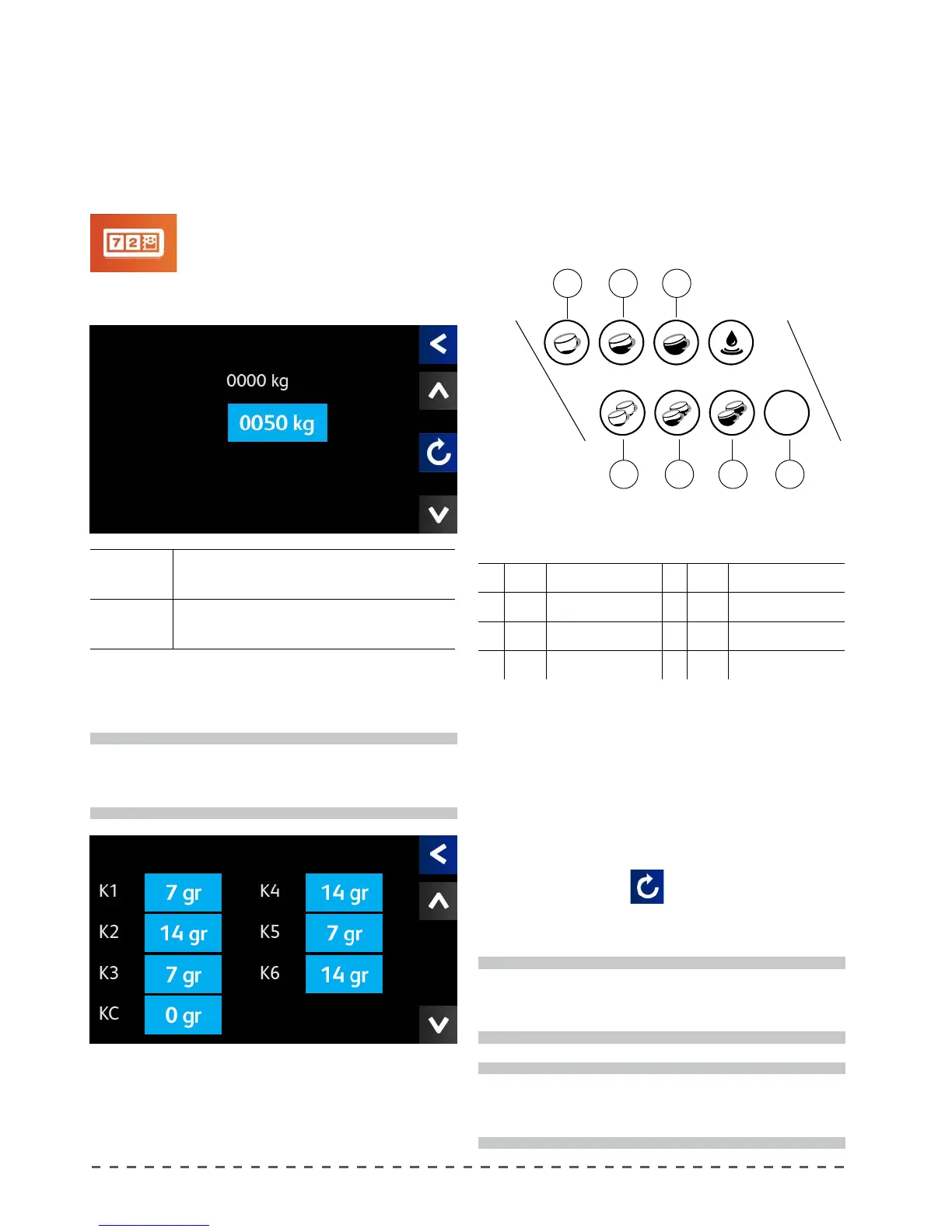
Counters
Grinded Total weight in kg of coee used since the last reset.
Limit
Threshold to be reached in kg of coee, for signaling
grinders wear.
To change the amount in kg, press "Limit" and set the
desired value. The available range is: 0 ÷ 2000 kg.
After setting the threshold limit of coee in kg, you
must set each beverage button and give them the correct
weight of ground coee used.
Press () and move to the screen below.
i
By setting the threshold for "GRINDERS WEAR" to
0, the system will not display any alerts.
Example of setting:
k1 g.07 (Single espresso) k4 g.14 (Medium double)
k2 g.14 (Double espresso) k5 g.07 (Single long)
k3 g.07 (Medium single) k6 g.14 (Double long)
kC g.07 (Continuous)
Upon reaching the amount of kilograms set as the
threshold, the system will display a message, reminding
the user to perform the replacement of the grinders of
the coee grinder.
Prog
Stop
k5
k6 kC
k3
k4
k1
k2
Key correspondence - displayed value.
Select the dose key "K1", and in the next screen, enter
the amount in grams of ground coee for the dose in
programming.
Repeat the previous step up to the setting of all the
dose keys.
The available range is: 0 ÷ 22 g.
After this operation, the counter will be incremented
by the dose set for each drink with every dispensing of
coee during use.
i
The system only works if the machine is paired with
only one grinder.
i
Setting one or more dose keys to 0, the count for
those keys will not be performed.
Reset
To reset the executed cycles counter proceed as
follows:
• move to the "Grinders Wear" screen;
• press the reset key (
);
• in the next screen answer "Yes";
• the ground coee kg count will restart from 0.
Wear ABD Blades
Grinded
Limit
Counters










 To Next Page