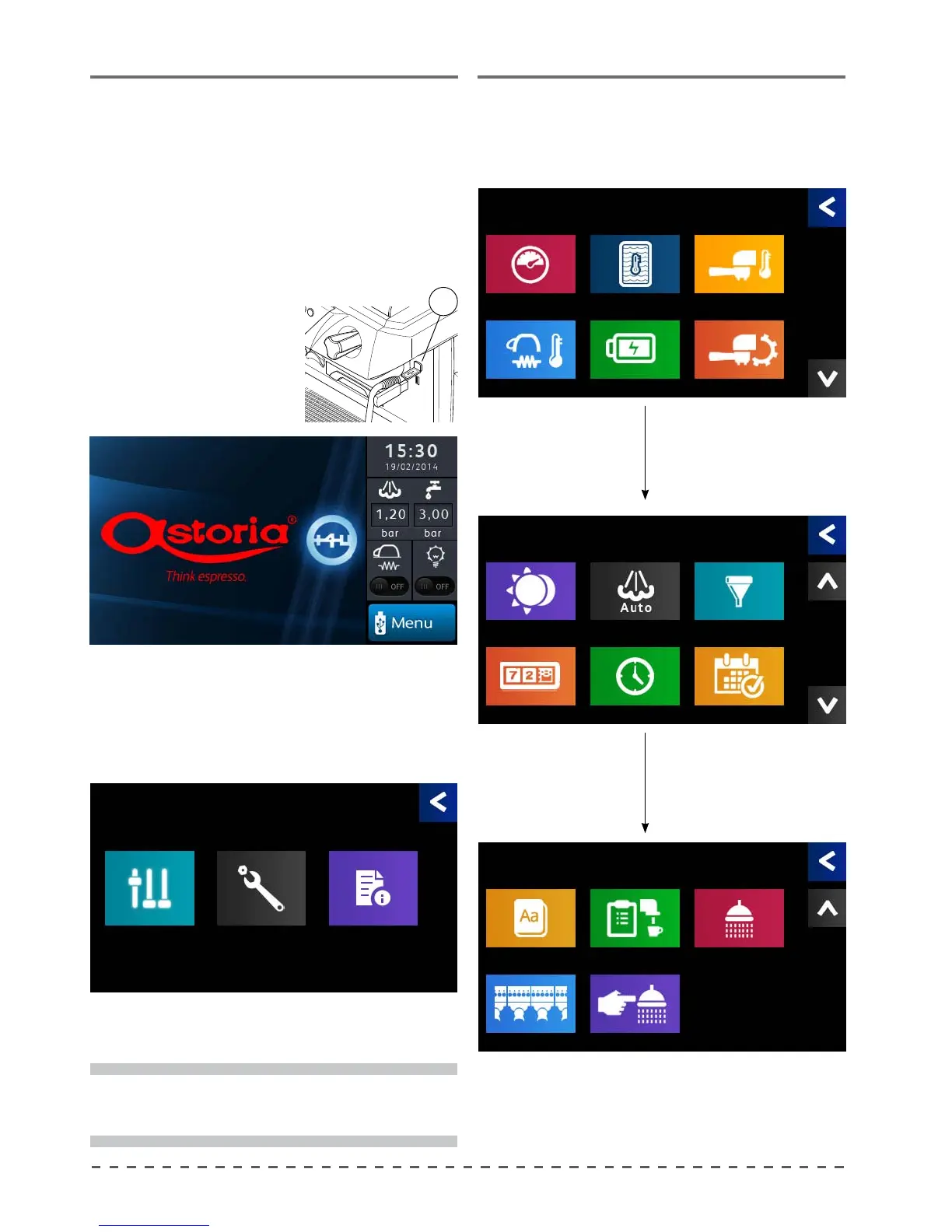
11 Programming
This paragraph deals with the programming menu
that allows the user to program the various functions
of the machine.
It also explains how to reset the machine by reloading
the default manufacturer's data to the memory.
To access machine programming, proceed as follows:
• insert the USB drive in the program reader (7), the
browser key will light up:
12 Parameters Menu
From the main menu, pressing the "Parameters"
button, gives access to the screens below.
7
• you can now access the programming menu.
Pressing the "Menu" button displays the main
programming menu.
All the machine programming operations carried out
using the touchscreen display.
page 1
page 2
page 3
i
To exit the menu, or return to the previous screen
press (
<).
Menu
Parameters Settings Info
Parameters
Language
Num. of groups
Delivery control
Force washing
Group washing
Parameters
Stand-by mode
Counters
Autosteamer
Clock Setup
Filter maintenance
Working days
Parameters
Boiler pressure
Cup heater temp.
Coee water temp.
Energy Saving
Groups temp.
Working Mode










 To Next Page