7 Preparation of beverages
7.1 Programming the coee doses
To program the dose keys, proceed as follows:
• press and hold the “PROG/STOP” key down for 5
seconds: the “PROG/STOP” key will ash and all keys
on the push-button panel being programmed will
turn on;
• ll the lter with a dose of ground coee and press it
with the coee press;
• attach the lter holder to the delivery group;
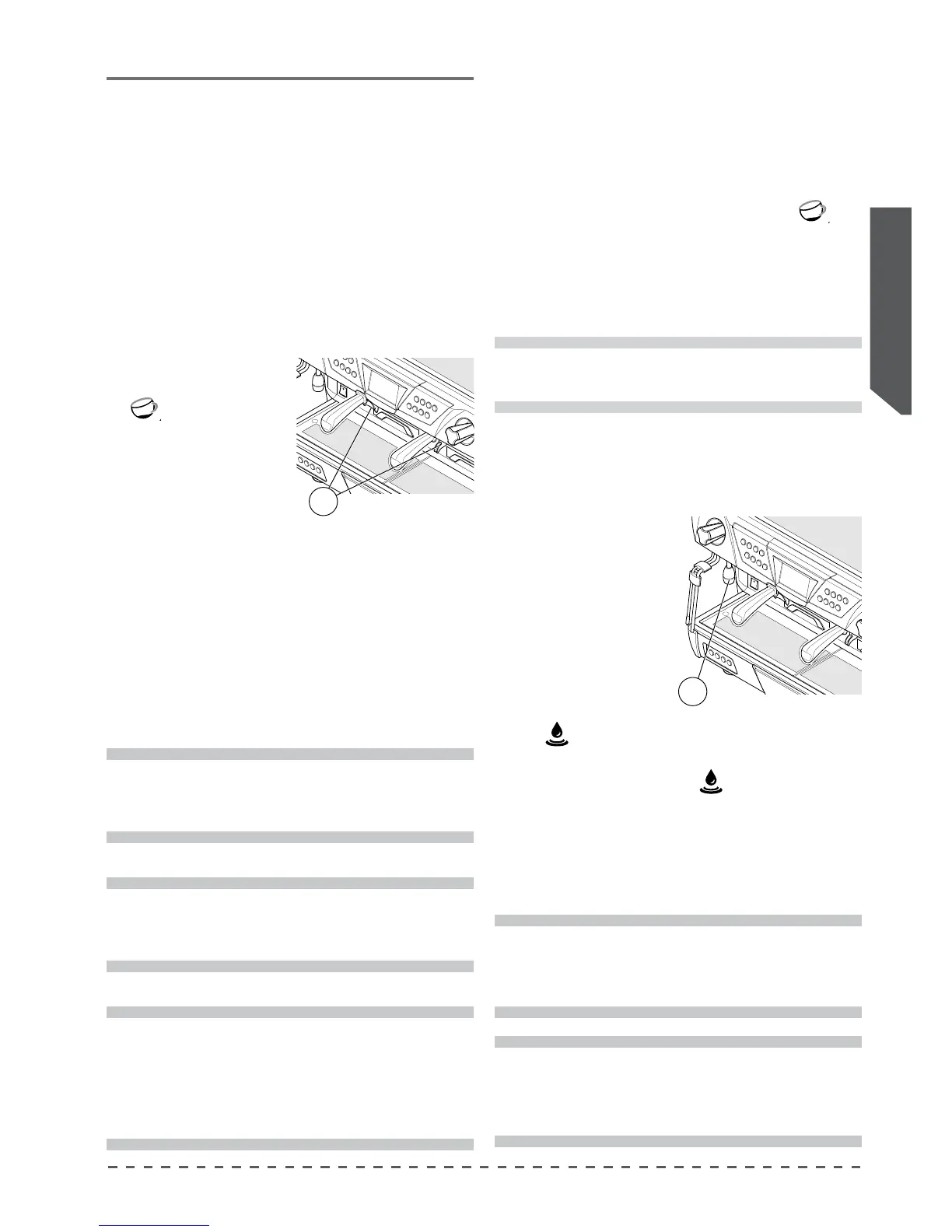
• place the coee cup under the delivery spout (17);
• press the desired dose
key (e.g.: “1 Espresso”
);
• all the leds will turn o,
except for the dose key
being programmed, and
the one on the “PROG/
STOP” key;
• wait for dispensing; to conrm the dose press the
dose key or the "PROG/STOP" key again;
• repeat this operation for the other dose buttons;
• upon completion of the programming, press the
“PROG/STOP” key to exit dose programming.
17
i
After 30 seconds of idle time, the machine will exit
from the dose programming mode.
i
The programming of each dose must be carried
out with ground coee and not with previously
used grounds.
i
It is possible to program all machine push button
panels simultaneously using only the right push
button panel. To obtain different doses for the
various groups, perform the programming starting
with the left push button panel and then all the
others.
7.3 Programming the hot water doses
To programme the
hot water key, proceed as
follows:
• place the cup under the
hot water nozzle (13);
• press and hold down
the "PROG/STOP" key
on the left push-button
panel until all dose key
LEDs are switched on;
• press the hot water but-
ton
;
• when the desired dose has been reached, conrm by
pressing the hot water key
again;
• upon completion of the programming, press the
“PROG/STOP” key.
13
7.2 Preparation of coee
• Fill the lter with a dose of ground coee and press
it with the coee press;
• attach the lter holder to the delivery group;
• put the coee cup under the dispensing spout;
• press the desired dose key (e.g.: “1 Espresso”
) and
wait for coee to be delivered (the LED of the selected
key will go out).
• to stop delivery of coee in advance, press the deliv-
ery key again or press the “PROG/STOP” key.
i
The tea key is present on each keypad of each
group. These can be programmed individually
and supply doses which are independent from
one another.
i
The 4GR version has 2 hot water nozzles. The 2
keypads on the left control the left hot water
nozzle, while the 2 keypads on the right control
the right hot water nozzle.
!
During the coee brewing, do not remove the
lter holder from the dispensing group.










 To Next Page