Ch. 9. Scanning Tunneling Microscopy Sec. 9.9. Set IV Parameters
4.
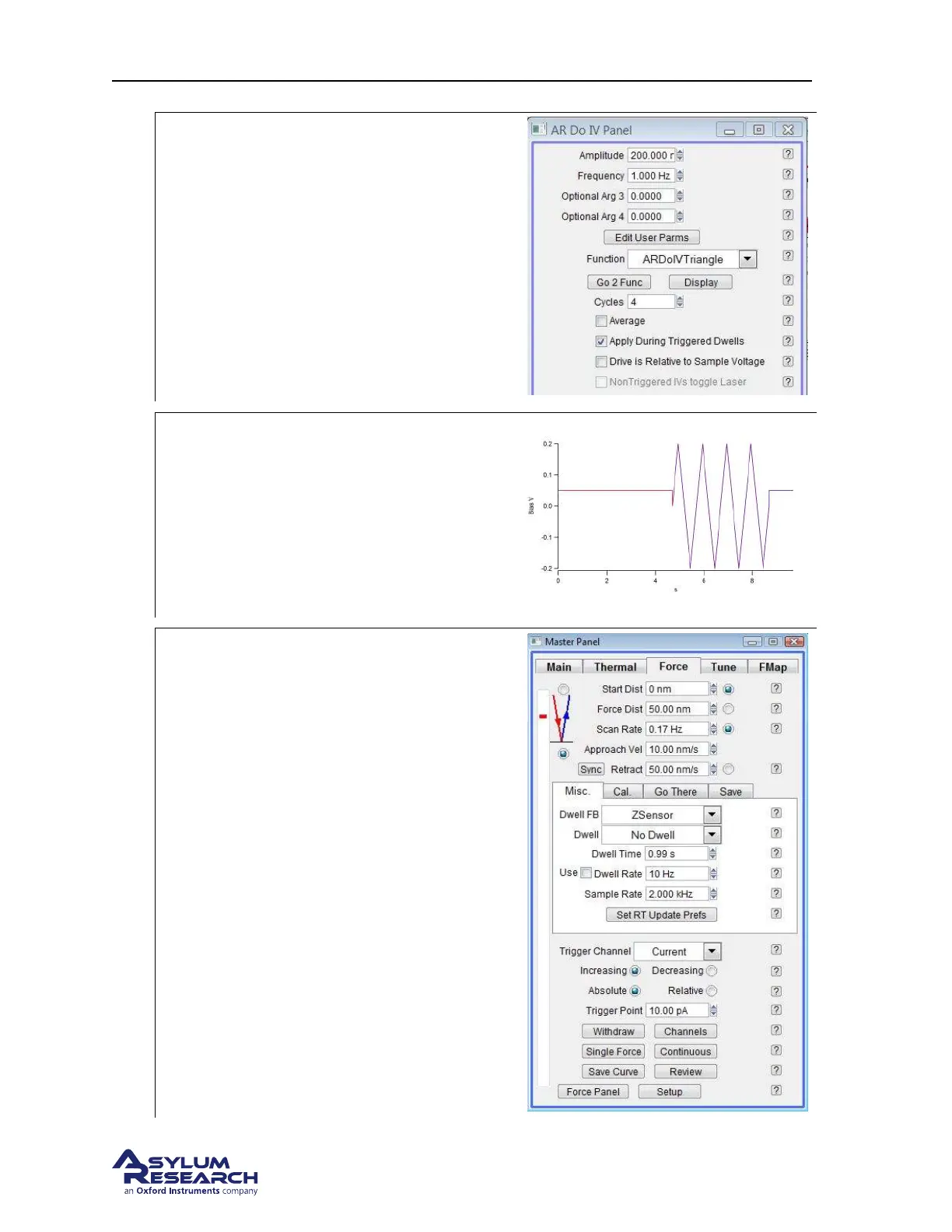
Drive Graph
• Adjust the Amplitude, Freq, Optional Arg
3 (Phase Offset), Optional Arg 4
(Voltage Offset) parameters to make the
desired ramping waveform.
5.
Drive Graph
• This is the result of the Ramp during IV
measurements. Notice that the voltage
before and after the ramp is not 0v, the
voltage used for the triggered current (in
this case 50mV) is kept before and after
the ramp.
6.
Finding the Surface There are two ways to
bring the tip close to the surface for IV curves
a) Click Engage in the master panel and
when the tip is on the surface hold the
shift button and left click mouse button
on the vertical bar for the z-range piezo.
This will set the force range to be close
to the surface. Make sure the Integral
gain is low enough such that the tip does
not oscillate.
b) The other method is to change the Force
Distance to 300nm, and click Single
Force (50nm Force Distance will take
too long). Make sure to switch the Force
Distance back to 50nm when making
measurements.
support.asylumresearch.com Page 110



 To Next Page