Ch. 9. Scanning Tunneling Microscopy Sec. 9.9. Set IV Parameters
2. Dwell at the surface using the Z position sensor to hold the tip at a constant Z height above the
surface
3. Ramp the bias voltage using the ramp functions in the Do IV panel.
9.9. Set IV Parameters
1. The Feedback Filter must be reduced to 1kHz in the Master Panel. Typically for scanning, the
feedback filter is between 5kHz and 10kHz but for IV measurements when triggering on currents
as low as 10pA (in a quiet lab) high frequency signals must be filtered.
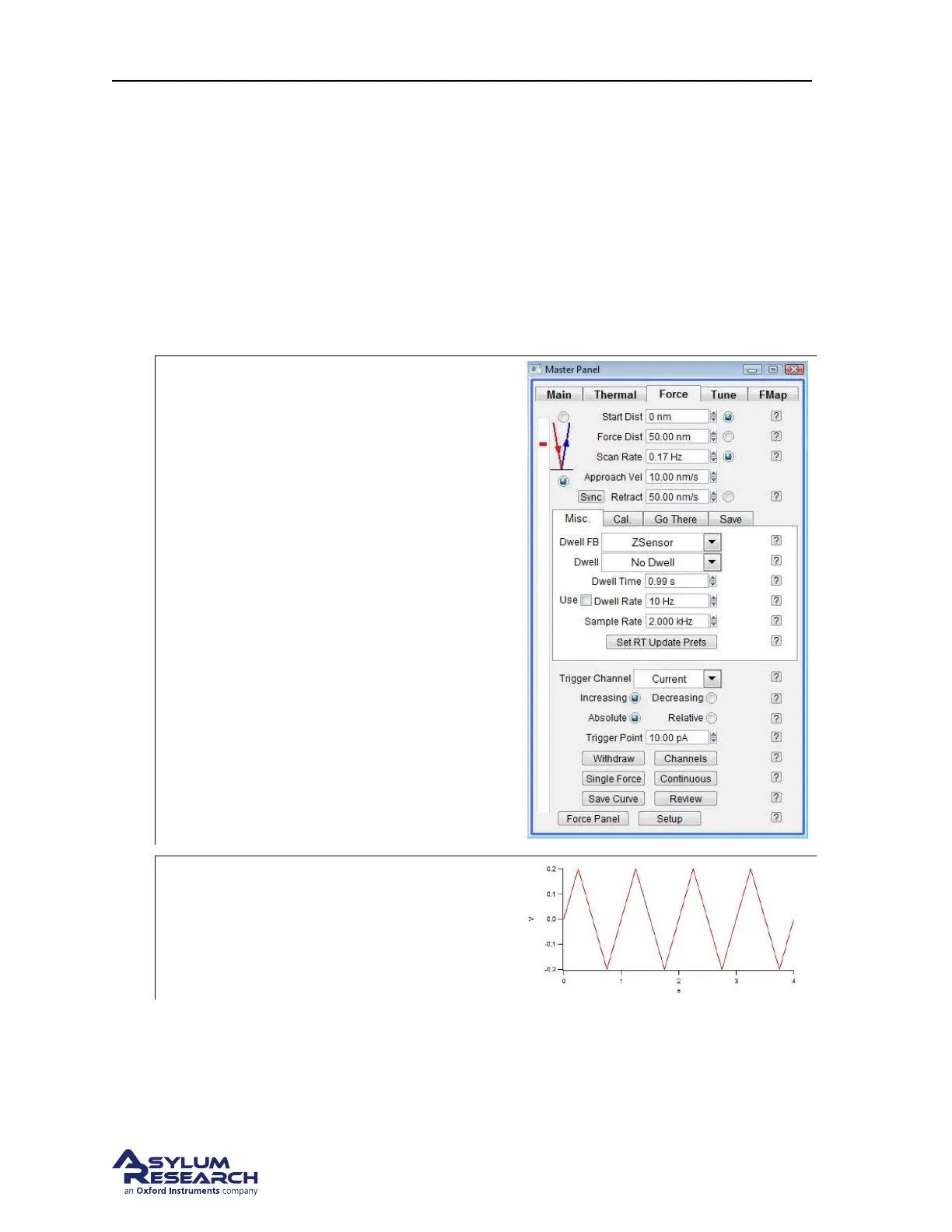
2.
Trigger Channel Current
• Click on the Force tab and set the
desired trigger point. The trigger point
is the setpoint current where the system
establishes the tip height during IV
measurements. The lowest trigger
current possible is ~10pA, any current
lower than this will be close to the noise
limit and cause the system to false
engage.
• To reduce the approach velocity the
Force Distance is set to 50nm and Scan
Rate ~0.2Hz . This is necessary to avoid
the tip moving beyond the height when
the feedback loop clamps the
Z-position. A sudden change in tip
speed can cause the tip to overshoot.
3.
AR Do IV Panel
• Click on the Display button in the AR Do
IV Panel to display the bias ramping
waveform
support.asylumresearch.com Page 109



 To Next Page