Ch. 19. Air Temperature Controller Sec. 19.9. Error messages
2.
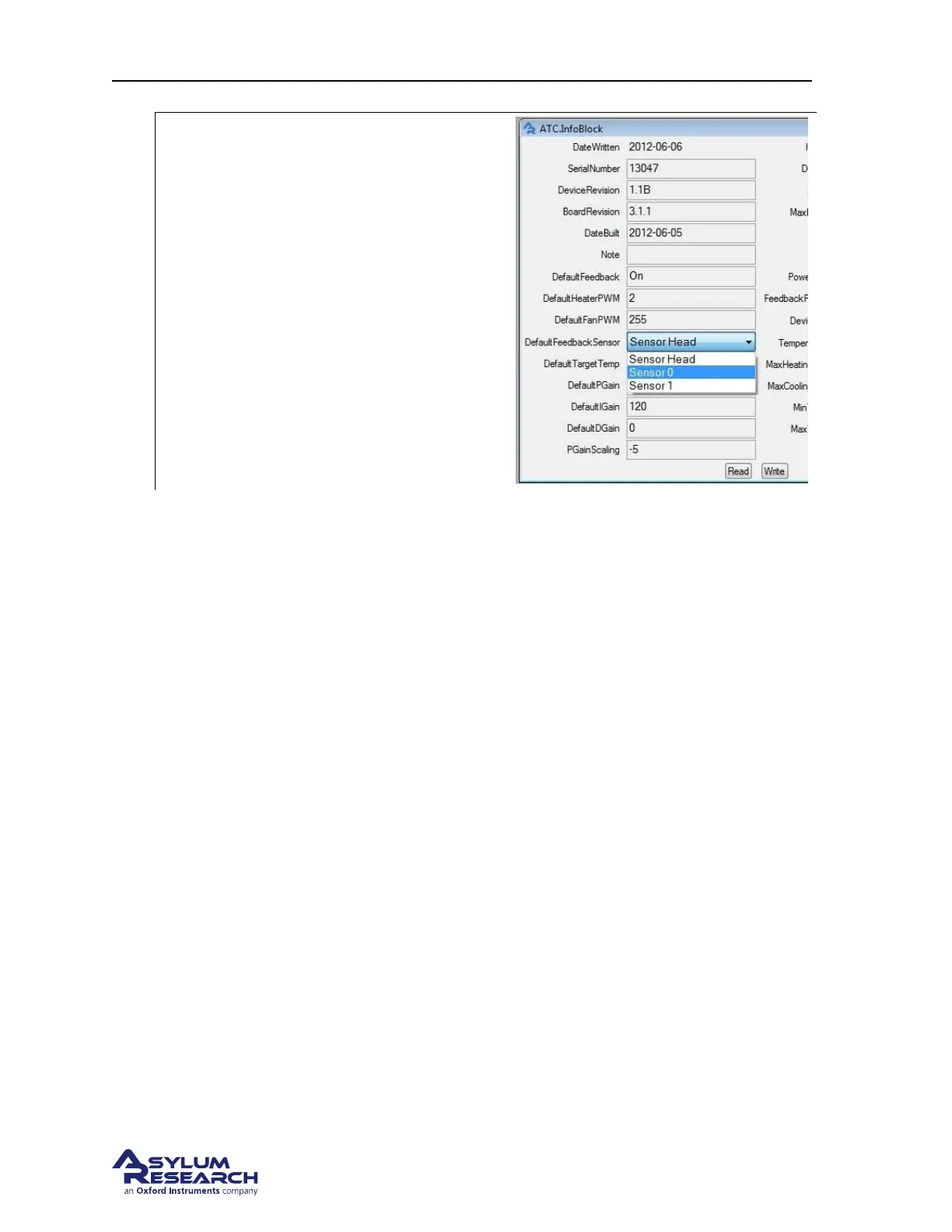
Permanently select the remote feedback
sensor:
• Change the feedback sensor to the
appropriate input channel.
• Click on Write to save the change.
• Rescan the smart start bus by clicking
on the blue spiral button or close and
open the software.
19.9. Error messages
19.9.1. ATC Messages
The messages area on the ATC control panel (see
Figure 19.2 on page 211) shows the current operating
state of the ATC. The window is typically green indicating normal operation with no errors. If an error
occurs, the message box will turn red. Clicking on the ’Details’ button will pop up a window with a
description of the error.
19.9.2. Critical Error messages
Any time a critical error is generated, the ATC will go into a state where all heating capability is
disabled. A critical error requires that a service technician reset the system. In the event of a crit-
ical error, please contact Asylum Research for assistance. A report log is generated by the system
computer which can be sent to us to help diagnose the reason for the error. Please go to: my docu-
ments\asylumresearch\devices\ATC. In the ATC folder you will see a file called ERRORDUMP.PXP. If
there is more than one error dump file, please send us the newest one along with a brief description of
any events that may be helpful in troubleshooting the problem.
19.9.2.1. Error: Overheating
BETA
Page 222



 To Next Page