Ch. 20. Safety Precautions Sec. 20.1. Motor Safety
• Operate motors only with the enclosure door closed.
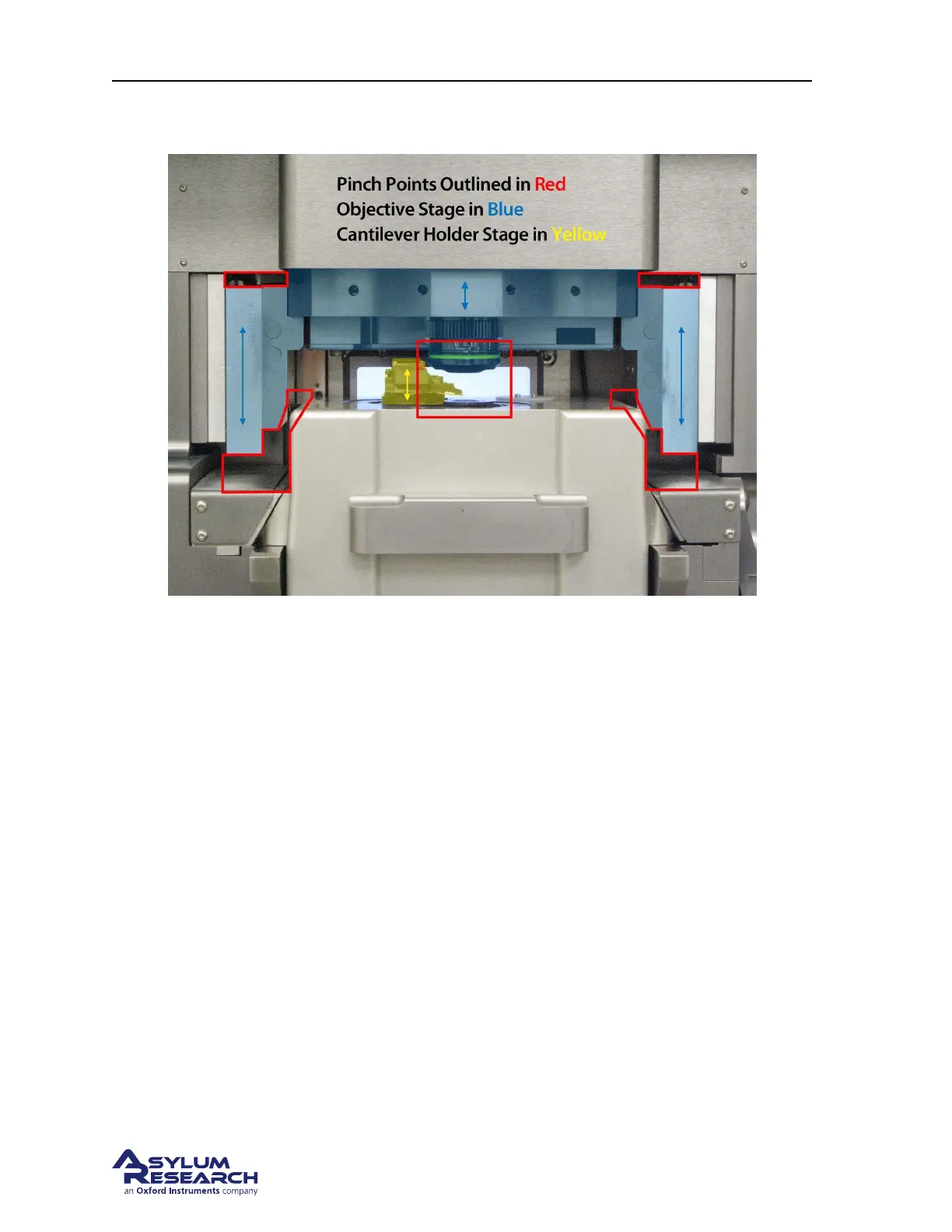
Figure 20.1.: Areas to avoid in particular when motors are driving the objective lens or cantilever holder.
Tinted parts can move as shown by the arrows.
20.1.2. How to stop the motors
In case of an emergency, the motors can be stopped in one of the following ways:
• The motor control knob at the lower front of the Cypher can be used at any time to override
computer commanded objective lens or cantilever holder motor moves. Turning the knob will
immediately stop any current motor moves and will transfer control of both the cantilever holder
and objective motion to the knob. Note that turning the knob always moves BOTH the cantilever
holder and the objective lens simultaneously. This means that if you were to have your finger
pinched between the cantilever holder and the objective lens, the best way to release your finger
would be to use the software to motor the objective lens upwards while leaving the cantilever
holder stationary.
• Press and HOLD DOWN the ‘Esc’ on the PC keyboard. This will always stop any automated
motor moves.
• Turn off the ARC2 controller. This is not advised since it will not allow you to use the knob or
software to control the motors and manually move them to a safer position.
• Unplug the power brick, which is connected to the Cypher. This power brick supply feeds the
motors. As was the case with turning off the controller, cutting power will stop the motors but
will not give you any quick method for moving the motors to a safe position.
BETA
Page 230



 To Next Page