Ch. 7. iDrive Imaging Sec. 7.2. Cleaning and Repair
7.2.1. Disassembly
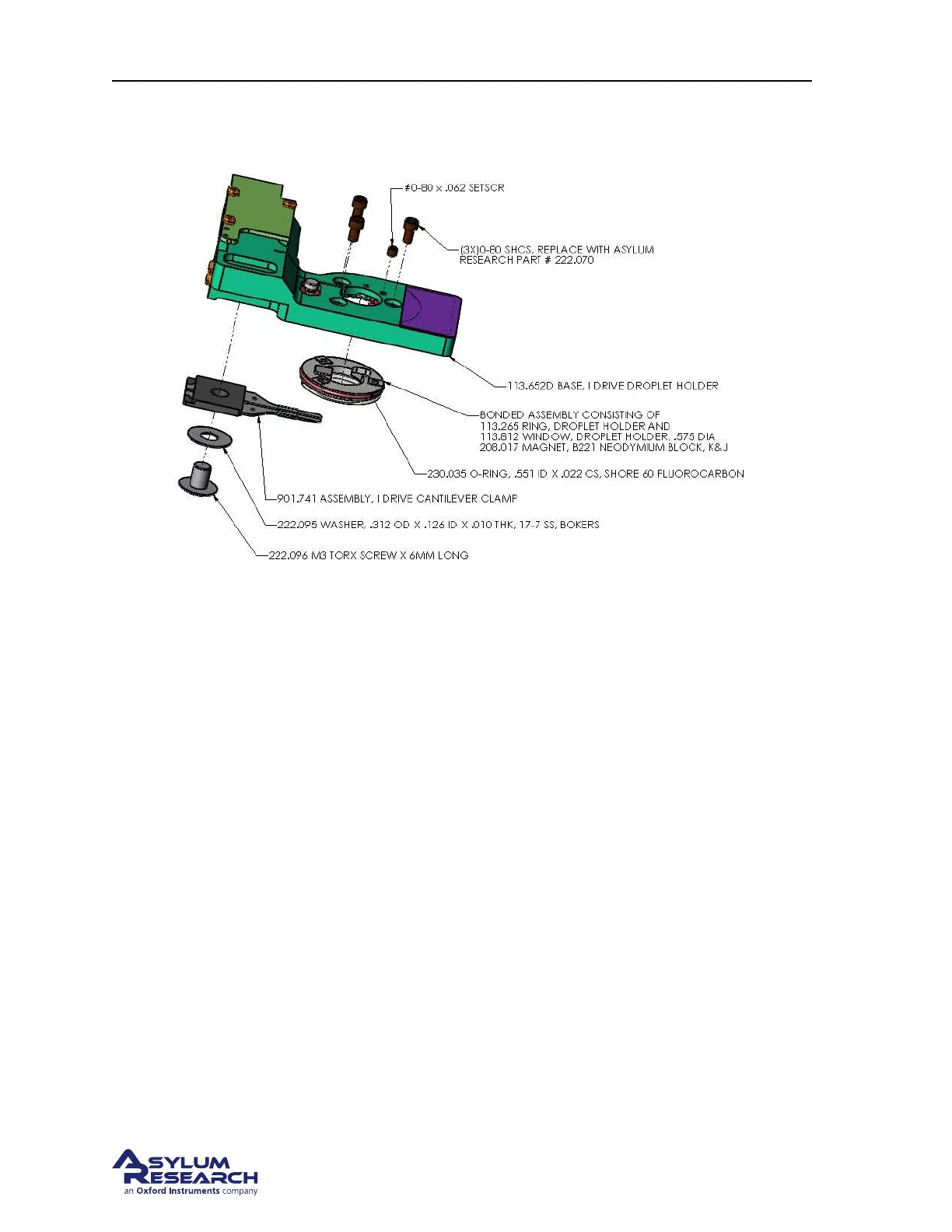
Figure 7.2.: Droplet Cantilever Holder Assembly exploded view
With the exception of the cantilever spring clip and the addition of a magnet to the window assembly,
the iDrive Droplet holder is mechanically identical to the standard Droplet Holder. Please refer to the
cleaning and repair section for the standard Droplet Holder.
Section 6.6 on page 69
To summarize the steps to disassembling and cleaning the holder:
1. Remove the cantilever clip.
2. Loosen the preload set screw above the piezo actuator.
3. Remove the three screws retaining the window.
4. Gently push the window out of the holder body.
5. Clean the parts.
7.2.2. Reassembly
To summarize the steps in reassembling the iDrive holder
1. Install the window assembly.
2. Install the cantilever clip assembly.
3. Set the preload on the piezo for acoustic AC imaging.
BETA
Page 81



 To Next Page