6-10 System Administrator’s Guide
Using a USB Thumb Drive
Using a USB thumb drive, you can update
♦ printerbootloader (r46*.bin)
♦ printer firmware (a46*.bin)
♦ RFID firmware (a84*.bin)
♦ RFID inlay database (d46ES*.db)
Note: The USB thumb drive must be
WIN32 format.
Only a qualified Service Representative may update the bootloader, printer’s
firmware, and RFID firmware.
Updating the RFID Inlay Database
The printer contains an RFID inlay database (d46ESxx.db). The RFID database is
included with the printer’s firmware and does not need to be flashed separately.
However, new inlays may be qualified in between firmware releases. Only inlays qualified
for use in the ADTP1 printer are included. The xx in the filename indicates the revision
level of the database.
To update the RFID Database:
1. Create an ADTP folder on your thumb drive.
2. Download the necessary file (d46ESxx.db) from our website.
3. Save the file to the ADTP folder on your thumb drive.
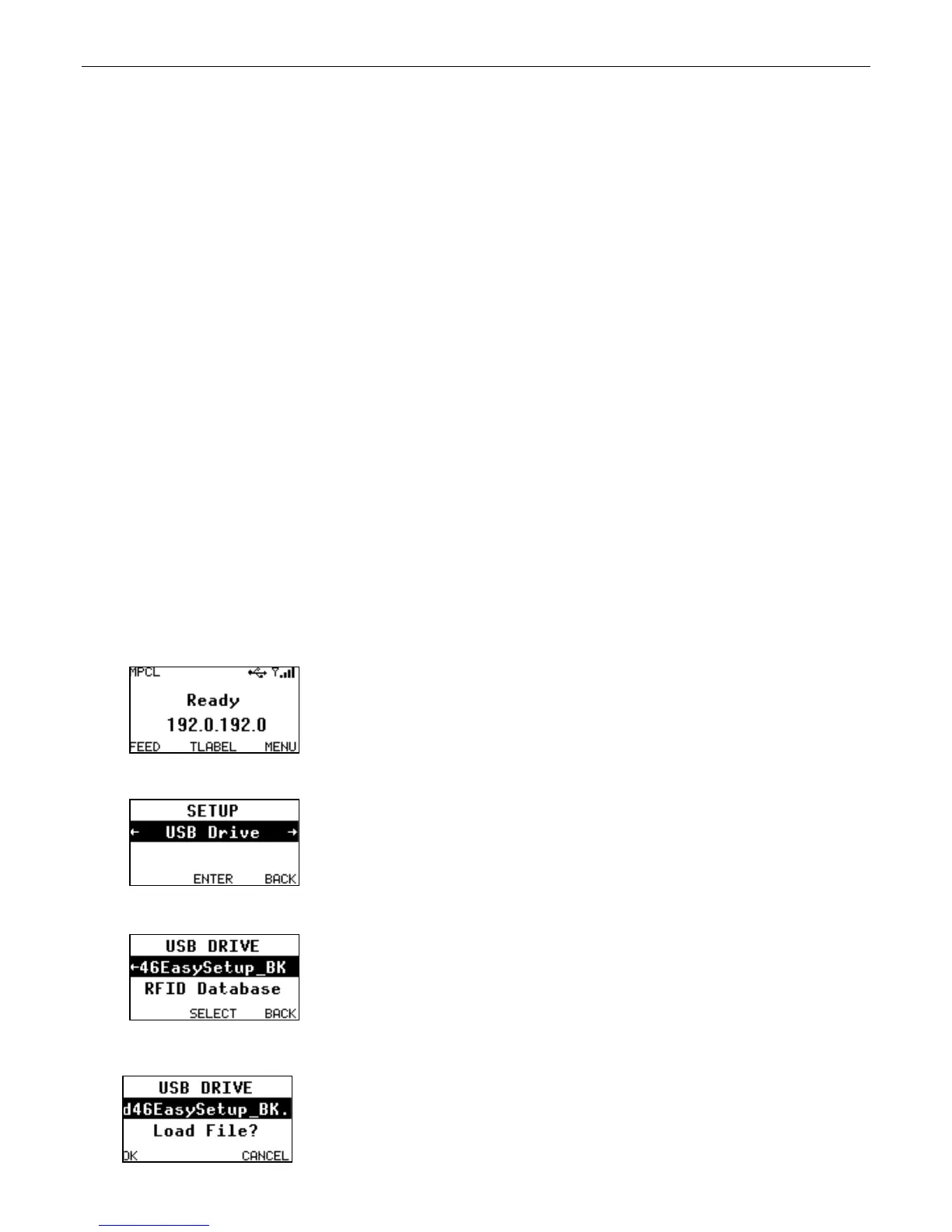
4. Turn on the printer. When you see “Ready”, insert the thumb drive into the USB port.
5. Press MENU and use or to select the Setup menu, USB Drive.
6. Press ENTER and use or and select the RFID Database file.
7. Press SELECT.










 To Next Page