34
Beam
®
, Operating Manual, Rev. 4.6.1 01/2016, GmbH
4.7 Using the Loop-/Event Recorder Beam
®
Connection via Bluetooth
®
The following steps are needed for the use of the ECG Recorders Beam
®
and the
HMS CS Program for the configuration:
Initial Situation:
■ Important: Bluetooth drivers are installed!
■ Bluetooth interface (dongle) is plugged into PC.
■ PC is turned on.
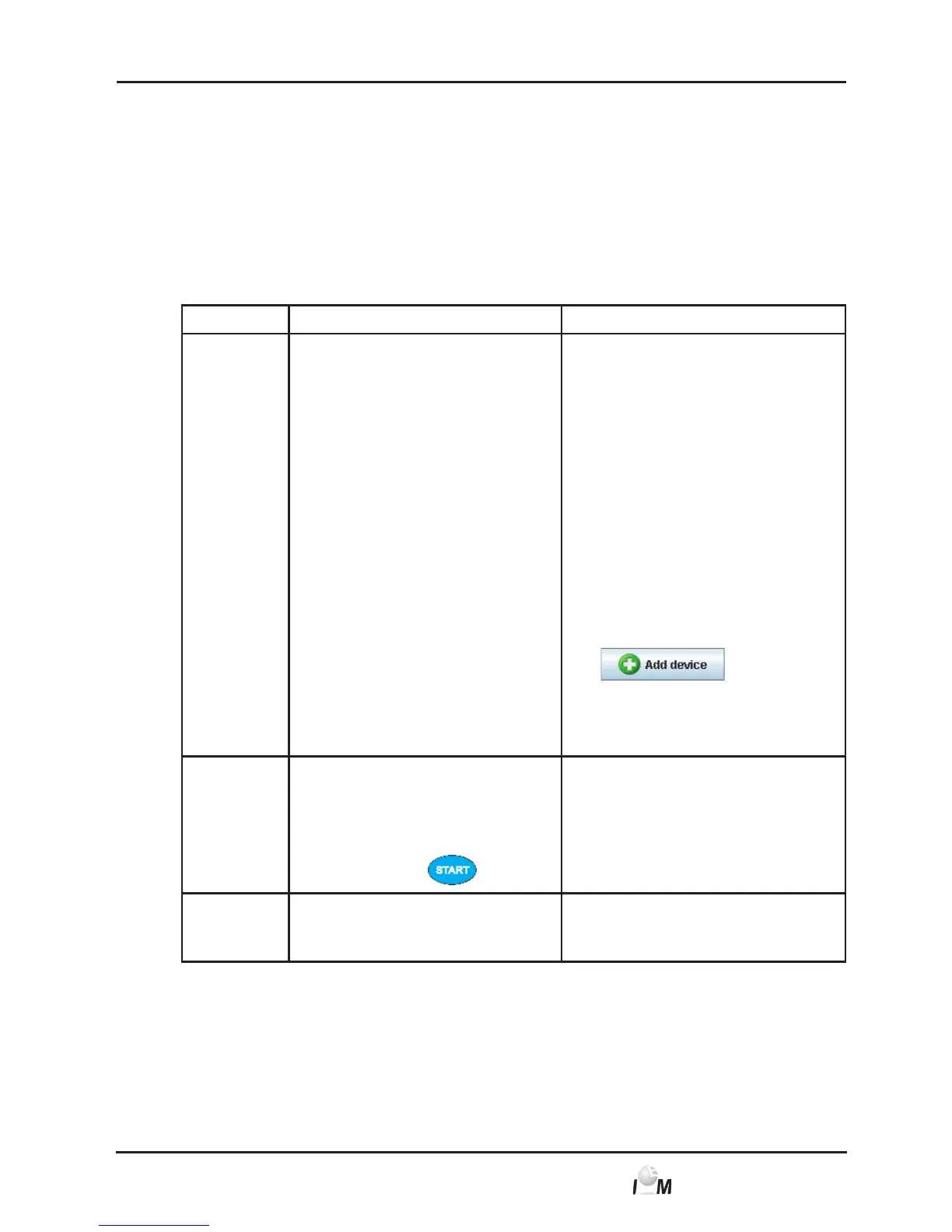
Step ECG Recorder Beam
®
PC
1) ► Start the HMS CS program.
Assuming the respec-
tive program settings the
Patient List window appears
(see 4.13.8, Options). In this
case select any patient (see
4.6.2, Select already crea-
ted patient).
► In the taskbar click on set-
tings and then on inter-
faces.
► In the interfaces window
click on the Bluetooth tab.
► Click on
.
A Note appears: Turn on the device
and switch to the “PAlr” mode. Then
click on “OK”.
2)
Switch to the PAlr modus:
► Insert the battery into
the ECG Recorder
Beam
®
and press and
hold this key
.
3) The buzzer will sound and the
LED of the Beam
®
will glow green
continuously.



 To Next Page