4.8 Prepare ECG Recorder Beam
®
Before carrying out a measurement of a patient send the recorder information about
the planned measured values sampled using the HMS CS program.
Initial Situation:
■ Battery is inserted into recorder,
■ the Bluetooth interface of the recorder is paired with the PC.
■ The recorder is connected to the PC via Bluetooth,
■ PC is turned on and the HMS CS program opens,
See 4.7, Using the Loop-/Event Recorder Beam
®
.
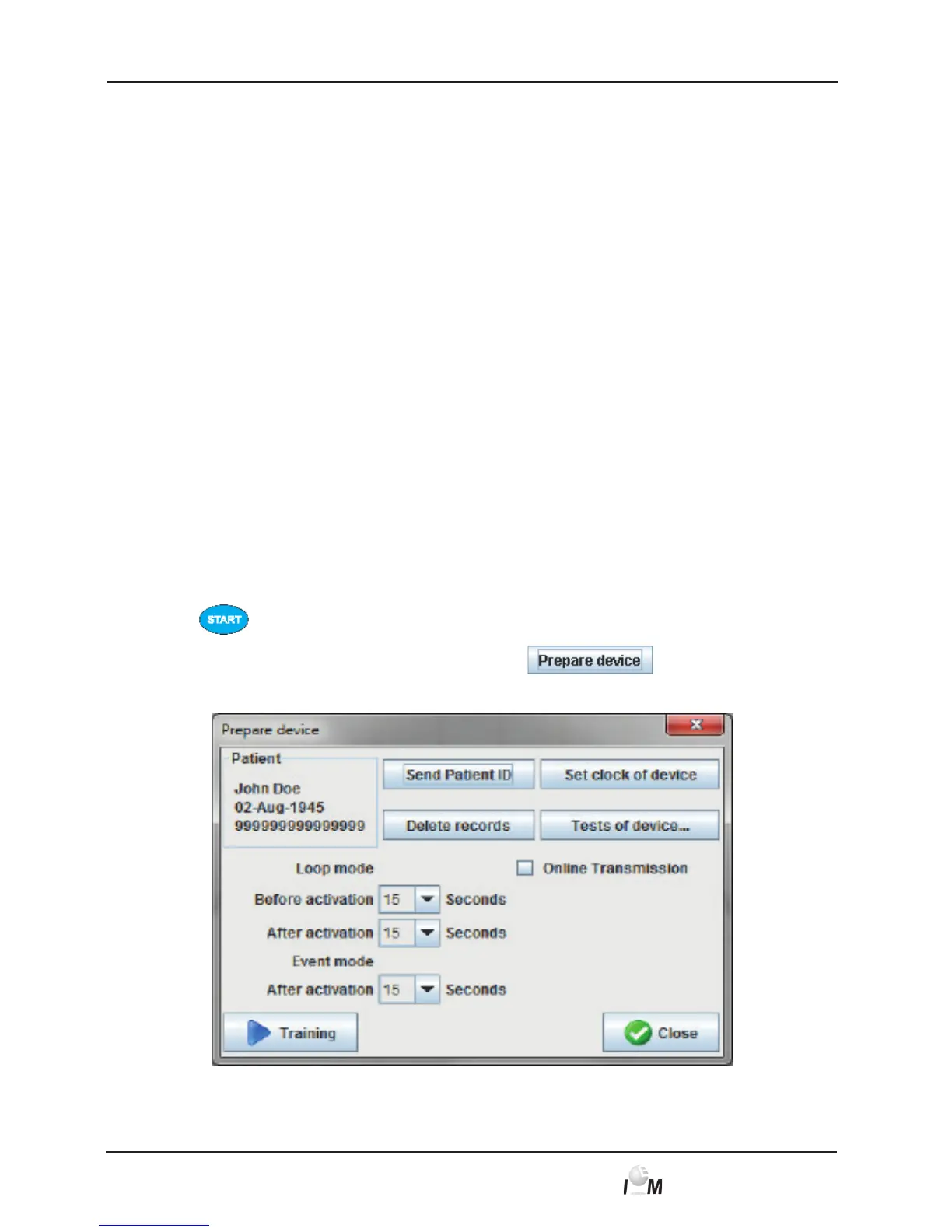
The following steps are processed:
- Specify Loop-/Event-recording time, see 4.8.1, Specify measuring protocol
- Configure device clock, see 4.8.2, Configure device clock
- Transfer Patient-ID, see 4.8.3, Transfer Patient-ID
- Device Test, see 4.8.4 Test measuring device
- Delete old recordings, see 4.8.5, Delete old measurements
- Activate E-health (Online Transmission), see 4.8.6, Activate E-health
online transmission
- Start training (Device test), see 4.8.7, Training
► Display the desired patient (see 4.6.2, Select already created patient).
► Activate the Bluetooth interface of the ECG Recorder beam
®
, by pressing
and holding it for 3 seconds.
► The device action window appears. Click on
.
The prepare recorder window appears:



 To Next Page