38
Beam
®
, Operating Manual, Rev. 4.6.1 01/2016, GmbH
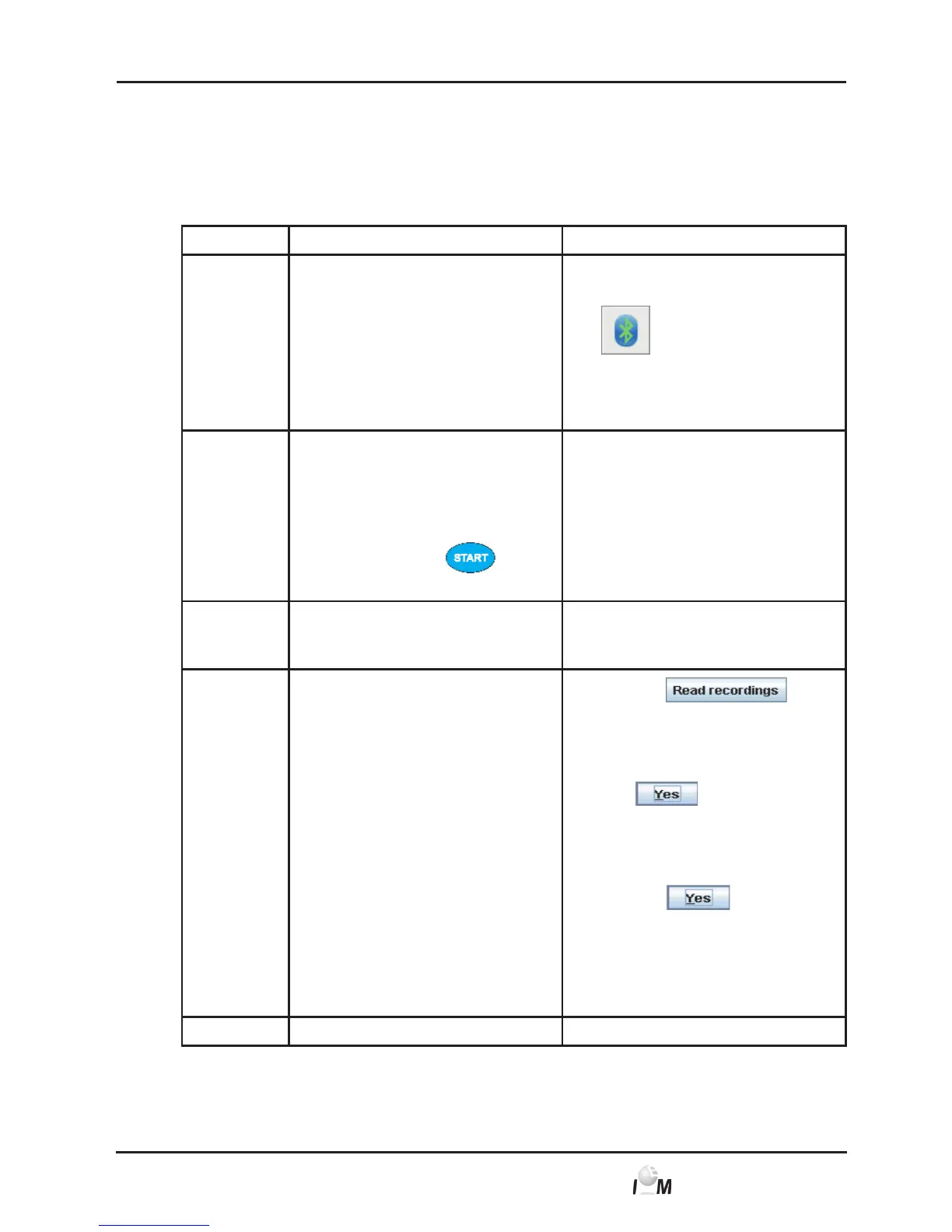
Read out recordings from the ECG Recorder Beam
®
via Bluetooth
Initial Situation:
■ ECG Recorder Beam
®
is turned on,
■ PC is turned on,
■ Interface for ECG Recorder Beam
®
is known to HMS CS program.
Step ECG Recorder Beam
®
PC
1) ► Start the HMS CS program.
In the task bar indicates
the active Bluetooth
connection.
The Device action window
appears.
2) ► Remove the measuring
device from the patient
(remove electrodes from
patient and cables from
measuring device).
► Press and hold
for 3 seconds.
3) The buzzer sounds
and the LED turns
orange.
4)
► Click on
.
question appears : Assign mea-
sured data to patient with pati-
ent ID xxx?
Click on
.
After the data transfer the
Delete measured values
window appears.
► Click on
in order to
delete the recordings in the
Beam
®
.
The ECG tab with an overview of all
ECGs of the patient appears.
5) ► Buzzer sounds.



 To Next Page