AeroNav 900/880 Series Pilot’s Guide
89000039-010
3-42 FMS Subsystem Rev 1 May 2019
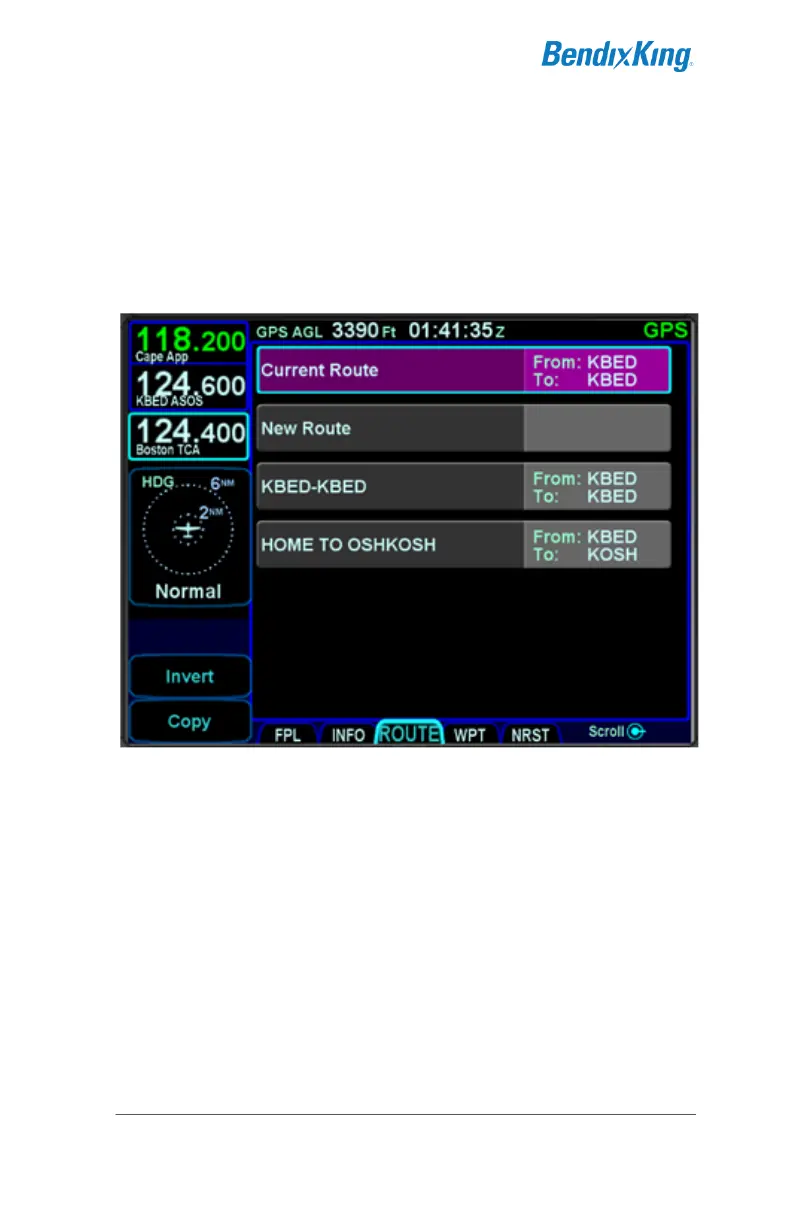
ROUTE TAB
The ROUTE tab provides mechanisms for managing stored
routes in the system. Up to 100 routes can be stored for later use,
which is useful for frequently traveled routes. A stored route must
first be “activated” via the “Activate Route” LSK, which makes it
the active flight plan and displays the flight plan (FPL) tab.
Route Tab
As indicated in the above image, each stored route is represented
by a single row with the route name on the left and the "from" and
"to" points identified on the right side of the row. Additionally,
there are two special purpose rows shown at the top of the list.
The "Current Route" row represents the flight plan being used on
the FPL page. This row is provided as a mechanism to allow the
copying and inverting of the active flight plan. Note that all active
flight plan editing is performed on the FPL page. Therefore,
attempting to edit when this row is selected will have no effect.
The "New Route" row represents a new route to be created.
Selecting this route will start the process of creating a new stored
route.



 To Next Page