AeroNav 900/880 Series Pilot’s Guide
89000039-010
4-16 Map Subsystem Rev 1 May 2019
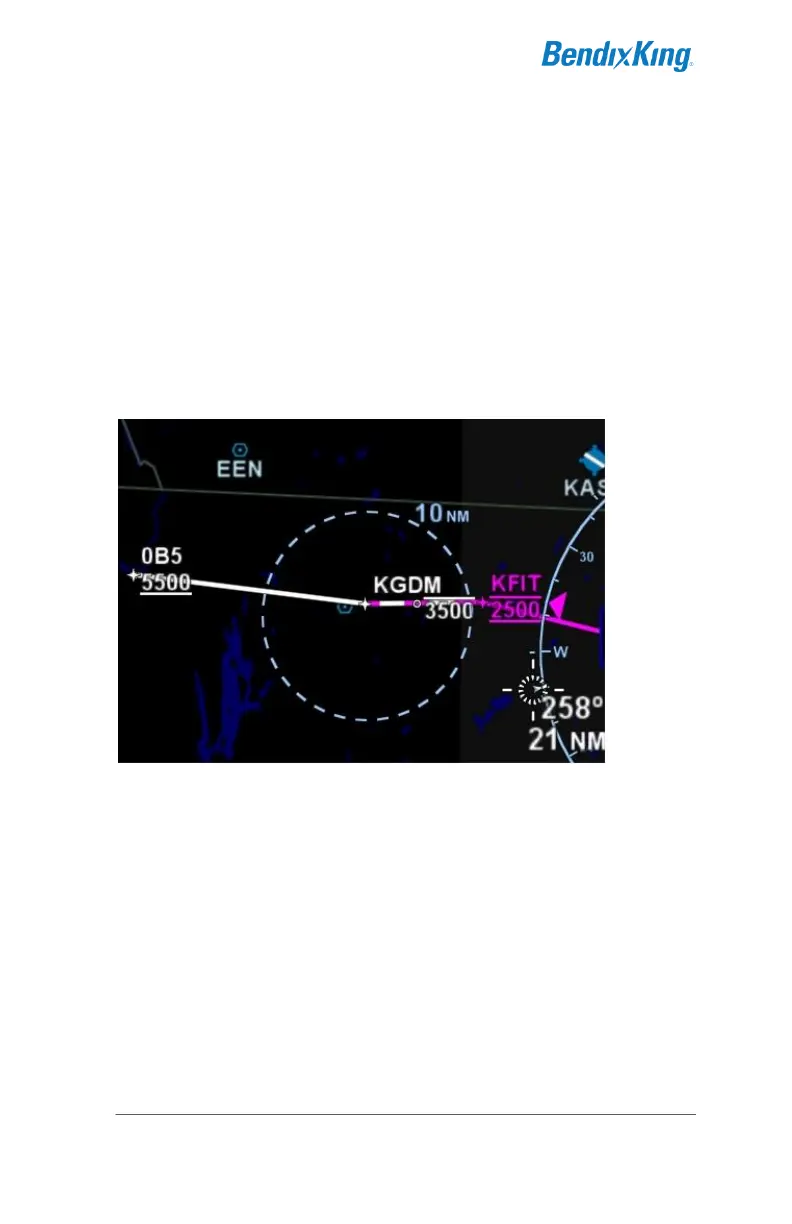
ALTITUDE CONSTRAINTS ON MAP
Any waypoint that has an altitude constraint defined for it in the flight
plan, including all published procedures, will display a graphical
indication of the altitude constraint on the map. The three types of
altitude constraints are:
At or Below (horizontal line above altitude);
At (horizontal lines above and below altitude);
At or Above (horizontal line below altitude)
Example Depictions of Altitude Constraints
The altitude constraint depiction will also appear at the proper
geographic position. For example, if an altitude constraint were
defined to be 5nm prior to a waypoint like it is for KGDM in the image
above, the graphical representation of the altitude constraint on the
map will be positioned 5nm prior to the waypoint, instead of at the
actual waypoint.
MAP INFORMATION POP-UP BOXES
There are “hot spots” all over the map and include every depicted
navaid, airport and airspace including TFRs. Touching one of these
“hot spots” will generate an informational pop-up box that contains
relevant information about that hot spot. These boxes will time out in
20 seconds and can also be dismissed by tapping somewhere else



 To Next Page